
Customer Signals
Turn feedback into evidence-backed decisions
Customer Signals
Turn feedback into evidence-backed decisions
Showcase
Description
There’s plenty of feedback—but what’s actually worth solving? Customer Signals organizes customer interviews, surveys, reviews, support tickets, and churn feedback. It extracts exact quotes, pain points, trigger events, and alternative approaches. It merges duplicate materials, preserves counterexamples, and separates research findings from opportunities that still need validation. It supports research synthesis, a VOC quote library, JTBD, provisional user personas, competitor review comparisons, and research gap plans. It can also design public community research, customer interviews, and PMF surveys. Online collection depends on the host’s available tools; without internet access, it provides search and sampling plans. For product managers, indie developers, operators, and small teams. Complaints do not equal willingness to pay, so the research marks evidence boundaries and identifies the next steps for validation. Published by: leowang. Adapted from customer-research v2.0.4 under the MIT License, with the required copyright notice retained.
Recommended by
Dancang
Why we love this skill
Turns customer quotes into traceable, testable judgments while distinguishing emotion, frequency, and actual behavior.
Best for
For product managers, indie developers, operators, and small teams turning customer feedback into product judgments they can validate.
How to use this Skill
Provide your input
Provide customer interviews, surveys, reviews, support tickets, win or churn feedback, or describe the target audience, product context, research question, and source of the materials.
Run the Skill
Organize customer quotes, merge duplicates, extract pain points, trigger events, alternatives, counterexamples, and evidence boundaries, and separate confirmed findings from opportunities to validate.
Review your result
Get a research synthesis with sources and distinct counts, a VOC quote library, JTBD, provisional personas, competitor review comparisons, or interview and survey research plans.
Related Skills
View all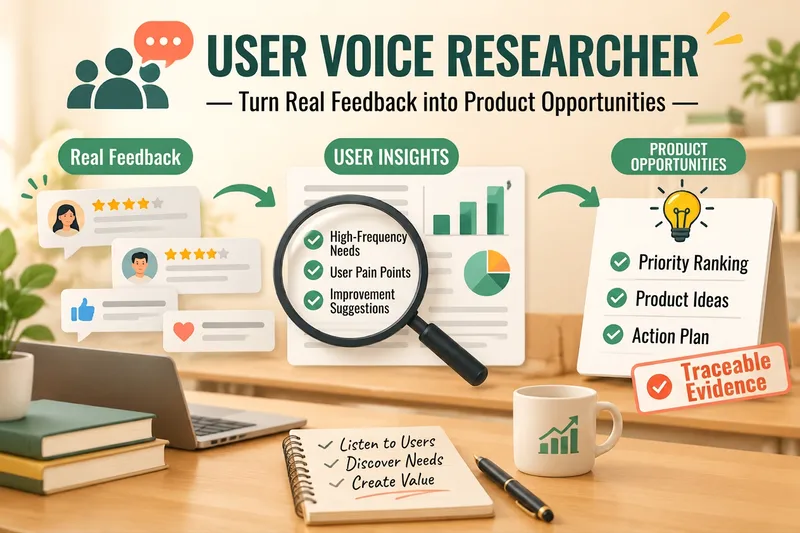
Voice of Customer Researcher
Turn reviews, ratings, user interviews, and customer feedback into traceable user demand insights, product opportunities, and validation plans. Analyze feedback materials such as reviews, ratings, interviews, open-ended survey questions, customer service logs, and community discussions to identify real user problems, behavioral motivations, purchase barriers, and improvement opportunities, ensuring every key conclusion links back to the original evidence. ### Applicable Scenarios - Product Managers: Analyze product reviews, feature requests, churn reasons, and experience issues. - E-commerce Sellers: Analyze product reviews, return reasons, purchase concerns, and selling points. - Content Creators and Knowledge Services: Analyze learner feedback, community questions, course evaluations, and unmet needs. - Local Merchants: Analyze customer reviews, service feedback, and repurchase barriers. - Entrepreneurs: Discover product opportunities from user interviews and early feedback.
 Research
User Pain Point Analysis
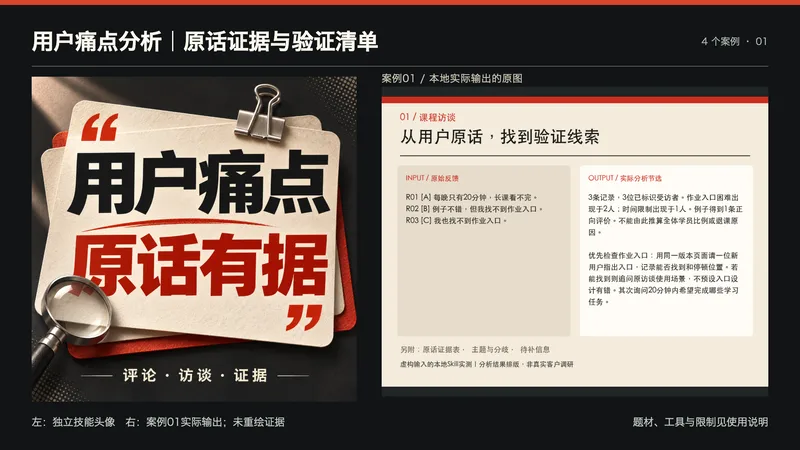
Target Audience: Creators and product operators who need to organize user comments, interviews, surveys, or customer service logs. What You Need to Provide: Authorized, anonymized raw feedback, product background, and the decision you want to make, along with available channels, dates, and anonymous user IDs. How It Works: Keeps original quotes and sources item by item, distinguishes record counts from user counts, consolidates duplicates from the same person, extracts scenarios and friction points, organizes themes and counterexamples, and then proposes minimal validation actions. Final Delivery: Scope and findings, original quote evidence table, theme and divergence table, validation priorities, and missing information. Defaults to fully copyable Markdown. Does not present individual feedback as applying to all users, nor does it infer paid conversion rates from comment counts. Usage: Paste feedback and state the problem to be solved; review the theme table and check original quotes, then follow the validation checklist to check the actual process or follow up. Suggestions are not yet implemented, and problem causes must be reproduced to be confirmed. Requires a text model only; GPT is recommended, with the model chosen by the platform. Does not require image models or external APIs. The four display images are fictional inputs and outputs analyzed by the local GPT main agent according to the actual final skill for layout presentation, not real customer research. No additional runtime tests were run on YouMind, so actual results still need to be verified. Not Suitable For: Impersonating real interviews, inferring total market share or purchase intent, unauthorized public disclosure of original quotes, or automatically contacting users. Does not promise commercial opportunities, growth, or conversion lifts. Display Notes: The first image is a side-by-side layout of the independent skill avatar and the actual output of Case 01 for horizontal thumbnail display; it is not a new case, nor did an image generation model redraw the evidence. The remaining three images correspond to Cases 02 through 04. The independent avatar is an original conceptual visual created by local ImageGen, not a research or polishing result; the specific image model ID was not returned by the tool.
Review Insights
# Review Insights **Don't let valuable user feedback get lost in hundreds of reviews.** What hidden pain points lie within product reviews? What do customers love most about your product? Are there ideas for your next best-selling product or content piece hidden in the comment section? Upload comments or paste feedback, and the AI helps you extract **pain points, selling points, and potential needs** from messy user feedback, citing source evidence for every conclusion and generating an intuitive insight chart. **Go beyond summarizing comments to turn user words into actionable insights.** ## What You Get **① Comprehensive User Needs Analysis** Organizes comments into three main categories: - 🔴 **Pain Points**: What are users complaining about? Which issues need improvement? - 🟢 **Selling Points**: What do users truly appreciate? Which advantages are worth highlighting? - 🟡 **Expectations**: What features do users want added? What unmet needs still exist? **② Evidence-Backed Conclusions** Every topic indicates the related comment count, review ID, and authentic quote for easy verification. No making up user thoughts or exaggerating a single comment into a majority opinion. **③ Rare but Severe Issue Detection** Potential safety or serious quality issues like burns, breakage, or allergies are flagged individually even if mentioned in few reviews, preventing them from being buried by positive feedback. **④ Actionable Next Steps** Provides product improvement, selling point refinement, and content topic suggestions based on review evidence, along with the reasoning for each recommendation. **⑤ User Insight Chart** Automatically organizes key findings into a visual diagram showing pain points, selling points, expectations, and comment counts for easy review and sharing. ## Who Is This For? **🛍️ E-Commerce Sellers** Analyze your own or competitor reviews to find quality issues, recognized selling points, and new product development opportunities. **📱 Content Creators** Organize video comment sections to understand viewer interests and find direction for future content. **📊 Product Managers & Operations** Prioritize issues and product improvements from app reviews, survey feedback, and user messages. **💡 Entrepreneurs & Product Selectors** Discover unmet consumer needs through authentic reviews to inform product positioning and selection. ## How to Use 1. Paste comments or upload Excel, CSV, or text format review data. 2. Optionally specify a goal, such as "find product flaws," "extract selling points," "analyze competitors," or "find video topics." 3. The AI organizes comments, categorizes themes, cites evidence, and offers suggestions. 4. Generate an insight chart to help you quickly understand key findings. ## Tips - More complete comments and sufficient samples generally provide more valuable analysis. - Opinions in comments do not necessarily represent all consumers. - Duplicate comments, unhelpful messages, and sample limitations will be noted during analysis. - Direct quotes are for evidence verification; ensure compliance with platform rules and privacy requirements before public commercial use. - AI statistics and chart text may contain minor errors; important conclusions should be cross-checked with raw data. --- **Turn every authentic review into a clue for product improvement, creative inspiration, and a more persuasive selling point.**
Information
- Version
- v3
- Last updated
- Runtime credits
- Usage-based
- Models
- Auto
- Use cases
- Research & analysisBusiness & strategy
- What you get
- ReportDocumentDiagram
