
User Pain Point Analysis
Turn reviews and interviews into actionable clues
User Pain Point Analysis
Turn reviews and interviews into actionable clues
Showcase
Description
Target Audience: Creators and product operators who need to organize user comments, interviews, surveys, or customer service logs. What You Need to Provide: Authorized, anonymized raw feedback, product background, and the decision you want to make, along with available channels, dates, and anonymous user IDs. How It Works: Keeps original quotes and sources item by item, distinguishes record counts from user counts, consolidates duplicates from the same person, extracts scenarios and friction points, organizes themes and counterexamples, and then proposes minimal validation actions. Final Delivery: Scope and findings, original quote evidence table, theme and divergence table, validation priorities, and missing information. Defaults to fully copyable Markdown. Does not present individual feedback as applying to all users, nor does it infer paid conversion rates from comment counts. Usage: Paste feedback and state the problem to be solved; review the theme table and check original quotes, then follow the validation checklist to check the actual process or follow up. Suggestions are not yet implemented, and problem causes must be reproduced to be confirmed. Requires a text model only; GPT is recommended, with the model chosen by the platform. Does not require image models or external APIs. The four display images are fictional inputs and outputs analyzed by the local GPT main agent according to the actual final skill for layout presentation, not real customer research. No additional runtime tests were run on YouMind, so actual results still need to be verified. Not Suitable For: Impersonating real interviews, inferring total market share or purchase intent, unauthorized public disclosure of original quotes, or automatically contacting users. Does not promise commercial opportunities, growth, or conversion lifts. Display Notes: The first image is a side-by-side layout of the independent skill avatar and the actual output of Case 01 for horizontal thumbnail display; it is not a new case, nor did an image generation model redraw the evidence. The remaining three images correspond to Cases 02 through 04. The independent avatar is an original conceptual visual created by local ImageGen, not a research or polishing result; the specific image model ID was not returned by the tool.
Recommended by
Dancang
Why we love this skill
Featured for turning comments and interviews into traceable original quotes, rigorously distinguishing sample frequency from market conclusions, and preserving divergences and boundaries.
Related Skills
View all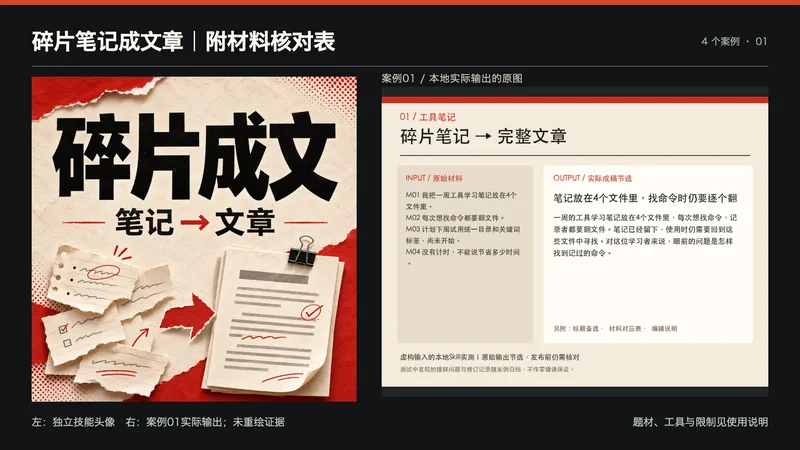 Write
Notes to Article with Checklist
Target Audience: Creators who already have scattered notes, interview texts, or oral transcripts and want to organize them into articles. What You Need to Provide: Raw materials, target audience, purpose, length, and expressions you wish to keep. How It Works: Number the materials, distinguishing between factual statements, opinions, and plans; draft around a central thread, then re-check numbers, speakers, and evidence gaps. Final Delivery: 3 headline options, complete Chinese text, material correspondence table, and items to confirm with editing notes. Directly outputs copyable text by default; file saving depends on the runtime environment. Steps to Use: Paste materials and specify the audience and word count; read the article after running, check materials against the correspondence table, and revise before use. The core feature only requires a text model, GPT is recommended; current YouMind tests use GPT-6.1 Sol, and actual results depend on runtime configuration. The four display images are excerpts from real local Skill test outputs with fictitious inputs, formatted for presentation and not real customer cases; phrasing issues found in tests have been archived, and articles still require manual verification. The platform has completed one text case test, which does not guarantee stable success in all scenarios. Not Suitable For: Generating genuine interviews out of thin air, providing unprovided personal experiences, replacing fact-checking, or automatic publishing. Insufficient materials will shorten the content and list gaps without expanding to fabricate facts. Display Note: The first image shows a side-by-side layout of the independent Skill avatar and the actual output of case 01 for horizontal thumbnail display; it is not a new case, nor did an image-generation model redraw the evidence. The other three correspond to cases 02 through 04.
 Write
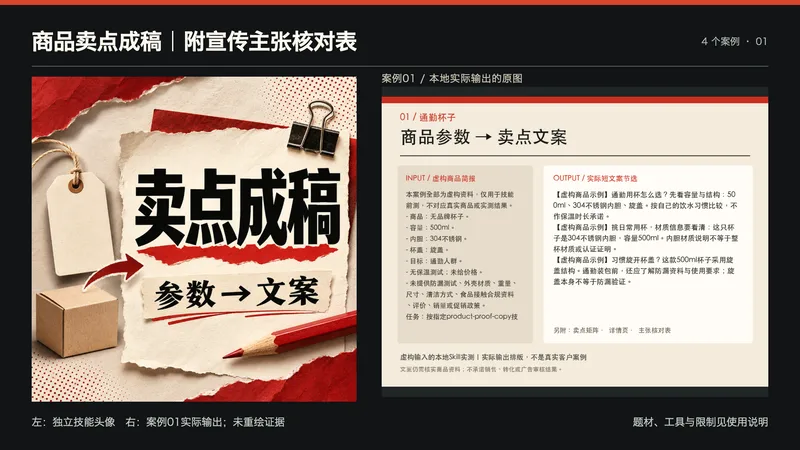
商品卖点成稿|附宣传主张核对表
适用人群:需要为实体商品、软件或课程整理卖点与介绍文案的商家和创作者。 你需要提供:商品名称、真实参数或功能、目标人群、使用场景、价格政策及已有证明资料。 如何处理:建立商品事实台账,将功能匹配到具体场景,再写详情页与短文案,回查价格、效果和商业主张。未提供的功效、销量、口碑、优惠和售后不会自行补造;价格冲突会列出待核项。 最终交付:卖点矩阵、3个标题备选、完整详情页草稿、3条短文案,以及主张核对表和待补信息。默认直接交付可复制文字。 使用:粘贴商品资料,说明渠道和希望顾客采取的行动;阅读成稿后对照主张核对表确认参数与证据,再按实际渠道审核使用。 核心需要文字模型,推荐GPT路线;YouMind已以GPT-6.1 Sol完成1个案例运行,本地另有4个虚构资料案例。四张展示图是这些本地实际输出的排版节选,不是真实客户或实物性能测试。结果会受模型与输入影响,仍需人工核对。 不适用:虚构认证、评价或功效,保证收入、销量或广告过审。技能不生成商品图、不自动发布或投放。 展示说明:首张为独立技能头像与案例01实际输出的并排排版,用于横向缩略展示;不是新增案例,也未让生图模型重绘证据。其余三张对应案例02—04。
 Write
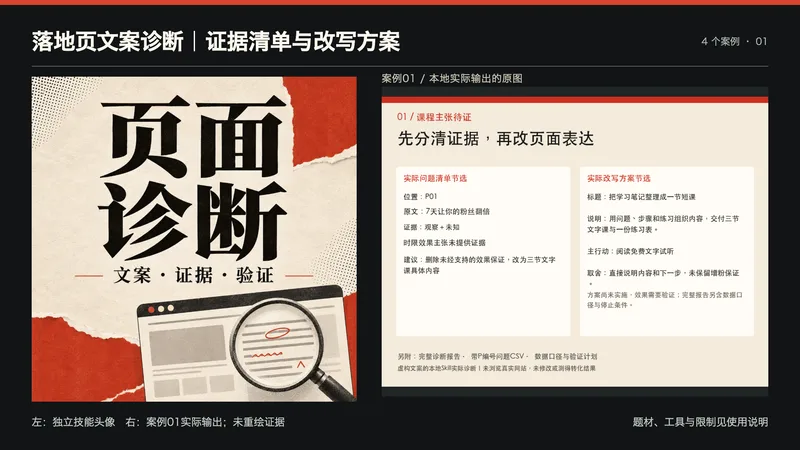
落地页文案诊断|证据清单与改写方案
适合需要检查产品介绍、课程页面、服务表单或价格页文案的人。 提供:页面链接、截图或完整文案、受众、主要动作、流量来源和可用数据;只有文案时仅诊断内容,不假称看过布局或测试加载速度。 处理:标记页面位置,检查功能和价格冲突、宣传依据、按钮结果、字段必要性与数据口径。观察、未知和假设分开写;人数与事件、不同周期不能混算转化率。 交付:带原文位置的问题表、2—3版可替换标题或按钮文案、数据口径核对、验证计划和待补事实。具备文件工具时可保存报告与CSV,否则给完整可复制内容。 使用:发送页面材料并说明希望访客做什么,核对事实和建议,再决定实际修改与验证;本技能不自动改线上网站。 依赖:文字模型,推荐GPT;材料齐全时不需要图片API或外部服务。实际检查链接需要浏览器;无法访问会注明范围。四张展示图为本地按最终技能真实诊断虚构文案的节选,涵盖宣传待证、数据口径、表单字段和价格冲突,未浏览真实网站,也未测得转化提升。 不自动投广告、装追踪器、提交资料或发布,不编造背书、统计显著性或效果百分比。未追加YouMind运行测试,未验证持久模型绑定。199积分为本技能售价,案例中的虚构产品报价不代表本技能价格;运行平台模型或第三方服务费用另计。 展示说明:首张为独立技能头像与案例01实际输出的并排排版,用于横向缩略展示;不是新增案例,也未让生图模型重绘证据。其余三张对应案例02—04。
Information
- Version
- v3
- Last updated
- Runtime credits
- Usage-based
- Models
- Auto
