chen teodor
 Image
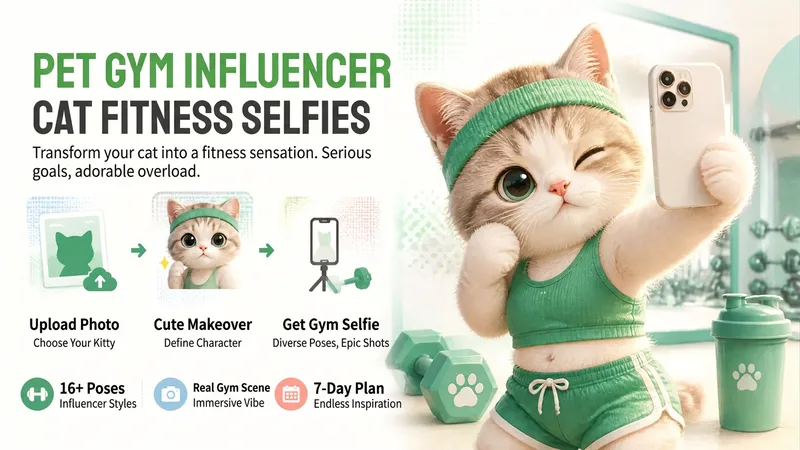
Cat Gym Influencer
Your feline friend is striking a pose at the gym today too. Upload a photo of a cat or dog, and I will first capture its markings and features to cute-ify it into a big-eyed, round-faced, fluffy fitness influencer character. Once you are satisfied, I will have it strike classic gym influencer poses in a realistic fitness setting: mirror selfies, benchside hair flips, looking back at the mirror, post-workout iced Americano... perfectly serious and irresistibly cute. ✔ Character reference card generated first; shooting starts only after your confirmation, and you can say "cuter", "bigger eyes", or "change color scheme" if unsatisfied ✔ 16 iconic fitness influencer poses, available by request or recommendation ✔ Generates one image at a time, moving to the next only after confirmation to save credits ✔ Each image includes bilingual captions, Instagram hashtags, and a prompt for the next shot ✔ One-click 7-day posting schedule, ideal for daily updates on pet accounts ✔ Supports cats, dogs, and original kitten characters Turn your pet into a tiny gym influencer: cute-ified character first, then photorealistic gym selfies, captions and a 7-day posting plan.
 Research
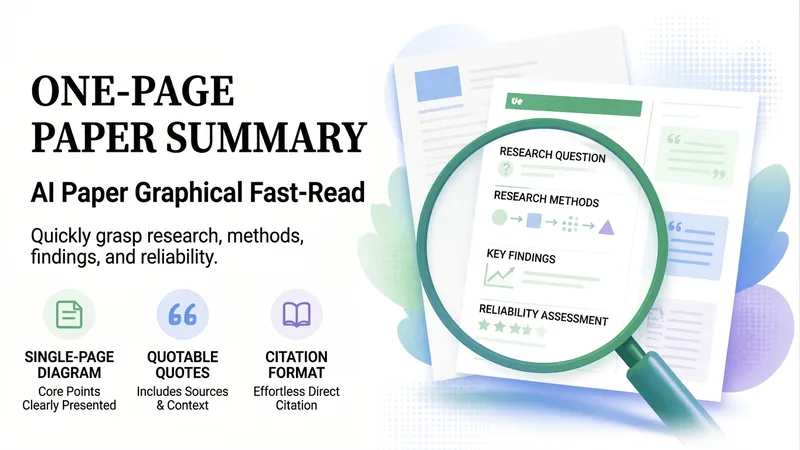
One-Page Research Paper
# One-Page Research Paper Upload a paper PDF or link to quickly understand what it studied, how it was done, what it found, and how reliable it is. All figures and citations are annotated with sources, and a one-page diagram is generated at the end. ## What You Get - **Quick Read**: One-sentence conclusion, research questions, methods, main findings, and author-stated limitations, each with a source - **Credibility Check**: First identifies the paper type (quantitative, qualitative, review, theoretical, technical), then checks with corresponding criteria: are samples sufficient, is correlation confused with causation, is comparison fair, can it be replicated - **Inconsistency Check**: Contradictory numbers between sections are pointed out, such as differences between the abstract and main text - **Quotable Sentences**: Verbatim excerpts with sources, indicating whether they fit the introduction, methods, or discussion - **Glossary and References**: Both GB/T 7714 and APA formats, missing fields are marked without fabrication - **Tailored Additions**: For writing literature reviews, finding methods, or preparing lab meeting reports (includes a 5-slide PPT outline and a 2-minute speech script) - **One-Page Diagram**: Research question → method → findings → limitations, all explained in a single chart ## Who It Is For Undergraduates, graduate students, researchers, and anyone who needs to quickly determine whether a paper is worth reading and citing. Supports both Chinese and English papers. ## Tips - Uploading a PDF works best; when providing a link, the PDF version is prioritized - State your purpose to make the content more targeted, such as "preparing a lab meeting presentation" or "writing a literature review" - All content comes strictly from the paper itself, and missing parts are stated honestly - Each run consumes about 100–200 credits (including 1 diagram generated)
 Image
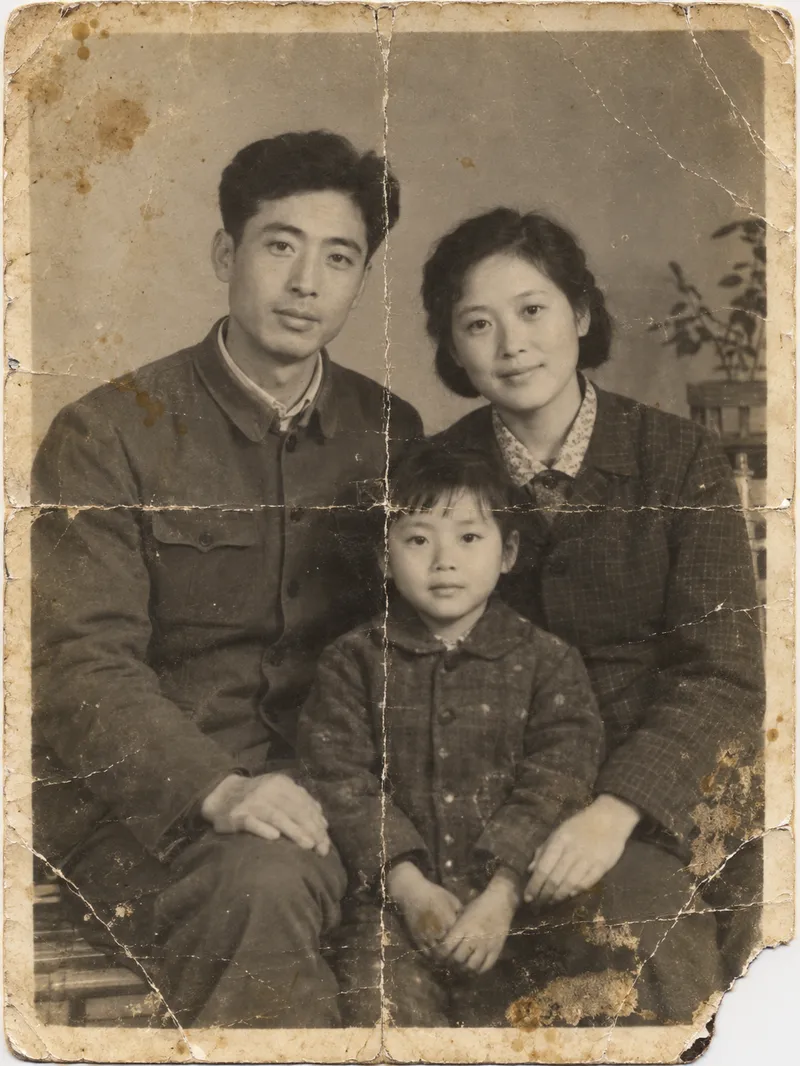
Old Photo Restoration
# Old Photo Restoration | AI Photo Renewal Upload a yellowed, creased, scratched, or stained old photo to restore it into a clean and clear version. You can naturally colorize it according to the era, or keep it in black and white or vintage tones. Every person in the photo remains just as they originally were. ## What You Will Get - **Photo Diagnosis**: Estimates the era of the photo, identifies the number of people, and highlights where the damage is most severe - **Restored Photo**: Removes creases, scratches, cracks, stains, mold spots, and yellowing, and fills in missing corners - **Three Modes**: Restoration plus colorization (default), keep black and white, or keep the warm yellowish tone of old photos - **Faithful Preservation of Individuals**: No beautification or making people look younger; when a crease crosses a face, only the crease is removed without adding glasses, wrinkles, or other unoriginal items - **Individual Verification**: For group photos with more than 3 people, each person is checked to ensure consistency before and after restoration, with verification results listed - **Preservation of Historical Marks**: Handwritten dates, photo studio stamps, and decorative white borders are kept as they are - **Transparent Explanations**: Clear notes on which areas were inferred and filled in by AI, and which colors were AI-generated ## Who It Is For Children wanting to restore old photos of their parents or grandparents; people making commemorative albums or longevity banquet gifts for family; and those organizing family or institutional historical photos. ## Usage Tips - Scanned copies yield the best results; when taking a photo with a phone, try to shoot straight on and avoid reflections - Knowing the shooting era, location, or clothing colors and noting them down (e.g., "Mom is wearing a red sweater") will make colorization more accurate - AI restoration infuses inferred missing details, so please keep the original copy for important photos - Each run consumes about 100–200 credits (generating 1 restored image; an extra image is generated during auto-correction)
 Image
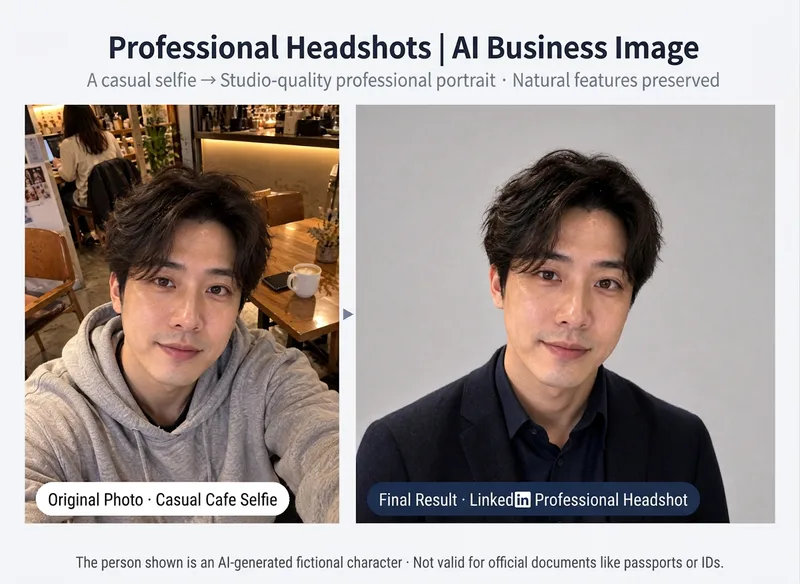
AI Professional Headshot
# AI Professional Headshot **Turn casual selfies into professional, polished business headshots!** No suitable resume photo? Using a random selfie for LinkedIn? Want a professional headshot without booking a photo studio? Simply upload an everyday photo, and AI will design the attire, background, and studio lighting based on your professional use case, generating a headshot tailored for the workplace. **The focus is on elevating your professional presentation, not changing who you are.** ## What You Get **① Tailored Professional Image Concept** Recommended styles based on your purpose and industry: - 💼 Resumes & Job Hunting: Natural, neat, and professional - 🌐 LinkedIn & Business Networking: Polished, trustworthy, and approachable - 🏢 Corporate Websites & Team Intros: Uniform, formal, and high-quality - 🎤 Speakers & Presenters: Poised, natural, and charismatic - ✨ Entrepreneurs & Freelancers: Formal or business casual based on industry **② A Professional Business Headshot** Transforms everyday photos into studio-quality styles: - Swaps in appropriate business attire - Adjusts to a clean, professional background - Optimizes lighting and overall composition - Selects a 1:1 avatar or 3:4 portrait ratio based on use case **③ Preserves Your True Features** Focuses on keeping your facial features, face shape, skin tone, hairstyle, and natural expression from the original photo. No default slimming, eye enlargement, or heavy skin smoothing; freckles, moles, and other personal traits are preserved. Headscarves, religious attire, or traditional garments are respected and kept according to your requirements. **④ Result Verification** Checks person recognition, clothing necklines, shoulders, and image edges after generation. If noticeable discrepancies are found, adjustments will be attempted according to the Skill's actual settings. Minor generation details may still vary. **⑤ Headshot Usage Tips** Provides applicable scenarios, cropping methods, and usage suggestions for different platforms. ## Who Is This For? - Job seekers preparing resumes - Professionals looking to update their LinkedIn photo - Entrepreneurs needing team photos for their website - Freelancers, consultants, and speakers - Anyone wanting to boost the professionalism of their workplace avatar ## How to Use 1. Upload a clear front-facing or slight-profile photo; phone selfies work too. 2. Select your use case, industry, and preferred business style. 3. Review the professional image concept recommended by AI. 4. Confirm to generate your professional headshot. 5. Use or crop the photo according to platform requirements. ## Tips - Photos with even lighting, clear facial features, and no obstructions generally yield better results. - For adults only; please upload photos of yourself or ones you have authorization to use. - AI-generated images are for professional presentation, not official photographic records. - Not suitable for passports, ID cards, visas, or other official identity document requirements. - Character details, clothing edges, and lighting may still contain generation errors. - Image generation and extra adjustments may consume credits; actual charges are subject to YouMind usage logs. --- **One everyday photo, one professional upgrade. Make your first workplace impression stand out.**
 Image
AI Hairstyle Try-On
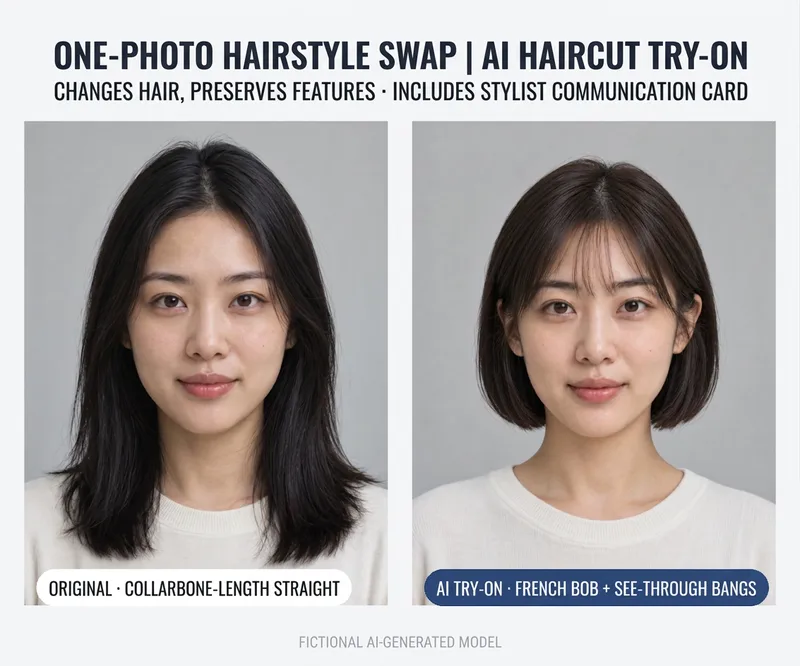
# AI Hairstyle Try-On **See what you look like with a new hairstyle before you cut!** Want short hair but worried it won't suit you? Thinking about bangs or a new hair color, but not sure of the final result? Never quite know how to describe the hairstyle you want at the salon? Upload a frontal photo, and the AI will recommend 3 hairstyles of different styles. Once you pick your favorite, it generates a try-on preview image along with a communication card you can show your hairstylist. **Suitable for both men and women—take the guesswork out of changing your hair.** ## What You Get **① 3 Personalized Hairstyle Recommendations** Based on your visible facial contours, current hairstyle, and preferences, the AI recommends 3 hairstyles with varying degrees of change: - ✂️ Minor Change: Optimize your existing hairstyle - ✨ Moderate Change: Adjust length, bangs, or layers - 🌟 Major Change: Try a noticeably different look or hair color Each recommendation includes details on length, bangs, layers, color, and daily maintenance difficulty. **② AI Hairstyle Preview Image** After choosing your preferred hairstyle, generate a test cut preview. Focuses primarily on hair adjustments while retaining your original facial features, face shape, clothing, and background to help you easily judge the visual effect of the new style. Check recognition and hair changes after generation, using runtime settings to correct noticeable issues if needed. **③ Professional Hairstylist Communication Card** It gives you more than just an image; it tells you how to talk to your hairstylist: - Length and layers for the back, sides, and top - Shape of the bangs and cutting requirements - Clipper length recommendations for short men's cuts - Hair color notes and whether to consult ahead about bleaching conditions - Daily maintenance methods and questions to confirm in person Includes a ready-to-use description you can read directly to your stylist. **④ Multilingual Salon Communication** Getting a haircut abroad and not sure how to express yourself? Request English or other language versions of the communication card to help you explain the desired look to your stylist. ## When Is This Useful? - Want short hair, but worried it won't work out - Want to try curtain bangs, layered cuts, or different hair colors - Men looking for a fresher, sharper short haircut - Preparing for an interview, date, photoshoot, or important event - Wanting reference images and communication notes ready before heading to the salon ## How to Use 1. Upload a clear frontal photo. 2. Tell the AI what hairstyle direction you want to try, or leave it unspecified. 3. Review the 3 hairstyle recommendations. 4. Select your favorite and generate a try-on preview. 5. Bring the preview and communication card to your hairstylist to confirm the actual cut. ## Tips - Photos with hair naturally down, a clear front view, and even lighting usually yield better results. - Limited to adult photos; please upload your own or authorized photos. - AI previews are visual approximations and do not guarantee an exact replica in real life. - Actual results depend on hair texture, hair volume, hairline, cutting technique, and daily styling. - Minor details or hair deviations may occur with AI; confirm major changes with a professional hairstylist. - Image generation and extra corrections may consume credits; check platform details for actual usage. --- **One photo, three hairstyle inspirations, one stylist communication card. Try before you cut!**
Review Insights
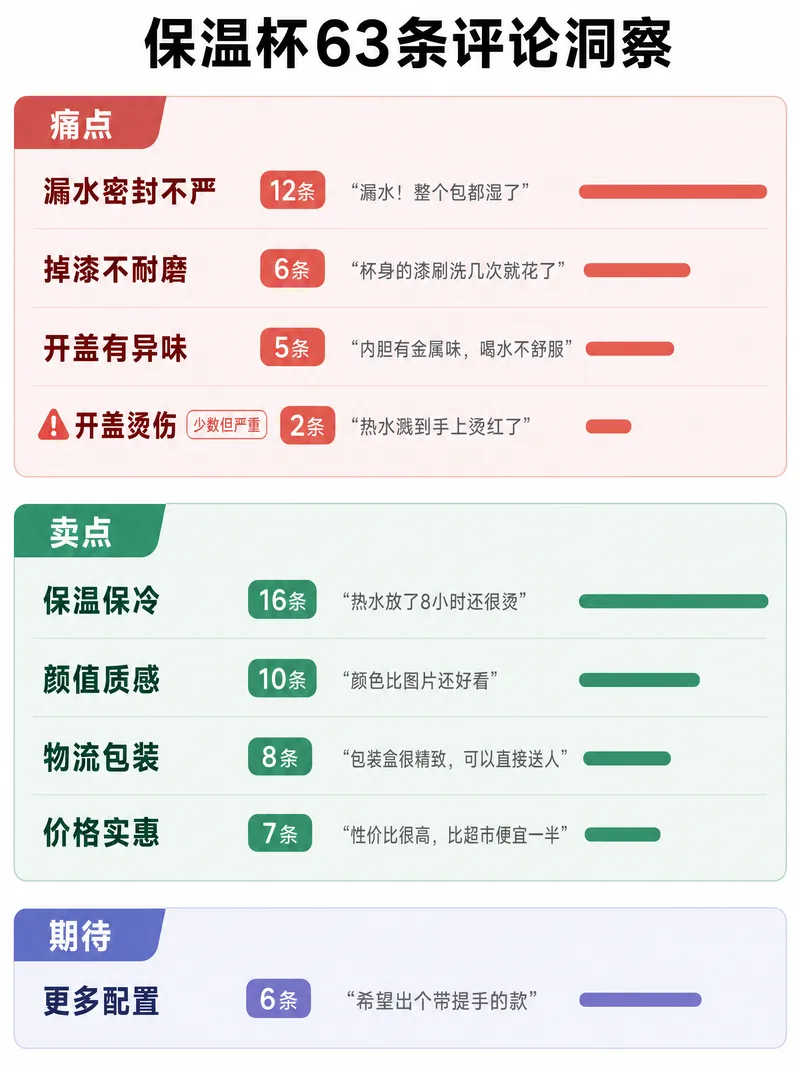
# Review Insights **Don't let valuable user feedback get lost in hundreds of reviews.** What hidden pain points lie within product reviews? What do customers love most about your product? Are there ideas for your next best-selling product or content piece hidden in the comment section? Upload comments or paste feedback, and the AI helps you extract **pain points, selling points, and potential needs** from messy user feedback, citing source evidence for every conclusion and generating an intuitive insight chart. **Go beyond summarizing comments to turn user words into actionable insights.** ## What You Get **① Comprehensive User Needs Analysis** Organizes comments into three main categories: - 🔴 **Pain Points**: What are users complaining about? Which issues need improvement? - 🟢 **Selling Points**: What do users truly appreciate? Which advantages are worth highlighting? - 🟡 **Expectations**: What features do users want added? What unmet needs still exist? **② Evidence-Backed Conclusions** Every topic indicates the related comment count, review ID, and authentic quote for easy verification. No making up user thoughts or exaggerating a single comment into a majority opinion. **③ Rare but Severe Issue Detection** Potential safety or serious quality issues like burns, breakage, or allergies are flagged individually even if mentioned in few reviews, preventing them from being buried by positive feedback. **④ Actionable Next Steps** Provides product improvement, selling point refinement, and content topic suggestions based on review evidence, along with the reasoning for each recommendation. **⑤ User Insight Chart** Automatically organizes key findings into a visual diagram showing pain points, selling points, expectations, and comment counts for easy review and sharing. ## Who Is This For? **🛍️ E-Commerce Sellers** Analyze your own or competitor reviews to find quality issues, recognized selling points, and new product development opportunities. **📱 Content Creators** Organize video comment sections to understand viewer interests and find direction for future content. **📊 Product Managers & Operations** Prioritize issues and product improvements from app reviews, survey feedback, and user messages. **💡 Entrepreneurs & Product Selectors** Discover unmet consumer needs through authentic reviews to inform product positioning and selection. ## How to Use 1. Paste comments or upload Excel, CSV, or text format review data. 2. Optionally specify a goal, such as "find product flaws," "extract selling points," "analyze competitors," or "find video topics." 3. The AI organizes comments, categorizes themes, cites evidence, and offers suggestions. 4. Generate an insight chart to help you quickly understand key findings. ## Tips - More complete comments and sufficient samples generally provide more valuable analysis. - Opinions in comments do not necessarily represent all consumers. - Duplicate comments, unhelpful messages, and sample limitations will be noted during analysis. - Direct quotes are for evidence verification; ensure compliance with platform rules and privacy requirements before public commercial use. - AI statistics and chart text may contain minor errors; important conclusions should be cross-checked with raw data. --- **Turn every authentic review into a clue for product improvement, creative inspiration, and a more persuasive selling point.**
AI Problem Decomposer
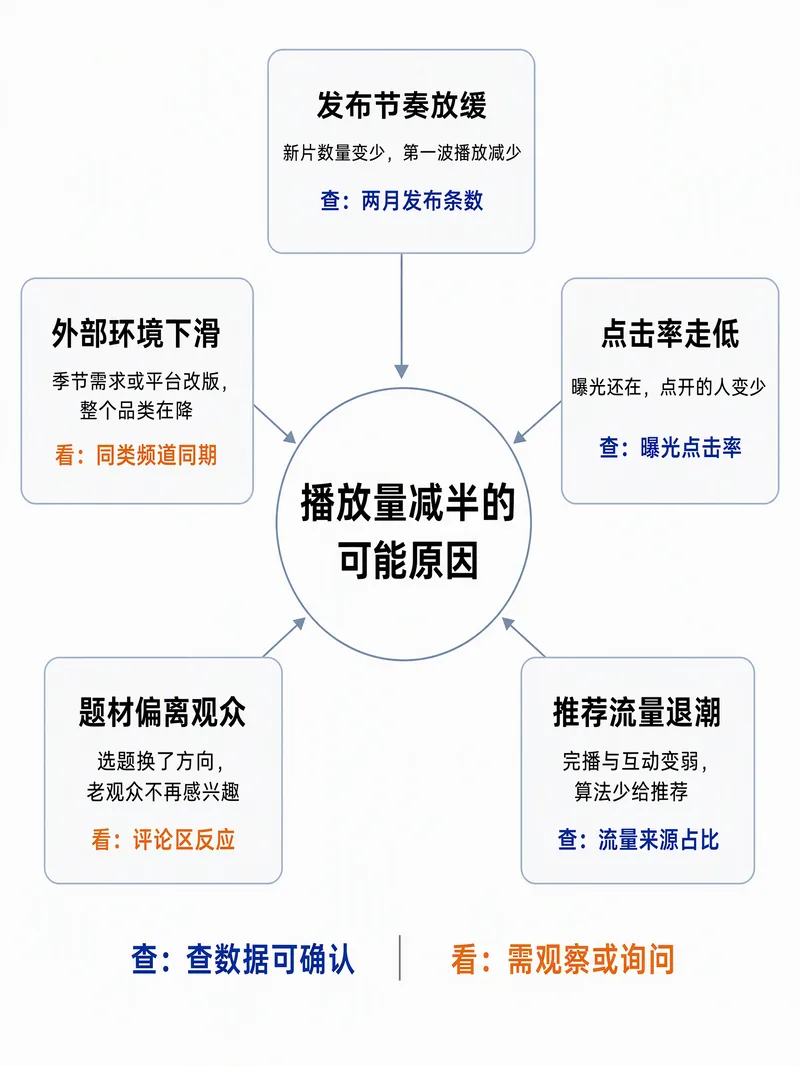
# AI Problem Decomposer **One complex question, one clear analysis diagram.** Why is store traffic unchanged while profits keep falling? Why did video views suddenly drop? Why are projects always delayed? Enter the question you want to understand, and AI will break down possible causes, map out cause-and-effect relationships, determine what to investigate first, and generate a clear, easy-to-understand Chinese-language analysis diagram. It does more than tell you **what the possible causes might be**. More importantly, it tells you: **why they might be happening and what to check next.** ## What you'll get **① Intelligent problem breakdown** Identify the key parts of a problem. For situations that can be analyzed with formulas, the tool prioritizes establishing metric relationships to help identify what needs to be investigated. **② 4–6 possible causes** Each cause includes: - Possible symptoms - The cause-and-effect mechanism behind the outcome - A practical way to verify it Unverified speculation is not presented as fact. **③ Intelligent investigation order** Based on impact, verification difficulty, and the information available, the tool recommends what to check first and what to check later, helping you avoid investigating blindly. **④ One professional Chinese-language analysis diagram** The tool automatically selects a suitable structure based on the question, such as a radial map, causal chain, fishbone diagram, or timeline. Different colors distinguish information types, and specific action prompts are placed next to causes, such as: - Check: impression click-through rate - Check: product gross margin - Review: customer comments and feedback **⑤ Image text check** After generation, the tool checks the Chinese text, number of causes, and consistency between the diagram and its content. If obvious text errors are found, it attempts one automatic correction based on the run settings; additional generation may use more credits. ## What kinds of questions is it suited for? **Business operations** - Why are profits falling even though store traffic is unchanged? - Why are returning customers decreasing despite good reviews? **Content creation** - Why did YouTube views suddenly drop? - Why are impressions high but click-through rates low? **Work and learning** - Why are projects always delayed? - Why hasn't performance improved significantly despite investing more time in learning? ## How to use it 1. Enter a specific question you want to analyze. 2. Include any data, screenshots, or reference materials you have. 3. AI breaks down the causes, analyzes the mechanisms, and provides verification methods. 4. Generate a Chinese-language multifactor analysis diagram to help you investigate each item step by step. ## Usage tips - The more specific the question and the more complete the data, the more targeted the analysis will be. - Do not fabricate statistics, survey results, or external sources. - The causes shown in the diagram are analytical hypotheses and do not mean the actual causes have been confirmed. - Generated images may contain layout or text errors. - A single test run uses approximately 100–200 credits. Actual credit usage depends on the model, task complexity, and whether additional generation is needed. **Make complex questions easier to understand, investigate, and act on.**
AI Makeup Try-On
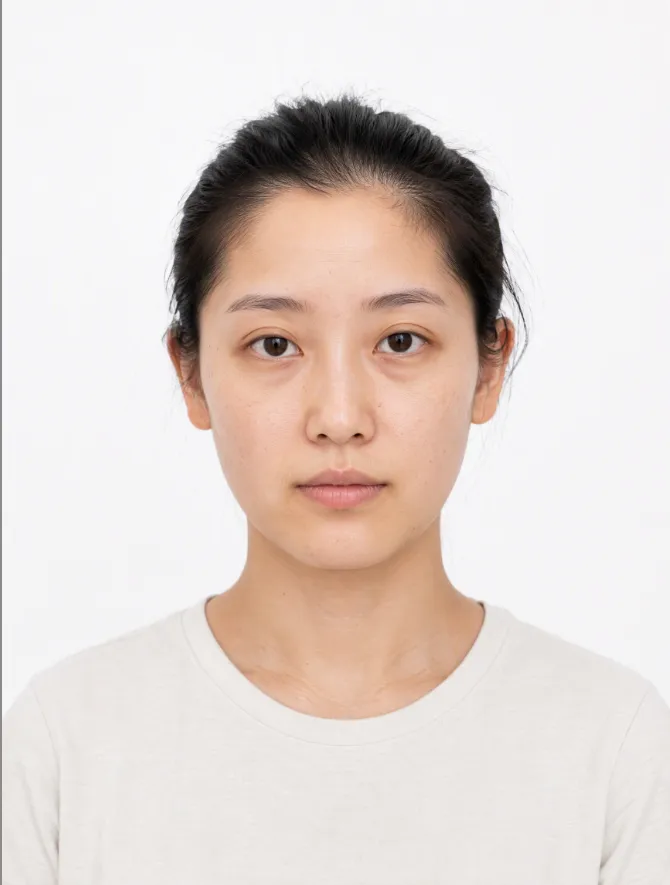
# AI Makeup Try-On | AI Makeup Designer Upload a front-facing photo, and AI will analyze your skin undertone, eye shape, and lip shape. It will select the three most suitable looks from current makeup trends, generate try-on previews, and give you an application card you can follow step by step. ## What you’ll get - **Facial analysis**: Explains what suits you without judging your attractiveness or commenting on your skin - **3 makeup recommendations**: One light, one medium, and one bold look, with an explanation of why each suits you - **Makeup try-on preview**: Changes only the makeup while keeping your facial features, hairstyle, and background unchanged; after generation, it automatically compares the result with the original and redraws it once if there are discrepancies - **Application card**: Clearly explains the base, brows, eyes, blush, contour, and lips, including color, texture, placement, difficulty, time, and a product list ## When to use it Before a date, interview, wedding, or photo shoot, when you want to see which makeup look suits you before deciding how to apply it. ## Usage tips - Clear, front-facing photos with even lighting and no obstructions work best - You can include an occasion or style, such as a date, interview, wedding guest makeup, Korean-inspired, or Western-inspired looks - For adults only. Upload your own photo or one you have permission to use - The preview is an AI-generated visualization; actual results may vary with lighting, skin texture, and application technique - Each try-on uses about 100–200 credits (one generated preview; automatic correction generates one additional preview)
 Research
Automated Quote Comparison
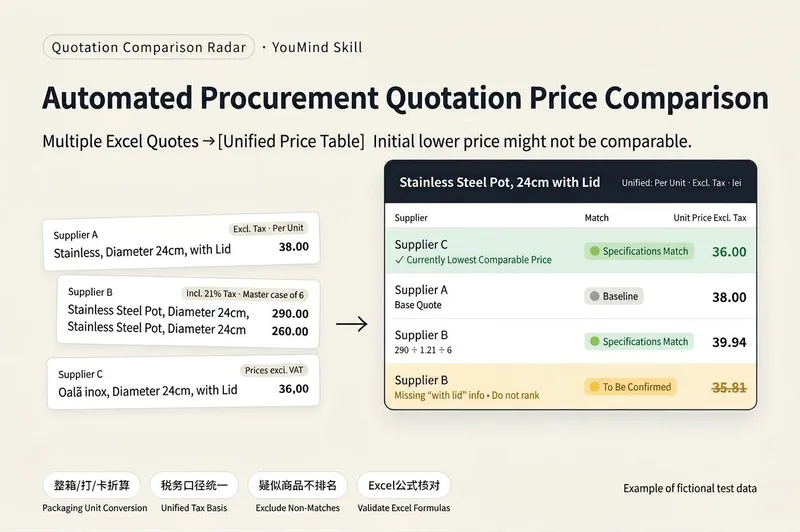
# Automated Quote Comparison | Quote Comparison Radar **Compare multiple supplier quotes in one table: only matching specifications are ranked, suspected matches require confirmation, and unit prices are calculated with Excel formulas.** ## Still comparing supplier quotes manually? If you run a wholesale business, stock a store, or handle purchasing, you may often encounter these issues: - Supplier A quotes by the case, supplier B by the dozen, and supplier C by the individual item. - Some prices include tax while others do not, making direct comparisons error-prone. - The same product may have different names and may mix Chinese, foreign-language text, and different decimal formats. - Products that look identical may differ in capacity, dimensions, material, or model. - Quote sheets may contain dozens or even hundreds of rows. Organizing them manually takes time and makes it easy to miss lines. **Quote Comparison Radar organizes multiple supplier Excel quotes into one standardized comparison table that you can check row by row.** The focus is not just on comparing prices, but first determining whether the product specifications are comparable. ## Core features **① Three-level product specification matching** 🟢 Matching specifications: Key specifications meet the requirements and can be included in the price comparison. 🟡 Needs confirmation: Key information is missing or the specifications require further confirmation. The item is temporarily excluded from the lowest-price ranking. 🔴 Conflicting specifications: Key attributes such as dimensions, capacity, or material are clearly different. The item is excluded from the lowest-price ranking for that product. This prevents a lower-priced product with different specifications from being treated as the best quote. **② Automatic packaging quantity conversion** Supports cases, dozens, cards, and multi-level packaging, such as “20 packs × 10 pieces.” Automatically organizes package quantities and pricing units while distinguishing product specifications from minimum order quantities, so quotes for different quantities are not compared directly. **③ Standardized tax-inclusive and tax-exclusive prices** When tax information is clearly provided in the quote, tax-inclusive prices are converted to tax-exclusive prices for a consistent comparison basis. Foreign-currency quotes are marked separately. Exchange rates are not converted automatically, and these quotes are not included in the lowest-price ranking. **④ Tiered pricing support** Tiered prices for different purchase quantities are listed separately. By default, only the starting quantity tier is used for comparison. **⑤ Excel formula calculations for row-by-row checking** Unit prices in the output are calculated with Excel formulas rather than estimated directly by AI. Each row retains the source file and original product number, making it easier to verify product descriptions, package quantities, tax rates, and prices. **⑥ Missing-row prevention and batch processing for large files** At the beginning, the Skill reports the number of rows identified in each file. After output is complete, it performs an item-by-item check and attempts to restore any missing rows. When there are more than 40 rows, the output is automatically split into batches. Reply “Continue” to get the next batch; row numbers remain continuous. **⑦ Supplementary confirmation for suspected products** For example, reply: “B-04 is transparent.” The Skill updates the corresponding entry based on the additional information, so you do not need to reorganize all quotes from scratch. ## How to use **Step 1: Upload at least two supplier Excel quote sheets.** Files are sorted by filename, and the first file becomes the reference supplier. To specify the reference supplier, add `1_` to the beginning of its filename. **Step 2: Wait for product matching and the comparison table.** If the quote contains more than 40 rows, reply “Continue” as prompted until the entire output is complete. **Step 3: Copy the results to Excel.** Paste each batch into Excel cell A1 in order so Excel can calculate the formula results. **Step 4: Filter for the lowest quotes.** Filter for 「参与排名=是」, group by product, and sort 「未税单价」 from low to high to find the currently lowest comparable quote for each group. **Step 5: Manually verify and confirm suspected products.** Add specification information for 🟡 entries, then ask the Skill to update the corresponding rows. ## Internal test results The final version was tested using self-created fictional quote data: - 4 suppliers and 156 quote rows in total. - The test included case packaging, tax-inclusive quotes, multiple worksheets, Romanian product names, comma decimals, euro quotes, tiered pricing, and entries without prices. - The final version output all 156 rows. - 0 incorrectly matched items entered the lowest-price ranking. - The lowest-price conclusions for all 50 product groups were correct. - After the output was pasted into Excel, no formula errors occurred during testing. These are **test results using fictional internal data**. They are not a real customer case and do not indicate that all real quote sheets will achieve the same accuracy. ## Limitations and notes - Currently supports only Excel quote sheets, not PDFs, images, or WeChat text. - Compares product unit prices only; shipping costs, minimum order quantities, and payment terms are not included in the price comparison. - 🟢 means the provided key specifications match. It does not guarantee the same brand, model, or completely identical product. - Foreign-currency quotes are not automatically converted using exchange rates. - If Excel uses commas as decimal separators, such as `12,50`, mention this when uploading. - Entries missing required tax rates, pricing units, or packaging information must be confirmed before they can be used for a valid comparison. - The Skill does not directly provide a final purchasing decision. You need to filter, sort, and verify the lowest quotes in Excel. - Before purchasing, manually verify key product specifications and supplier quotes. ## Price and credit usage **Launch price: 1,980 credits.** In an internal test with quotes from 4 suppliers and approximately 150 rows, the run used about 224 credits. Actual credit usage depends on the number of files, number of product rows, batch output, and the number of follow-up confirmations. 224 credits is not a fixed fee. ## Who is it for? - Retail store owners who frequently purchase from multiple suppliers - Wholesalers and small trading companies - People responsible for product purchasing and supplier quote requests - Business operators who need to organize multiple Excel quote sheets **Confirm that specifications are comparable before comparing prices.** A price that looks cheaper may not be directly comparable.
 Image
AI One-Photo Ad Maker
Upload one product photo and let AI create e-commerce advertising materials for you! No professional design experience is needed. AI first identifies the product’s appearance, colors, quantity, and key details, then plans four advertising visuals for different marketing purposes based on the product’s characteristics. **Core features:** - Analyzes your product and recommends marketing styles and advertising concepts. - Plans four images for different purposes by default, with options to adjust them as needed. - Review the plan first and authorize generation afterward to reduce unnecessary credit usage. - Tries to preserve the product’s original colors, structure, material, and quantity. - Reviews product fidelity and image quality after generation, and provides marketing copy suggestions. **Best for:** E-commerce sellers, department store owners, social media operators, and businesses without design experience. **How to use:** Upload a product photo → Review the advertising plan → Authorize generation → Check the review results → Get your marketing materials. **Please note:** AI-generated images may contain inaccuracies in product details, so check them manually before official use. Image generation may consume platform credits. Sales or advertising performance is not guaranteed.