One-Page Action Planner
Turn messy materials into clear next steps
One-Page Action Planner
Turn messy materials into clear next steps
Showcase
Description
The meeting is over, the chat has filled several screens, yet nothing is moving forward. Bring in meeting transcripts, chat logs, scattered notes, or multiple documents, and the One-Page Action Planner will organize them into one page: the current situation, decided items, blockers, and who will do what next—and when. Each action includes an owner, timing, status, and source. Agreed decisions are preserved, personal suggestions are marked separately, and conflicting information or missing owners and dates are labeled “To confirm.” It will not make decisions for the team just to fill in a table. Useful for post-meeting follow-up, project handoffs, organizing multiple sources, and personal planning. It ends by highlighting one question that most urgently needs confirmation, making the next step clearer. Supports text and attachments, screenshots, audio transcripts, and links that the current platform can read; when something cannot be read, it will say so clearly. “One page” refers to a compact reading structure; the actual length varies with the complexity of the materials.
Recommended by
Dancang
Why we love this skill
Compresses scattered meeting notes, chats, and attachments into an actionable one-page checklist without turning discussion into commitments.
Best for
Team members, project leads, and individuals who need to turn meeting or project materials into clear action items.
How to use this Skill
Provide your input
Provide meeting transcripts, chat logs, notes, or other readable materials. You may also attach screenshots, audio transcripts, and links. Convert unreadable content to text or a transcript.
Run the Skill
Organize the facts, decisions, disagreements, and gaps in the materials, distinguish agreed items from suggestions needing confirmation, and retain necessary source references.
Review your result
Create a one-page action list covering the current situation, decided items, blockers, next steps, owners, timing, status, and sources, plus one priority question to confirm.
Related Skills
View all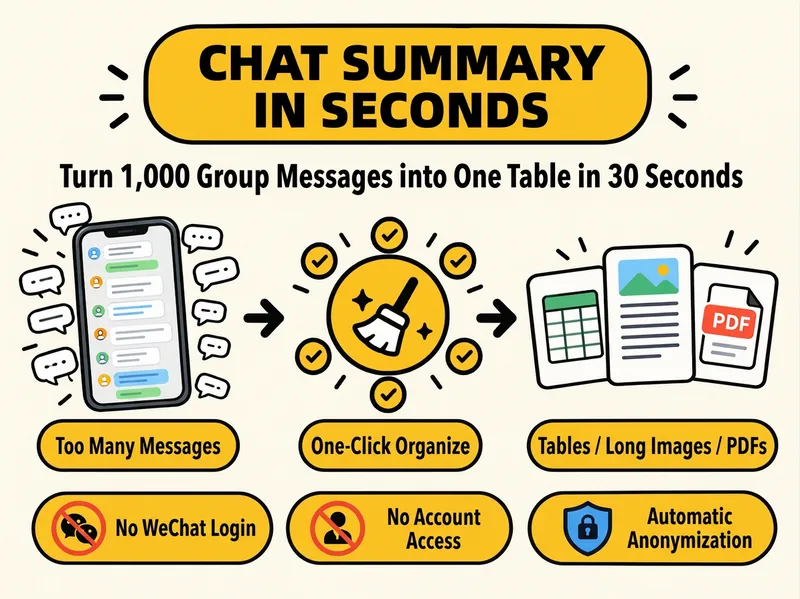 Research
WeChat Group Review Assistant
Too many groups, too many messages, and no time to scroll? Hand them over to the one-click review assistant. Send in your exported, copied, or screenshotted WeChat group chat logs, and it will automatically organize them into a clear summary and export them to your desired format. What you get: 🔥 Hot topics: What people are talking about and who disagrees 💡 Key insights: Valuable experiences and methods worth saving ❓ FAQs and answers: Which questions are solved and which are unanswered 🔗 Resources and links: Tools, files, and URLs shared in the group 📌 Action items and deadlines: Who is doing what and when ⚠️ Disputes and risk warnings: Potential ads, traffic generation, or misinformation 📈 Trends and content ideas: Angles you can directly use for content creation Three output formats to choose from: 📊 Excel spreadsheet: A separate sheet for each section, filterable and copyable 🖼️ Long image: Great for sharing in groups, on Moments, or on Xiaohongshu 📄 PDF: Perfect for archiving and forwarding to colleagues
Work Review MAX: Logs→Review
Does your weekly report look like this: “Moved Project A forward this week, participated in discussions for Meeting B, supported the team with Request C, delivered xx documents, and will continue next week.” Your manager glances at it and moves on. It’s not that you didn’t work hard. It’s that you wrote a log, not a review. When evaluators review promotion materials and managers read monthly reports, they care about just five things: ① Why was this work worth doing? (judgment) ② What benchmark shows that the result was good? (data anchoring) ③ Which parts did “you” do, and which were done by the team? (contribution boundaries) ④ What reusable insight did you take away from the work? (growth curve) ⑤ What do you commit to delivering next cycle? (commitment mindset) 99% of review drafts fail to make even one of these clear. They just list features: “Iterated on X,” “launched Y,” “supported Z”—like a robot. This Skill is a structured compiler I refined through frontline business reviews as an AI OPC. Paste in your raw work log exactly as it is—no matter how messy or scattered—and it will produce a complete review that meets senior-level promotion and performance-review standards: 📊 One-line overall assessment (help readers understand your value in 30 seconds) 🎯 Key achievements (STAR + judgment-based narrative, not a feature list) 📈 Data benchmark table (with baselines, definitions, and your share of the contribution) 🧠 Methodology and lessons learned (showing your growth curve) 📅 Next-cycle plan (commitment-letter format, with measurable goals + deadlines + resource needs) ⚠️ Risks and support needed (surfacing risks shows ownership) 📋 Missing-data checklist (everything you need to look up, all at once) Bonus: ✓ Review of 3 key improvement areas (showing which weaknesses in the raw material were addressed) ✓ Defense-risk forecast (which points evaluators may challenge in a promotion review + suggested responses) ✓ Reusable template variables (make a few edits and reuse it next time) How is it different from a typical “AI weekly report” Skill? Others: Rephrase your work log and output it again—it’s still a work log. This one performs structural surgery on it, upgrading it from a “feature-listing format” to a “judgment-based narrative.” What it will never do: ✗ It will not invent data—anything you didn’t provide is marked “needs to be added,” with no made-up numbers ✗ It will not write filler like “As an AI,” “In conclusion,” or “Thank you, leadership” ✗ It will not flatter you or ask, “Can you tell me more?” It gets straight to work Who should use it: People tired of weekly reports and hoping to log off early P6→P7 / M1→M2 / mid-level→senior professionals aiming for promotion Anyone facing a midyear or annual performance review with materials still unwritten Project leads who need to write quarterly reviews for managers, evaluators, or clients Anyone who works hard and wants their work to be truly seen Doing good work doesn’t automatically mean you know how to report it. With the same workload, people who know how to write effective reviews get promoted a year faster. Use it for your next weekly report and make your work visible.
 Write
Incident Review & Actions
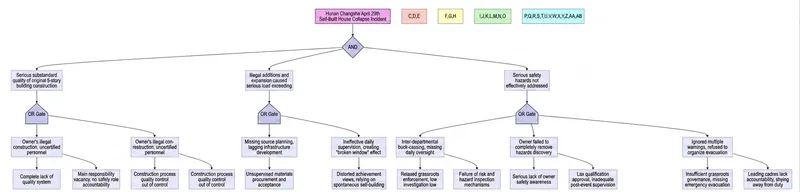
Turn a company’s Incident Investigation Report into a clear, measured incident review focused on practical action. It traces the chain of causation from the incident itself through direct, indirect, and root causes, helping you see both the triggering behavior or condition on the day of the incident and internal organizational issues involving systems, training, inspections, site conditions, resource allocation, and safety culture. The analysis is based strictly on the report’s original text. Direct causes retain their original wording, while distinguishing between what the report records and what the later investigation determines. Indirect and root causes are summarized without changing their original meaning. Information not provided in the report is explicitly marked “Not mentioned in the report.” No times, locations, data, or causes are added, and unrelated content is not forced into the incident chain. Each cause includes an author’s perspective based on the report and corresponding action recommendations. Vague statements such as “strengthen training” or “improve inspections” are translated into specific people, timing, items, and actions—for example, who checks what, how often it is done, where it is recorded, and what to observe after remediation. It is suitable for corporate incident reviews, safety discussions, corrective action planning, and organizing safety training materials, helping teams move from what happened to why it happened, and then turn that understanding into a small action that can start as soon as possible.
Information
- Version
- v2
- Last updated
- Runtime credits
- Usage-based
- Models
- Auto
- Use cases
- Presentations & reportingResearch & analysisBusiness & strategy
- What you get
- ReportDocumentPlan
