
Storefront to Hand-Drawn Illustration
Turn your shop into a postcard with its signature facade and name preserved.
Storefront to Hand-Drawn Illustration
Turn your shop into a postcard with its signature facade and name preserved.
Showcase
Description
Upload a photo of your shop's storefront to transform the familiar place into a collectible illustration. Ideal for coffee shops, flower shops, bookstores, bakeries, and guesthouses to use as social media graphics, store stories, commemorative postcards, or promotional materials. It first analyzes the doors, windows, signs, awnings, color scheme, and key furnishings in the original photo before designing the artwork. The primary style is pen-and-wash: varied line weights, translucent color washes, subtle textures, and natural paper white. Other styles can also be specified, with actual results depending on the final output. The focus is on keeping the original shop easily recognizable. The count and placement of key objects, the relationship between doors and windows, and the main sign are individually checked. Any typos, obstructions, or redrawing discrepancies will be noted. When precise store names are needed, you can combine this with original lettering or post-processing layout. By default, it first generates a clean main illustration, and then creates a promotional layout using your exact copy if needed. It will not automatically add fictitious storefronts, business information, or promotional watermarks. A pen-and-wash API sample has already been completed using a real CC0 photo, showing some furnishing redrawing discrepancies; it has not yet been test-run within YouMind. Actual image generation relies on the host image tool, and installation does not include runtime credits. Product and workflow design by leowang.
Why we love this skill
Turns real shop photos into promotional illustrations that maintain hand-drawn charm while preserving facade recognition. It balances aesthetics with structural accuracy for windows, signage, and brand colors.
Best for
Ideal for store owners and content creators looking to turn a real shop front into social media graphics, story illustrations, or commemorative postcards.
How to use this Skill
Provide your input
Upload a storefront photo and optionally provide the exact store name, preferred art style, and intended use.
Run the Skill
Transforms the storefront's windows, sign, color scheme, and key displays into a hand-drawn illustration while preserving the original shop's recognizable features.
Review your result
Receive a clean main illustration of the shop, with promotional layouts available if exact copy is provided.
Related Skills
View all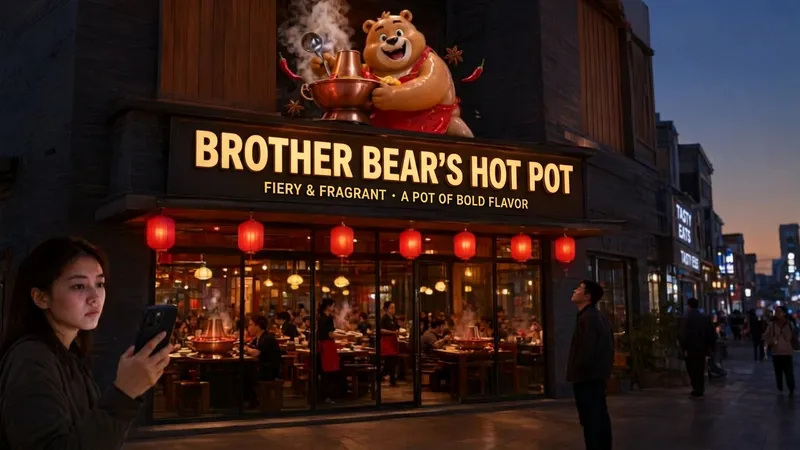 Image
Storefront Sign AI Wordsmith
A professional prompt generator for commercial storefront signs, designed for aspiring business owners and designers. Provide your store category and name, then optionally add a style, slogan, or IP elements. It automatically creates standardized English image-generation prompts compatible with leading AI image models such as Qwen Image, GPT Image, and Nano Banana. Core capabilities ・Automatically lays out a three-layer storefront structure: primary sign text, 3D sculptural IP elements, and storefront materials and surroundings ・Optimizes Chinese sign text rendering to greatly reduce AI typos and distorted lettering ・Recommends an image model based on your needs ・Uses a 16:9 landscape composition by default, suitable for realistic storefront photos and trendy, social-media-ready store concepts ・Supports custom styles, including night-market stalls, neighborhood shops, trendy cafés, hot pot restaurants, and tea drink shops Best for: brick-and-mortar entrepreneurs, advertising and storefront sign designers, and AI art enthusiasts who want to quickly generate storefront concepts for previewing designs before opening and comparing sign proposals.
 Image
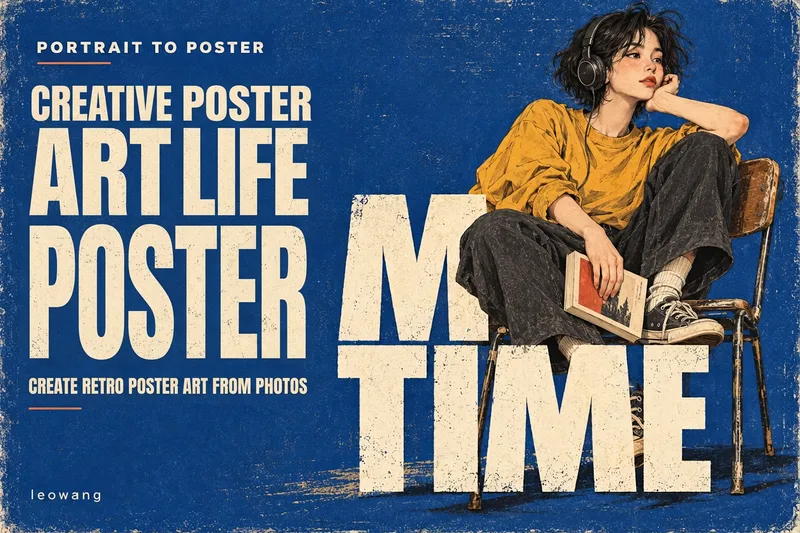
Portrait to Retro Poster
Upload a real-person photo to transform daily moments like drinking, cycling, shopping, or resting into a textured retro typographic poster. It preserves visible features, outfits, and poses while cleaning up cluttered backgrounds. Characters are redrawn using delicate ink lines, color blocks, and paper textures. Short titles are then designed around the actions so that figures and huge typography overlap in the foreground and background. Each poster features an independent composition tailored to the pose rather than a generic template. It defaults to a 3:4 vertical format with cobalt blue paper texture and off-white large lettering. Color schemes, titles, languages, and illustration directions can be customized. Execution is supported in hosts with image capabilities. Image fidelity and typography accuracy depend on the model and source photo quality. Other art styles are optional directions and have not all been thoroughly tested. Product Design: leowang.
 Image
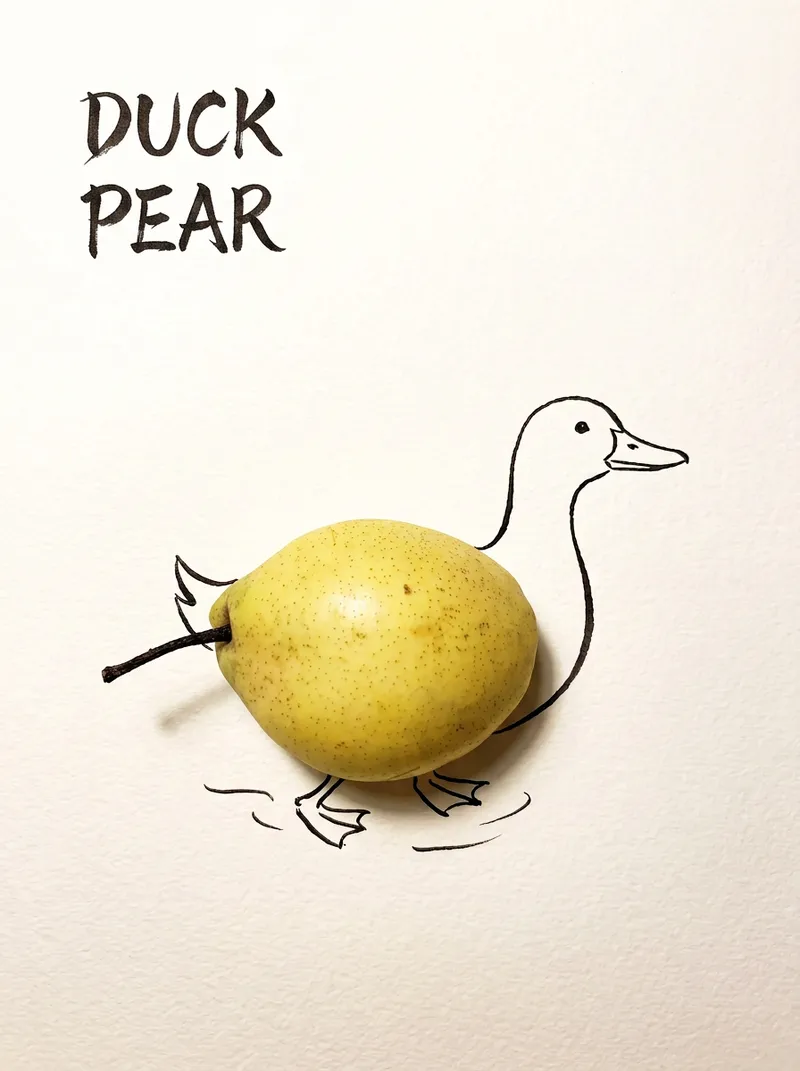
Bring Objects to Life
Best for: Xiaohongshu / Douyin creators Turn everyday objects into posters and create a consistent "bring-to-life series" with highly engaging content Food and lifestyle creators Turn ingredients into cover images that make your work more memorable Illustrators / designers Find inspiration quickly and test the "real object + line art" creative direction Teachers / parents Create materials for arts and crafts lessons, helping children make up stories with objects around them Businesses / brand operators Create creative hero images, holiday posters, and packaging inspiration for produce, fruit, and snacks Cultural creative brands, stationery shops, and coffee shops Design merchandise, postcards, stickers, and menu illustrations Everyday enthusiasts Photograph something nearby and share an "artwork" on social media Everything you photograph is hiding another character. "Bring Objects to Life" is a creative poster generator that combines real-object photography with minimalist line art. Just upload a photo of an object, and AI will automatically do three things: 🔍 Read the shape: Analyze the object's outline, curves, and texture to find what it most resembles ✏️ Add line art: Use dark ink pen lines to draw in a head, limbs, a human figure, ropes, and more, fitting the lines precisely to the object's edges 🖋 Turn the idea into a phrase: Create a 2–4-character Chinese pun title and arrange it in the empty space in an artistic typeface The finished image preserves the object's real colors and texture. The background is clean, warm-white watercolor paper, with at least 40% negative space. The result feels calm and refined: recognizable at a glance, then delightfully witty once you see the idea. The default format is a 3:4 vertical layout, suited to Xiaohongshu, Moments, and Douyin image posts. The aspect ratio, font, and title can all be customized.
Information
- Version
- v2
- Last updated
- Runtime credits
- Usage-based
- Models
- Auto
- Use cases
- Images & designMarketing & growth
- What you get
- Image
- Visual styles
- WatercolorPrintmaking
