
Realistic Skin Texture Prompts
Natural skin texture for portraits
Realistic Skin Texture Prompts
Natural skin texture for portraits
Showcase
Description
Generate text-to-image prompts for selfies, close-ups, half-body portraits, and portrait photography, with a focus on reducing plastic-looking skin, an oily film, and AI-looking faces. Skin is guided toward more natural glow, texture, and subtle variation. Whether you need everyday portraits, magazine-style portraits, direct-flash snapshots, or realistic portraits with less of an AI look, prompts can be customized based on the subject, camera position, lighting, style, and preferred imperfections. Prompts are organized around the overall skin texture, highlight placement, differences across facial areas, textures such as pores and peach fuzz, and natural skin-tone variation, rather than simply stacking vague terms like “realistic skin” or “ultra-realistic.” You can specify image ratios such as 9:16, 3:4, and 1:1, and get composition and parameter suggestions for the image-generation model you use. When needed, you can also generate Chinese, English, or bilingual versions for GPT-Image, 即梦, 豆包, Midjourney, SDXL, or Flux. In addition to copy-ready positive prompts, the Skill explains how key descriptions affect skin texture and provides targeted troubleshooting and adjustment suggestions for over-smoothed skin, an overly oily face, a waxy appearance, or distorted texture. Generated prompts can also be saved by topic for easier lookup, fine-tuning, and consistent texture across a portrait series.
Recommended by
Dancang
Why we love this skill
Breaks skin texture into five control points to address plastic-looking skin, oily film, and AI-looking faces with customizable, traceable bilingual prompts.
Best for
Content creators, photography enthusiasts, and image-generation users who need prompts for natural, realistic portraits.
How to use this Skill
Provide your input
Provide the subject, camera position, lighting, style, preferred imperfections, and image ratio. You can also specify the image model or language version needed.
Run the Skill
Organizes skin texture, highlight distribution, regional differences, textural details, and natural variation, then adjusts the prompt for the scene.
Review your result
Get ready-to-copy text-to-image prompts, plus optional negative constraints, description analysis, and advice for troubleshooting skin texture issues.
Related Skills
View all Image
Asian Portrait Prompt Director
This skill is designed for users who need to create high-quality portrait prompts for AI image-generation platforms, especially creators and designers pursuing Asian aesthetics and mature, natural-looking female subjects. It transforms your creative concepts into specific, actionable prompts while helping ensure visual quality and platform compatibility. Core features include generating prompts based on your descriptions for major AI image models and platforms such as Midjourney, SDXL, Flux, GPT Image, 豆包, 即梦, and ComfyUI. It can intelligently identify and rewrite high-risk wording so prompts follow platform safety guidelines and avoid infantilized, vulgar, or overly body-focused expressions. You can also use quick commands to switch between image styles, including realistic selfies, commercial fashion editorials, high-end cosplay, cyberpunk, and classical Chinese aesthetics. The skill also supports prompt repair based on feedback when generation fails. Whether you want to create a fashion magazine cover, a cinematic portrait, or a 3D CG character design, this tool provides precise language descriptions and parameter suggestions. Final prompts are optimized for the selected platform—for example, natural, fluent English long-form prompts for Midjourney, clear positive and negative keyword groups for SDXL/Flux, or detailed modular parameter slots for ComfyUI—to help you efficiently generate AI portraits that match your expectations.
 Image
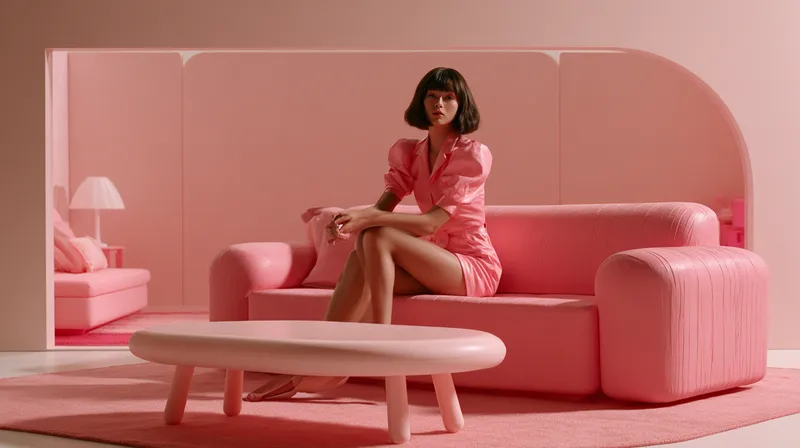
Pink Western Fashion Aesthetic
Turn people, spaces, products, or story scenes into ready-to-use still-image prompts for pink open-toy architecture. Place real people among sleek, open, slightly miniature-feeling plastic buildings and furniture while preserving realistic skin, natural textures, and clear action relationships. Ideal for creating Barbie-style candy-pink artificial paradises, open sectional rooms, pink toy homes, and coordinated scene sets in the same style. Descriptions combine material layering from pale cherry pink to rose pink, substantial rounded plastic components, open wall display spaces, scale comparisons between people and architecture, and contact shadows under bright, soft lighting. They avoid making people look plastic, as well as pink glass, unsupported stairs, clipping, and simply applying a pink filter. You can customize the number of people, actions, props, scene proportions, and image orientation to get composition intent and still-image generation prompts suited to your subject. When needed, the output can include Chinese ImageGen prompts, English Midjourney prompts, or related review points. When you clearly request actual image generation, it also checks the results around the number of people, load-bearing, contact relationships, style anchors, and consistency across images, then fixes only the issues that actually failed.
 Image
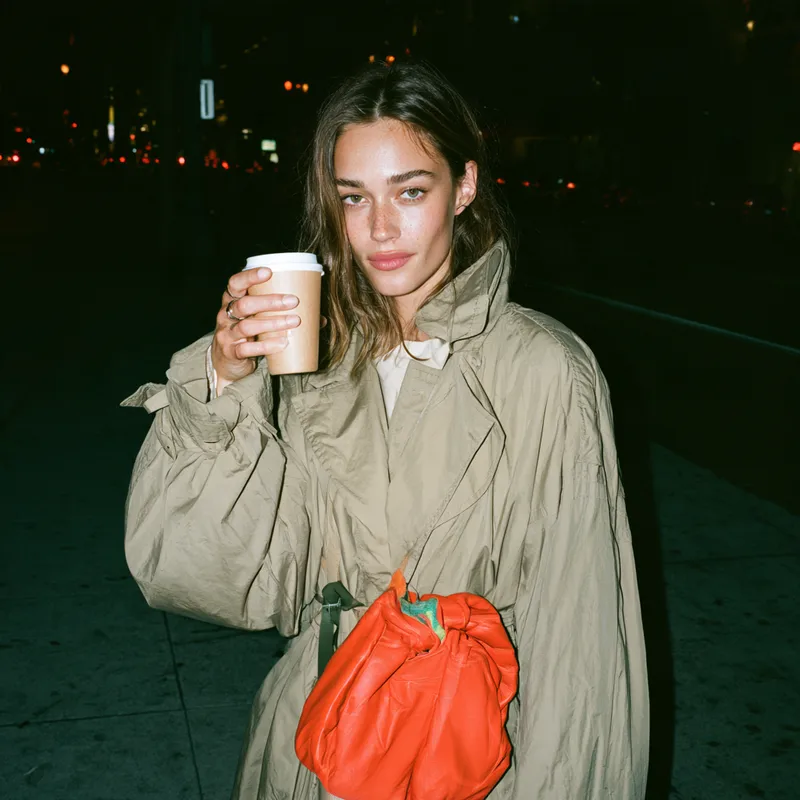
Street Style Flash Prompts
Generate image prompts for streetwear, bags, shoes, and other accessories with the candid feel of close-up direct flash. Keep products clear and eye-catching while preserving the relaxed poses and immediate snapshot atmosphere of a real street setting. Ideal for brand visuals, social media content, and early-stage fashion and accessory concept images, without turning the scene into stiff, formal studio photography or an overly polished advertising campaign. You can provide a single product, a person’s outfit, or a specific use case, along with colors, materials, quantity, carrying method, and aspect ratio. The skill builds each scene around close-range front-facing flash, short hard shadows, darker but still discernible ambient exposure, and street backgrounds in natural gray, white, deep blue, and other tones. It also adjusts the composition for different relationships, such as hand-carrying, crossbody wear, or placing an item on a table, making bag bodies, handles, soles, and garment structure easier to see. The default output includes standalone 16:9 visual concepts and prompts ready for use with Midjourney and Chinese ImageGen. If you need only one format, you can request it. For multi-image series, it can also maintain consistent product features and visual style while varying the settings and poses, making it suitable for building a cohesive street fashion image series.
Information
- Version
- v6
- Last updated
- Runtime credits
- Usage-based
- Models
- Auto
- Use cases
- Images & design
- What you get
- Prompt
