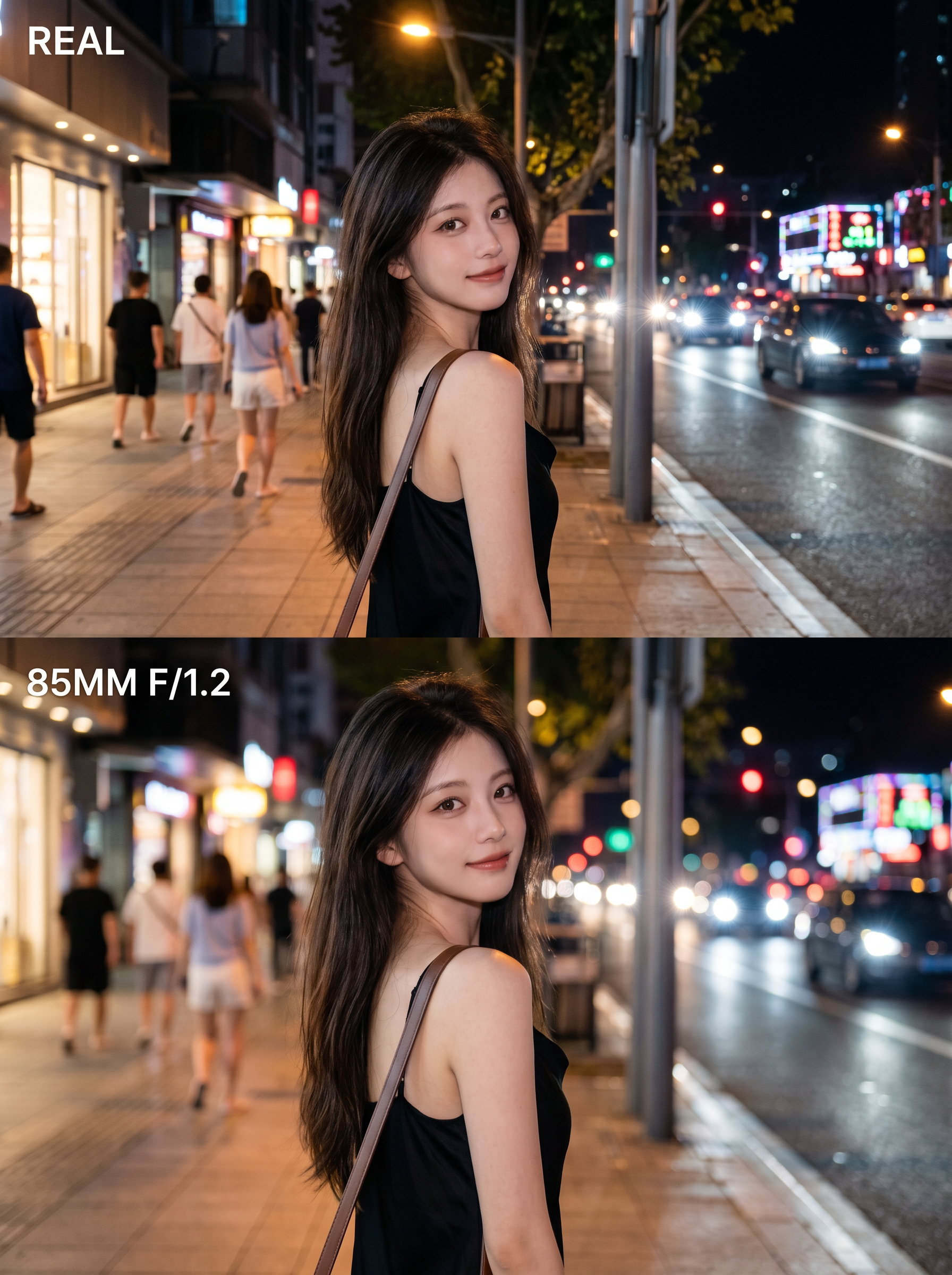
Pro Lens Portrait Maker
Turn one photo into a polished portrait
Pro Lens Portrait Maker
Turn one photo into a polished portrait
Showcase
Description
Turn an ordinary photo into a 3:4 vertical poster with a polished, high-end look. The top half fully preserves the photo’s original, authentic appearance. In the bottom half, create the feel of a professional portrait photo using the same face, pose, and setting—with the subject sharply defined, the background softly blurred, and the lighting transformed into gentle circles of bokeh. No face swapping, pose changes, or cutouts—the result feels like the photo was retaken with a better lens. Ideal for portrait photography, social media covers, and before-and-after comparisons.
Recommended by
淡苍
Why we love this skill
Transforms an ordinary portrait into a professional lens comparison poster while preserving the subject, composition, and setting with realistic 85mm f/1.2 depth of field and natural edge transitions.
Best for
For anyone who wants richer portrait quality, a social media cover, or a before-and-after comparison.
How to use this Skill
Provide your input
Upload a portrait photo. You can also specify the subject, details to preserve, or preferred color tone.
Run the Skill
Create a top-and-bottom comparison poster: keep the original look in the top half, and show natural shallow depth of field with soft bokeh in the bottom half while preserving the person, pose, and setting.
Review your result
Get a vertical, realistic portrait poster that compares the original image with a professional lens look.
Related Skills
View all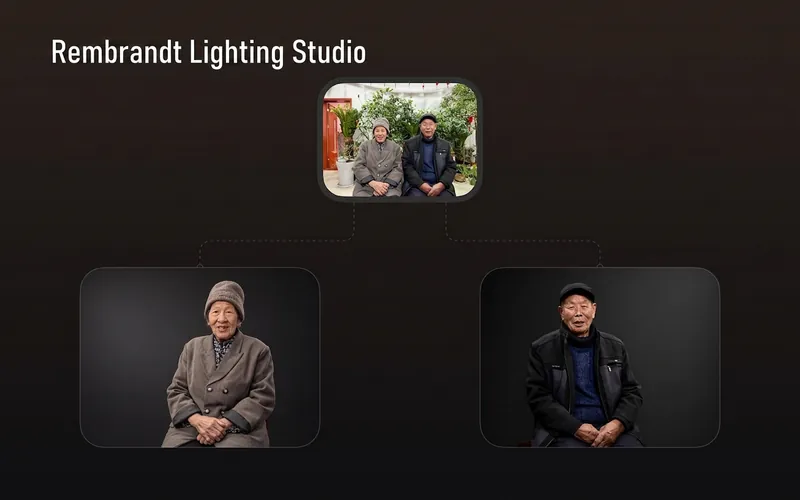 Image
ImageRembrandt Studio Portrait
Transform ordinary photos of people or pets into Rembrandt-lit portraits with realistic studio lighting, strong chiaroscuro shaping, and a cinematic look. The skill automatically selects lighting suited to the original photo, based on a person’s frontal, profile, or three-quarter view, or on a pet’s facial and fur structure. It will not distort the nose shadow or facial features just to create a “Rembrandt triangle of light.” By default, people retain their identity, age, expression, skin tone, clothing, and accessories. Pets retain their breed, coat color, markings, ears, eyes, and body structure. Small adjustments to the camera angle, shoulder line, head direction, and composition are allowed to make an ordinary photo feel like a genuine new studio session, while avoiding a stiff, cutout, or memorial-portrait look. The original photo’s aspect ratio and orientation are preserved by default; a 1:1 headshot is not required. The skill also supports 1:1 headshots, 4:5 social portraits, 3:4 classic portraits, 2:3 print formats, 3:2 photographic landscapes, 4:3 general landscape images, and 16:9 cinematic covers. When the aspect ratio must change, it prioritizes cropping irrelevant background. If hair, ears, chin, hands, paws, or tail might be cut off, it extends the clean studio background instead. The background uses a clean, smooth, noise-free gradient from deep charcoal gray to inky black, aligned with the direction of the key light. Film grain, sensor noise, mottling, paper texture, smoke, glow, banding, and AI-generated compositing textures are explicitly prohibited. Suitable for: people portraits, pet portraits, profile photos, social media covers, editorial portraits, family photo upgrades, and cinematic studio transformations.
 Image
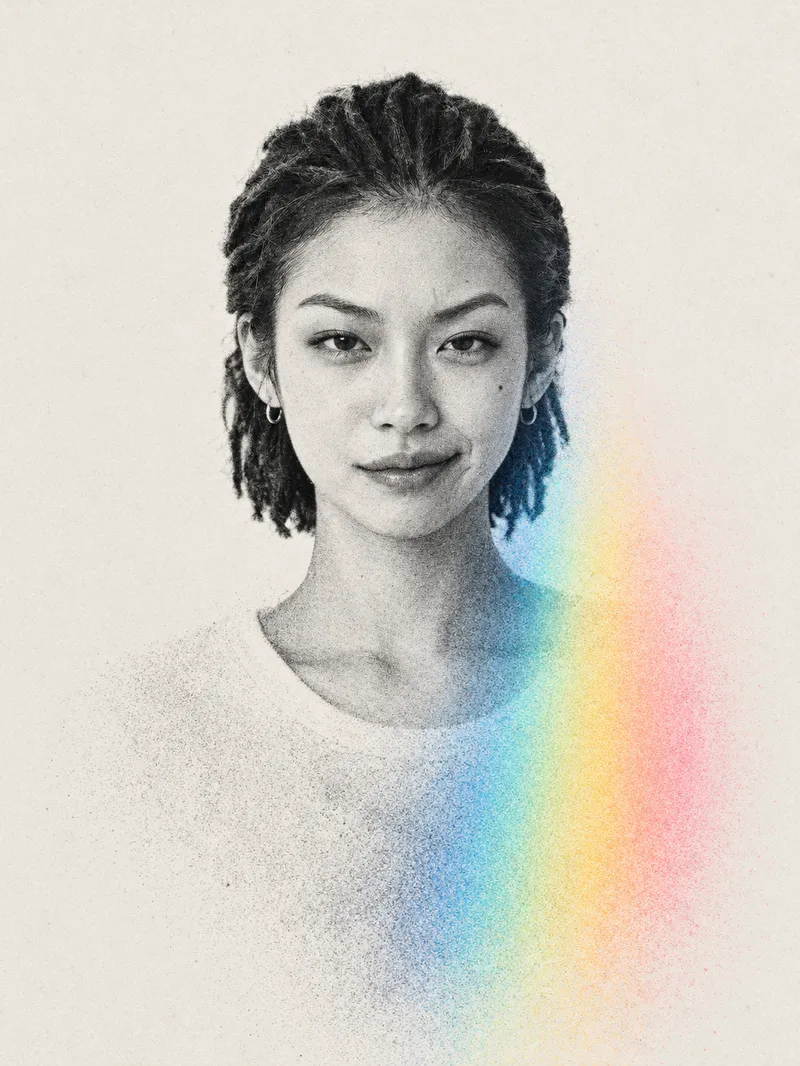
ImageAdvanced Midjourney Posters
For: Self-media and content creators: Create profile images, channel covers, and personal-brand visuals that stand out at a glance in content feeds. Designers and photographers: Quickly develop style concepts for clients or create a cohesive series for a portfolio. Personal brands and professionals: Make LinkedIn and WeChat official account profile images, personal website homepages, and business cards more distinctive than standard headshots. Musicians, artists, and small shop owners: Create album covers, event posters, and guest introduction graphics. Everyday users: Make profile images, social media covers, and keepsake images for couples or families. Upload one person’s photo to automatically generate a vertical 3:4 minimalist editorial-style art poster: a high-contrast black-and-white halftone portrait overlaid with a single prism-spectrum color band, with everything below the head dissolving into particle mist while strictly preserving the person’s identity, facial features, pose, and orientation.
 Image
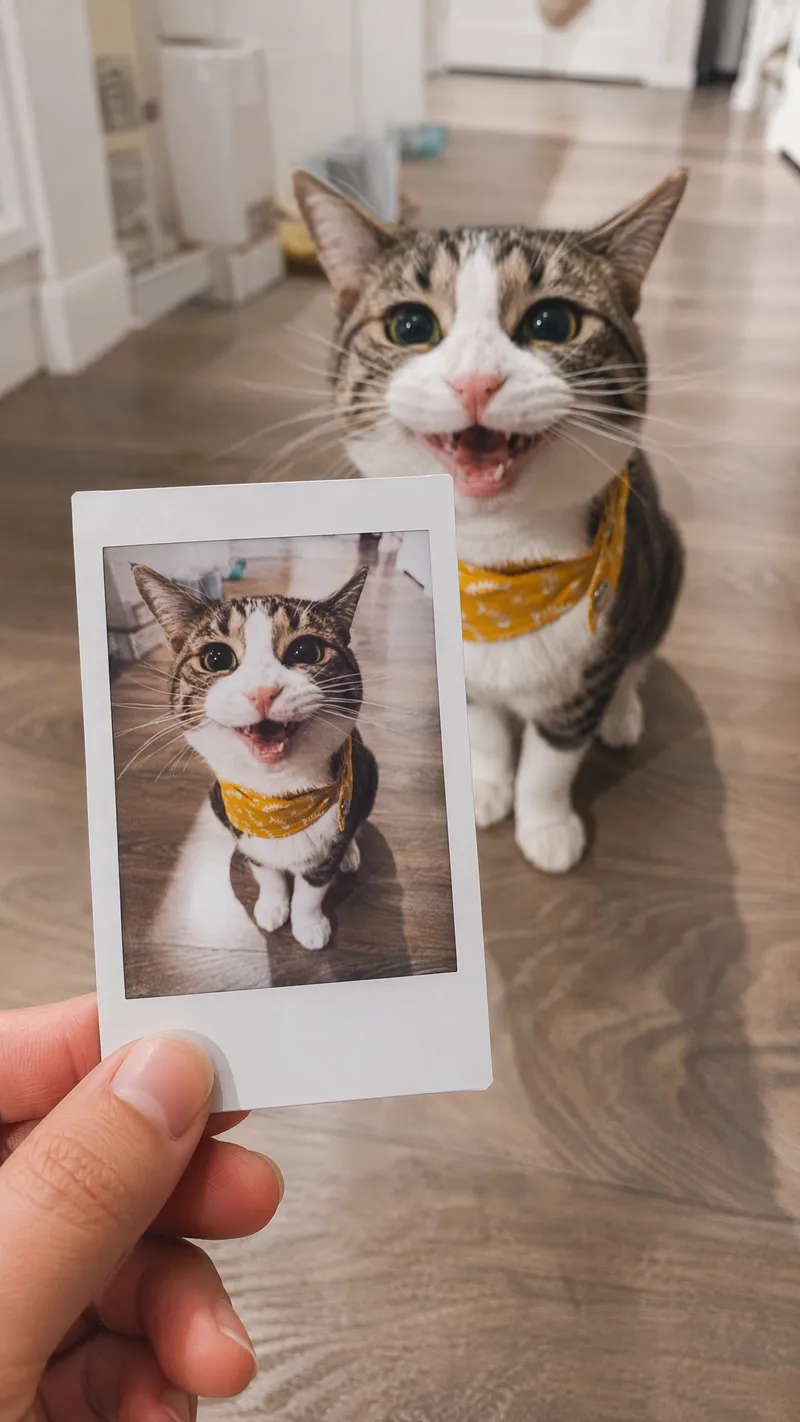
ImageSame-Scene Instant Photo
Turn an image or natural-language scene description into a realistic, natural-looking handheld instant photo: a hand holds a physical white-bordered instant print in the foreground, while the real scene from the same place and moment appears in the background, creating a coherent picture-within-picture effect. Whether the subject is a landscape, urban architecture, person, animal, car, product, or everyday object, the image preserves its key appearance and places it in a plausible real-world setting—not simply pasted into a frame. The results emphasize authentic photographic qualities, including natural perspective, paper texture, contact shadows, hand details, moderate depth of field, and the casual feel of a phone snapshot. Mountains, buildings, people, animals, and other subjects in the instant photo correspond to the background, allowing viewers to directly compare the image inside the print with the real scene outside it. Unnatural elements such as floating cards, digital collages, design lines, and excess text are avoided. The composition automatically adapts to landscape, portrait, or square formats based on the original image or your specified aspect ratio, while keeping the instant photo in your hand aligned with the final image. You can also use natural language to adjust the photo’s position, tilt, size, background clarity, lighting, and overall style. It’s suitable for travel photography, life documentation, and scene images with a convincing realistic illusion.
Information
- Version
- v4
- Last updated
- Runtime credits
- Usage-based
- Models
- Auto
- Use cases
- Images & design
- What you get
- Image
- Visual styles
- Photorealistic
