
Negative Review & Return Diag
Paste reviews, diagnose page flaws in 10 min.
Negative Review & Return Diag
Paste reviews, diagnose page flaws in 10 min.
Showcase
Description
Negative reviews are piling up and returns won't come down, but you can't tell if the issue is in specifications, ingredients, or after-sales service? Paste your negative reviews and 'Ask Everyone' comments here, and in 10 minutes get a problem map: 9 categories of feedback → detail page gaps → P0/P1/P2 modification priorities. It does one thing—helps you see the problem clearly, without fabrication or hard selling. Want to know exactly how to fix it and what it will look like? After the diagnosis, directly connect to the flagship 'E-commerce Detail Page & Customer Script Optimization Tool' for fully consistent tone—no need to repaste materials.
Why we love this skill
This diagnostic accurately analyzes Taobao/Tmall negative reviews, pinpoints detail page issues, and provides prioritized modification suggestions—an essential tool for merchants to optimize product pages.
Related Skills
View all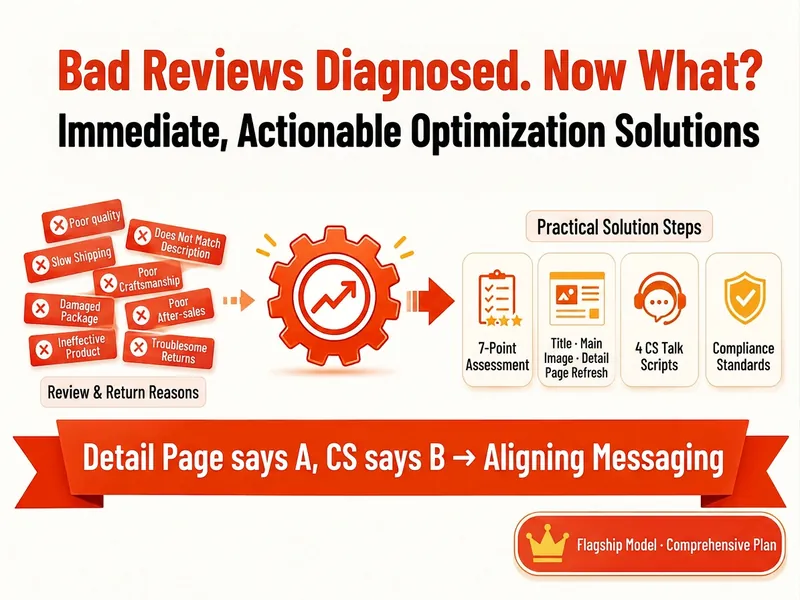 Research
Tao/Tmall Detail & CS Script Op
Diagnosed negative reviews and found the problems, then what? This Skill directly converts buyer negative reviews/return reasons into actionable solutions: 7-dimension page rating, title/main image/detail page FAQ restructuring, four types of CS scripts (pre-sale, objection handling, expectation management, post-sale), high-risk expression compliance replacement. The gap where the detail page says A but customer service says B is the root cause of negative reviews and returns — this locks both sides consistent. Honesty first: only make conservative judgments when materials are insufficient, never fabricate.
Review Insights
# Review Insights **Don't let valuable user feedback get lost in hundreds of reviews.** What hidden pain points lie within product reviews? What do customers love most about your product? Are there ideas for your next best-selling product or content piece hidden in the comment section? Upload comments or paste feedback, and the AI helps you extract **pain points, selling points, and potential needs** from messy user feedback, citing source evidence for every conclusion and generating an intuitive insight chart. **Go beyond summarizing comments to turn user words into actionable insights.** ## What You Get **① Comprehensive User Needs Analysis** Organizes comments into three main categories: - 🔴 **Pain Points**: What are users complaining about? Which issues need improvement? - 🟢 **Selling Points**: What do users truly appreciate? Which advantages are worth highlighting? - 🟡 **Expectations**: What features do users want added? What unmet needs still exist? **② Evidence-Backed Conclusions** Every topic indicates the related comment count, review ID, and authentic quote for easy verification. No making up user thoughts or exaggerating a single comment into a majority opinion. **③ Rare but Severe Issue Detection** Potential safety or serious quality issues like burns, breakage, or allergies are flagged individually even if mentioned in few reviews, preventing them from being buried by positive feedback. **④ Actionable Next Steps** Provides product improvement, selling point refinement, and content topic suggestions based on review evidence, along with the reasoning for each recommendation. **⑤ User Insight Chart** Automatically organizes key findings into a visual diagram showing pain points, selling points, expectations, and comment counts for easy review and sharing. ## Who Is This For? **🛍️ E-Commerce Sellers** Analyze your own or competitor reviews to find quality issues, recognized selling points, and new product development opportunities. **📱 Content Creators** Organize video comment sections to understand viewer interests and find direction for future content. **📊 Product Managers & Operations** Prioritize issues and product improvements from app reviews, survey feedback, and user messages. **💡 Entrepreneurs & Product Selectors** Discover unmet consumer needs through authentic reviews to inform product positioning and selection. ## How to Use 1. Paste comments or upload Excel, CSV, or text format review data. 2. Optionally specify a goal, such as "find product flaws," "extract selling points," "analyze competitors," or "find video topics." 3. The AI organizes comments, categorizes themes, cites evidence, and offers suggestions. 4. Generate an insight chart to help you quickly understand key findings. ## Tips - More complete comments and sufficient samples generally provide more valuable analysis. - Opinions in comments do not necessarily represent all consumers. - Duplicate comments, unhelpful messages, and sample limitations will be noted during analysis. - Direct quotes are for evidence verification; ensure compliance with platform rules and privacy requirements before public commercial use. - AI statistics and chart text may contain minor errors; important conclusions should be cross-checked with raw data. --- **Turn every authentic review into a clue for product improvement, creative inspiration, and a more persuasive selling point.**

E-Commerce Thesis Check Guide
Stuck on your e-commerce undergraduate thesis? Does your current status section read like a company intro? Is your strategy section just the classic "strengthen promotion, improve service" four-piece set? Did you only realize two weeks before your defense that your title doesn't match your content? This skill is a revision workbench designed for e-commerce undergraduates. Its 13 commands help you check: whether the title is correct, whether the framework holds up, whether the paragraph arguments have loopholes, whether sentences are smooth, whether the same indicator has inconsistent definitions across chapters, why the defense teacher asks a certain question, and where follow-up questions might come from. In a word: AI won't write your thesis for you, but it helps you see where the problems are, how to fix them, and what to do next. What it cares about most: It will not fabricate data for you, will not write company facts for you, and will not write entire paragraphs of text for you. All revision suggestions leave a placeholder like 【Please replace with your real data】 so that you fill in with the authentic materials you collected yourself—so the thesis you submit is yours, not AI's. When checking sentence by sentence, each sentence's issues are categorized into two types: 【Structural issues】 that need content addition or rewriting, and 【Language issues】 that are suitable for polishing—so you won't use smooth wording to mask empty content, and you can clearly see which sentences are truly revised after editing. Coverage: mainstream e-commerce directions such as online marketing, store operations, short videos, live streaming sales, cross-border, private domains, agricultural product e-commerce, and more. From first draft self-check, chapter-by-chapter proofreading, version comparison to defense preparation, multiple rounds of follow-up. 【For advisors】 Teachers supervising e-commerce undergraduate theses can also use it this way: have students first run /check to diagnose the four layers of issues—framework, evidence, paragraphs, sentences—and then come for a meeting with the diagnostic report. This way, your grading time can focus more on judgment and direction rather than reading through everything to find problems. The /compare command can also directly compare the student's first draft and second draft to see if the revisions are adequate. Not suitable for: master's/doctoral theses, journal submissions, or non-e-commerce undergraduate theses. v2.2.1 early version. Feedback from students and advisors is welcome to help us make this revision workbench even smoother.
Information
- Version
- v4
- Last updated
- Runtime credits
- Usage-based
- Models
- Auto
