Slides to Lecture Scripts
PPT to 30,000+ Character Scripts
Slides to Lecture Scripts
PPT to 30,000+ Character Scripts
Showcase
Description
Enter a paginated courseware PDF or PPT to automatically generate detailed, conversational lecture scripts in batches, matched page by page. Each page includes “Goal and Suggested Time,” “Ready-to-Deliver Script,” “Classroom Interaction,” “Wrap-Up and Transition,” and “Preparation Notes.” The Skill automatically identifies the subject and adds enhanced explanations of formulas and derivations for math-focused courseware. It supports continuation, targeted deepening, and time-limited compression.
Best for
Teachers and course designers who want to turn concise courseware into page-by-page scripts ready for classroom delivery.
How to use this Skill
Provide your input
Upload a paginated courseware PDF or PPT. You can also provide class length, students’ background, or specify pages and requirements for continuation, deepening, or compression.
Run the Skill
The system reads the courseware, analyzes its structure in file order, and expands each page with explanations, interactions, transitions, and preparation tips. Longer content is generated in batches.
Review your result
Receive a detailed, conversational lecture script matched to each page, including teaching goals, ready-to-deliver text, classroom interaction, page wrap-ups, and necessary preparation notes.
Related Skills
View all
Complete Lesson Pack & Slides
Enter the topic and basic information (textbook scope, learners, class hours, and lesson type) to generate a complete five-part lesson preparation package in one go, following a fixed framework and a consistent academic handout style: a word-for-word lesson plan, classroom activities and interactive question design, a board plan, and in-class exercises, plus an approximately 40-slide competition-ready PPT. Document structures are fixed while content adapts to the topic. The PPT follows the same visual system across lessons and is produced in two steps: generate images first, then assemble them with slidesCompose. Course memory is updated automatically. Suitable for all subjects and grade levels.
 Slides
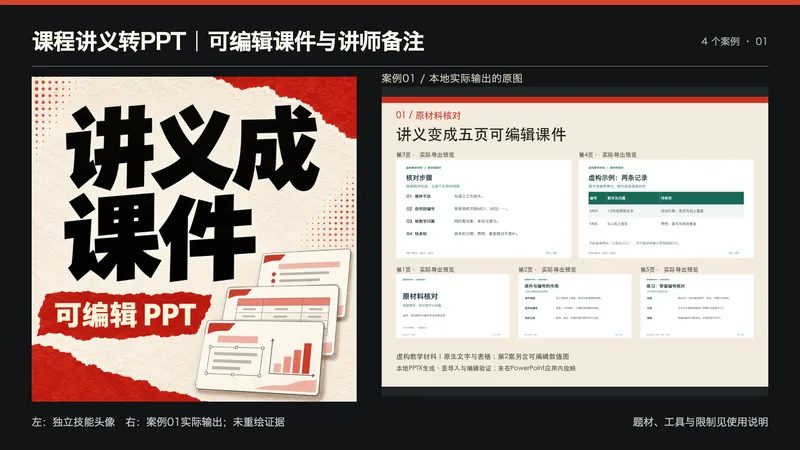
课程讲义转PPT|可编辑课件与讲师备注
适合有课程讲义、培训笔记,需要整理授课演示的讲师与创作者。 提供:讲义、学员基础、学习目标、时长、总页数和视觉参考;没有数值时不会编造统计图,新增练习注明教学设计。 处理:材料编号与事实核对、教学页序、每页内容和讲师备注、原生对象排版、PPTX导出和检查。文字保留为文本框,表格为原生单元,数值图使用可编辑图表;插画只作辅助,不用整页截图冒充课件。 交付:真正可编辑PPTX、讲师备注与使用说明;环境支持时附全页预览。没有PPTX导出能力会明确未完成,不以纯大纲或图片代替。 使用:发送讲义并说明要讲给谁、总页数与时长;核对材料映射与练习,再下载PPTX在授课软件中确认字体、备注和放映。 依赖:文字模型(推荐GPT)和支持原生对象及PPTX导出的工具;本地四案例用Codex的Artifact Tool运行环境制作,并验证文字/表格可单独编辑,第二案例还验证图表数据与嵌入工作簿。该本地运行库不会随技能包分发;YouMind需要其自身可用的可编辑幻灯片导出能力,未追加平台运行测试或验证模型持久绑定。不保证任意环境直接具备该工具。 四张展示图来自四份本地真实PPTX的全页渲染,每份5页、虚构教学材料;未在PowerPoint应用内放映,跨应用和接收方字体兼容需要再确认。不承诺学习效果或收益,199积分售价不含Office订阅、平台模型费或其他服务。 展示说明:首张为独立技能头像与案例01实际输出的并排排版,用于横向缩略展示;不是新增案例,也未让生图模型重绘证据。其余三张对应案例02—04。
Lesson Prep Script V1.0
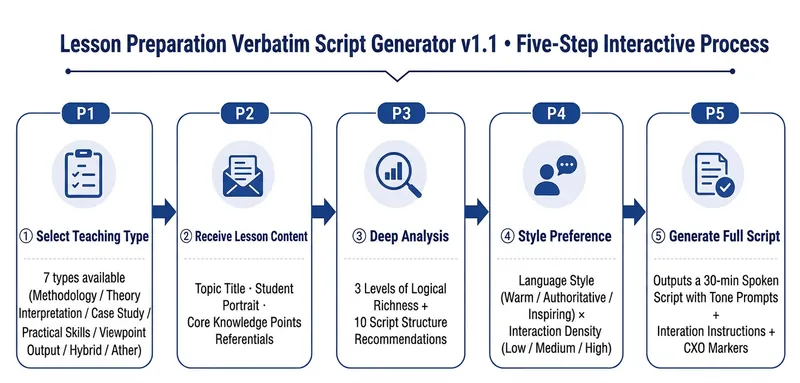
Helps instructors/knowledge IPs directly turn lesson preparation topics into a ready-to-use 30-minute spoken-word script—just pick it up and read, not secondary prompts. What it solves Traditional lesson preparation requires instructors to go through "ideation → break into modules → write script → mark pacing → design interactions", which is time-consuming and easy to miss details. This Skill compresses this process into a 5-step interaction. Instructors only need to provide the topic and key knowledge points, and the rest is automated. Core capabilities ① Five-step structured interaction: Select lesson type → Receive preparation content → Deep analysis with option presentation → Ask for style preference → Directly generate a complete spoken-word script. Each step waits for user confirmation before proceeding. ② CXO three-dimensional teaching verification: Each module is annotated with teaching dimensions — C (Content/Knowledge), X (Experience/Practice), O (Objective/Output), ensuring full coverage throughout. ③ Spoken-word script template: Each segment follows the framework of Hook → Key Point → Structure → Call to Action. The structure supports four modes: reason, method, situation/reaction, and chronological order. ④ Complete output includes: 7 modules totaling approximately 7,900 words of spoken text + tone cues (【Pause 2 seconds】【Emphasis】) + audience interaction instructions + CXO paragraph annotations + full statistics. ⑤ Seven-dimensional quality check: Word count deviation / Spoken style / Template completeness / CXO coverage / Logical coherence / Pacing / Reusability — each dimension is checked, and if any fails, it is corrected and regenerated.
Information
- Version
- v2
- Last updated
- Runtime credits
- Usage-based
- Models
- Auto
- Use cases
- Writing & contentLearning & education
- What you get
- Document
