
Watermark Remover
Remove photo watermarks and restore the view
Watermark Remover
Remove photo watermarks and restore the view
Showcase
Description
Upload a watermarked photo, indicate the watermark location, or let me find it automatically. I will determine the watermark type (corner logos, centered translucent text, tiled text, camera date stamps, platform banners, etc.). Croppable items are cropped directly with zero redraw and lossless quality. Items in the middle are repainted locally, matching grain, sharpness, and lighting to the original image, followed by 100% magnified quality checks. The default output is a clean finished image at original size and aspect ratio without secondary compression or new watermarks. You can also request a before/after comparison along with a brief delivery note detailing each watermark's status and limits, without misrepresenting reduction as complete removal.
Recommended by
Dancang
Why we love this skill
Uses a professional photo editing workflow to accurately assess watermark types, boundaries, and best strategies. Prioritizes cropping, uses local reconstruction when needed, ensures minimal changes at original size, and includes 100% zoom quality checks.
Best for
Users who need to remove signatures, date stamps, or other self-added watermarks from their own photos.
How to use this Skill
Provide your input
Upload a personal photo and specify the watermark location, or let the system auto-detect it. For copyrighted works or stock previews, obtain authorization first.
Run the Skill
The system determines the watermark type and background complexity, selects cropping, local reconstruction, or reduction, and checks that the repaired area looks natural.
Review your result
Receive a processed photo with the same size and aspect ratio; optionally get a before/after comparison and a short note detailing cleared, reduced, or untouched areas.
Related Skills
View allImage Watermark Remover
After you upload or reference an image, this Skill automatically identifies watermarks in the image, including text, URLs, logos, semitransparent overlays, and repeated tiled marks. It seamlessly fills them with a background that matches the surrounding area while keeping everything else unchanged—the subject, composition, color tone, and aspect ratio. It is suitable for situations where source images contain platform watermarks, copyright marks, or semitransparent overlays and you need a clean version. Supports single or multiple images.
 Image
Old Photo Restoration
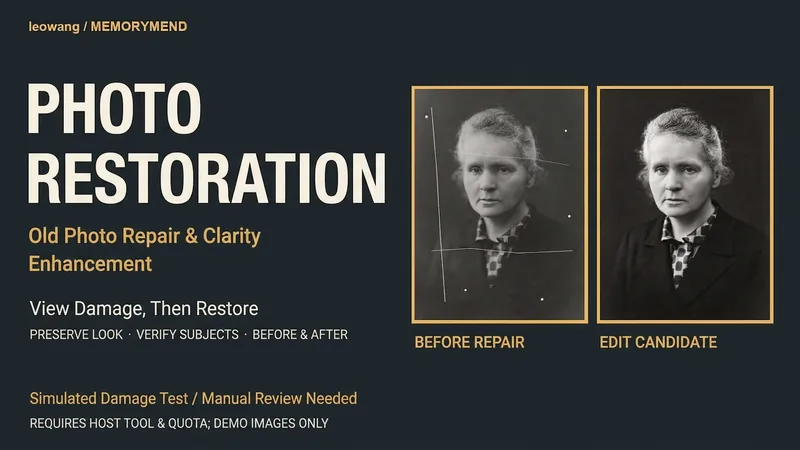
Restore clarity to old photos while preserving their original appearance. Upload a scanned or photographed old photo to first identify scratches, blemishes, fading, and blur, followed by conservative enhancement or generative restoration based on available host tools, while checking the number of people, facial features, clothing, composition, and inscriptions. The original tone is retained by default, with a speculative colorized version noted if requested. A diagnosis and complete prompt are provided when editing tools are unavailable. This workflow was adapted by leowang from an MIT project, with the original license included. An actual editing sample is attached where the input is a public-domain historical portrait with artificially simulated damage, and the clean original image was not sent to the model. Local facial textures may be redrawn with no guarantee of authentic facial feature recovery or that faces remain unaltered. Not test-run within YouMind; tools or model quotas are not included. This candidate removes simulated damage, though fine facial and hair textures show reconstructed changes and require manual review rather than being considered an authentic final version.
 Image
Vintage Photo Restoration and Colorization
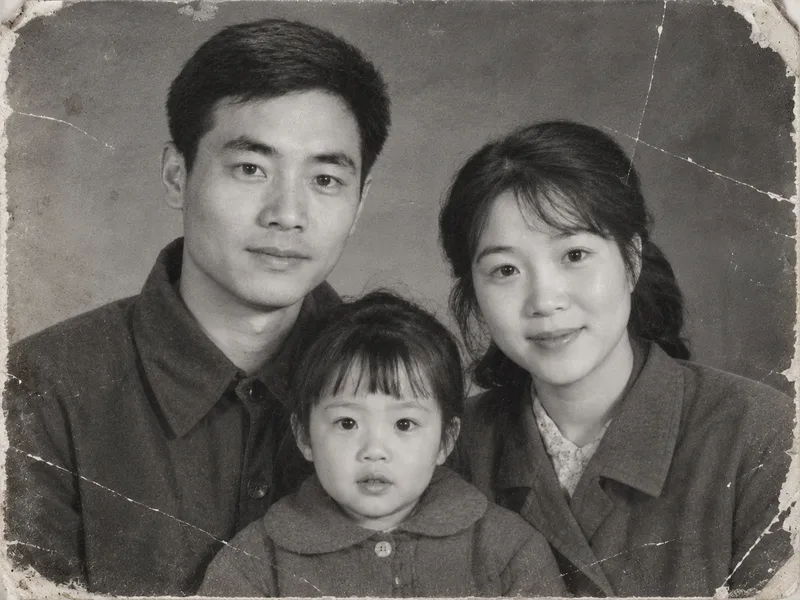
Transform black-and-white, yellowed, blurry, or damaged vintage photos into high-definition, natural color images. Remove scratches, creases, cracks, mold, stains, water damage, noise, and yellowing. Repair damaged corners and missing edges, rebuild clear facial details, hair strands, and clothing textures, and correct exposure and lighting contrast while applying reasonable, period-appropriate coloring based on ethnicity, clothing style, and era. Strictly lock facial structures, facial proportions, expressions, age traits, hairstyles, poses, and positioning of all subjects in the original photo, while keeping the composition, shooting angle, number of people, clothing styles, background objects, and scene layout unchanged. No face-swapping, no heavy beautification, no adding or removing people or objects, and no modern alterations. By default, it uses the image generation model with the highest fidelity to the reference image. The default output is one image per original photo with an aspect ratio matching the original. Clothing colors, background colors, and overall tones can be specified manually. Supports both single-image touch-ups and batch processing for multiple vintage photos.
Information
- Version
- v3
- Last updated
- Runtime credits
- Usage-based
- Models
- Auto
- Use cases
- Images & design
- What you get
- DocumentImage
