
Meta-Prompt Architect
Designs, refines, and optimizes prompts
Meta-Prompt Architect
Designs, refines, and optimizes prompts
Showcase
Description
Transform your ideas into precise, high-performance AI prompts with the Meta-Prompt Architect. This skill goes beyond simple prompt generation, diving deep into your true objectives to craft AI instructions that are clear, executable, and resistant to common pitfalls like hallucination. Whether you're aiming for stable task execution, consistent output formats, or enhanced AI behavior control, this architect meticulously designs prompts that deliver. The Meta-Prompt Architect analyzes your request for underlying intent, identifying critical constraints and potential failure points to build safeguards directly into the prompt structure. It employs a robust framework to define AI roles, specific tasks, and desired output formats, ensuring every instruction is optimized for clarity and stability. You'll receive prompts that are not only ready to use but also include transparent design notes and suggestions for future optimization. Benefit from a rigorous internal review process that assesses clarity, structural completeness, and hallucination risk control, guaranteeing a high-quality prompt tailored to your needs. This skill is ideal for anyone looking to elevate their prompt engineering, from individuals seeking reliable content generation to teams requiring structured, reusable AI task systems for complex workflows.
Related Skills
View all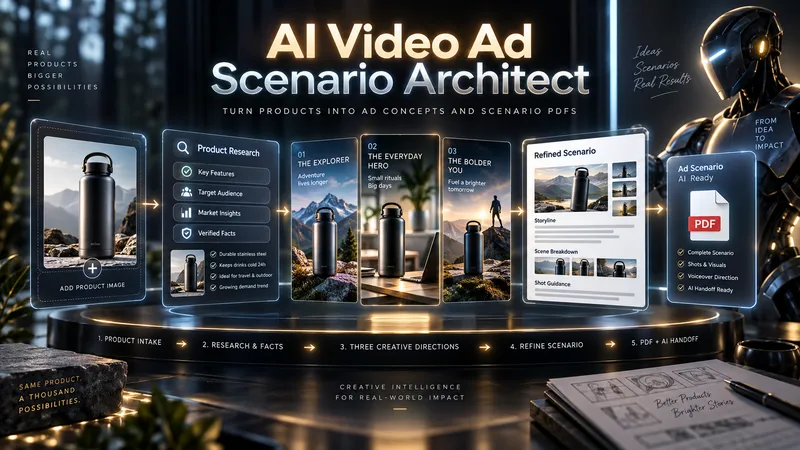
AI Video Ad Scenario Architect
Upload a product image or provide a product/model name. AI Video Ad Scenario Architect researches the product, identifies verified features, and turns them into creative advertising opportunities. The Skill first builds the Product Creative DNA, then uses the Creative Diversity Engine to generate 3 genuinely different ad directions. You can choose one, combine ideas, or introduce your own concept. If you want more control, Collaborative Mode lets you refine the selected direction together with the AI. For identifiable products already on the market, the Skill researches the web, prioritizes official sources, resolves conflicting information, and prevents unsupported technical claims from entering the script. When you upload a product image, Product Identity Lock preserves key visual details such as color, silhouette, logo placement, and distinctive product features for later production stages. After your chosen direction is approved, it is developed into a complete video ad scenario with scene timing, dialogue, visual direction, product visibility, sound design, payoff, and an optional CTA. The final deliverable is a structured PDF. It is not just a readable script: it also includes Verified Sources, Product Identity Lock, Production Context, and a Universal AI Continuation Prompt. You can give the PDF to another capable AI assistant and continue with image generation, image-to-image, image-to-video, voice, sound, and editing planning. You can also pass the same PDF into an optional AI Video Ad Production Workflow for a more advanced production pipeline.
 Image
ImageTactile Ephemera Studio
Transform a rough idea into a premium, art-directed mixed-media image concept. Tactile Ephemera Studio helps you shape a clear visual story before writing prompts. It asks only the questions that matter—your intended format, mood, density, key objects, and preferred image platform—then turns your answers into a cohesive 2.5D paper-and-material collage direction. Receive a complete prompt pack with: A concise creative direction and material plan One detailed, production-ready master prompt Prompt versions tailored for ChatGPT Images, Midjourney, Flux, Ideogram, or your chosen platform Purposeful “Quieter / Curated” and “Denser / Collectible” variations when useful Clear format, ratio, and usage notes Each result is built around tactile paper layers, deckled edges, vellum, ribbons, botanical fragments, antique details, and a controlled visual hierarchy—never generic clutter, glossy 3D, photorealistic tabletop scenes, or accidental AI text. Once you choose a direction, the skill can also create the final image for you.
 Image
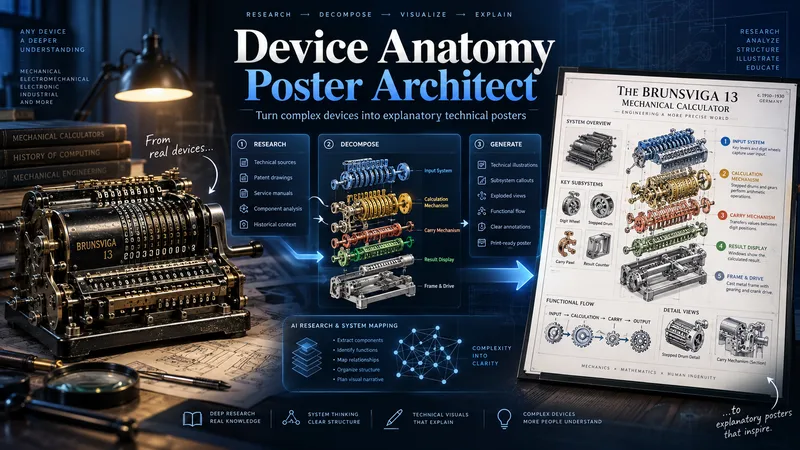
ImageDevice Anatomy Poster Architect
Turn complex machines, tools, and devices into clear, educational technical posters. Provide a device name, model, reference image, cutaway, or technical photo. The Skill first researches the device’s real structure and working principle, then identifies its critical components, functional subsystems, operating sequence, and relevant power, fluid, signal, or material flows. Instead of producing a generic labeled cutaway, it reconstructs the device for teaching: separating dense mechanisms, exposing hidden relationships, organizing subsystems, and adding focused detail views where needed. You receive three genuinely different visual directions: Clean Hierarchical — structured, precise, highly readable engineering infographic. AI Artistic Creative — dramatic, spatial, mechanism-driven technical visualization. Hybrid Technical — premium 3D realism combined with modular engineering-diagram clarity. Each direction comes with its own fully independent, detailed English production prompt. The prompts share the same verified technical foundation but use different compositions, viewpoints, decomposition strategies, and visual storytelling. The workflow and visible poster text follow your language by default. Image-generation prompts are written in English for stronger production reliability. Nothing is generated automatically: review the three directions, choose one or request revisions, then proceed to final poster generation and technical quality validation.
Information
- Version
- v4
- Last updated
- Runtime credits
- Usage-based
- Models
- Auto
