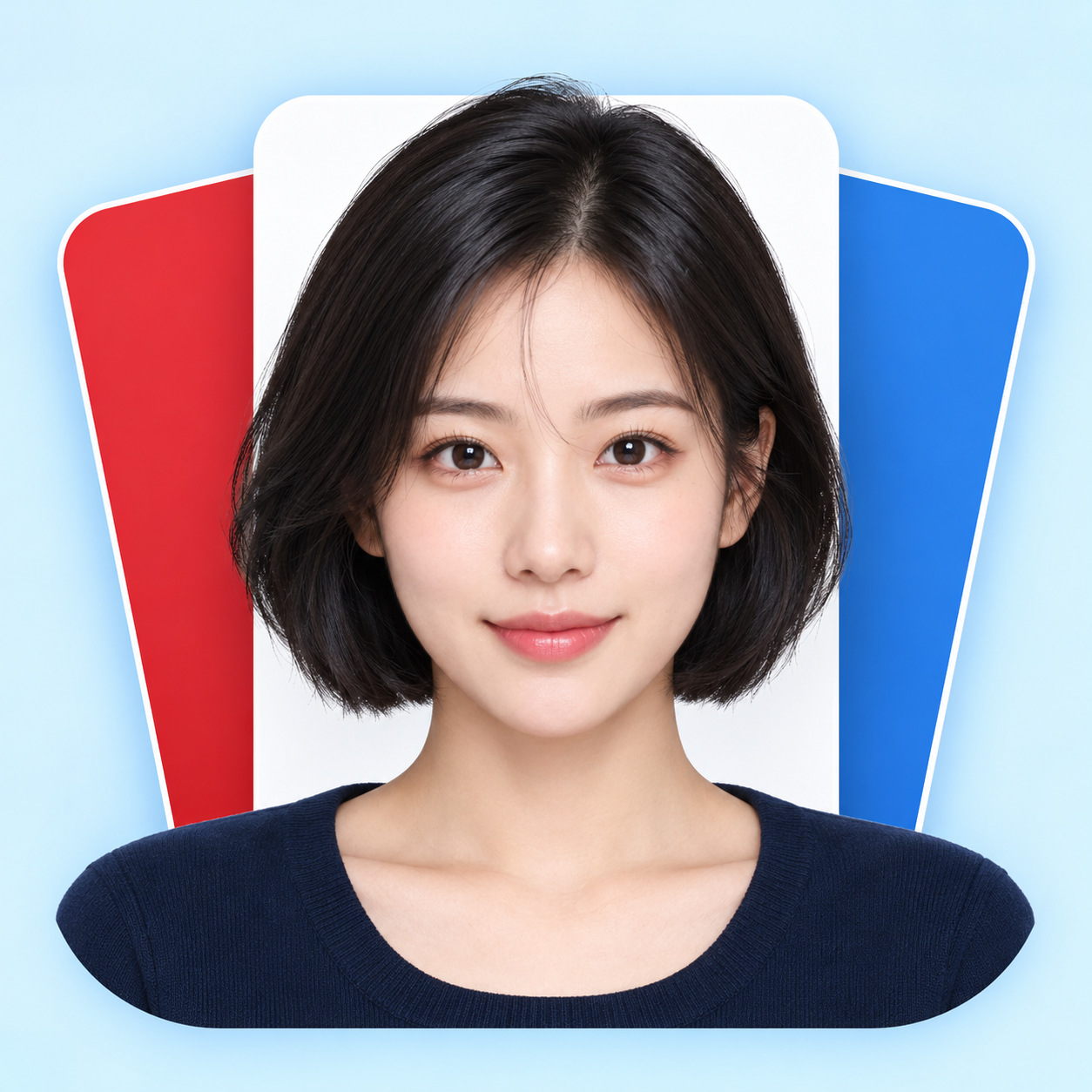
ID Photo Studio
Convert photos to red, blue or white ID portraits
ID Photo Studio
Convert photos to red, blue or white ID portraits
Showcase
Description
Upload a portrait and create a clean, natural ID-style photo with a red, blue or white background, or get all three colors at once. Turn a casual photo into a frontal, evenly lit head-and-shoulders portrait. Keep your facial features, hair, glasses and identifying details. Original clothing is retained by default; request a shirt or jacket when needed. • Pick a red, blue or white background. • Get three matched color versions as separate images. • Specify pixel dimensions or print width and height. • Use Chinese or English. Final portraits are text-free. Try: "Make a blue-background ID photo from my upload. Keep my face and clothes." Or: "Create matching red, blue and white versions. No beauty reshaping."
Recommended by
Dancang
Why we love this skill
Reliably turns ordinary photos into natural, standard ID portraits with red, blue, or white backgrounds, keeping facial features and clothing intact.
Best for
Anyone who needs to turn a portrait photo into a natural, clean ID photo.
How to use this Skill
Provide your input
Upload a clear portrait photo and choose a red, blue, or white background. You can also specify the size, clothing, and whether you want all three colors.
Run the Skill
Generates a clean, frontal, evenly lit ID-style portrait with a solid background, retaining the original clothing and personal features by default.
Review your result
Receive one or more text-free ID photos. Three-color versions are output separately, with composition and dimensions adjusted as requested.
Related Skills
View all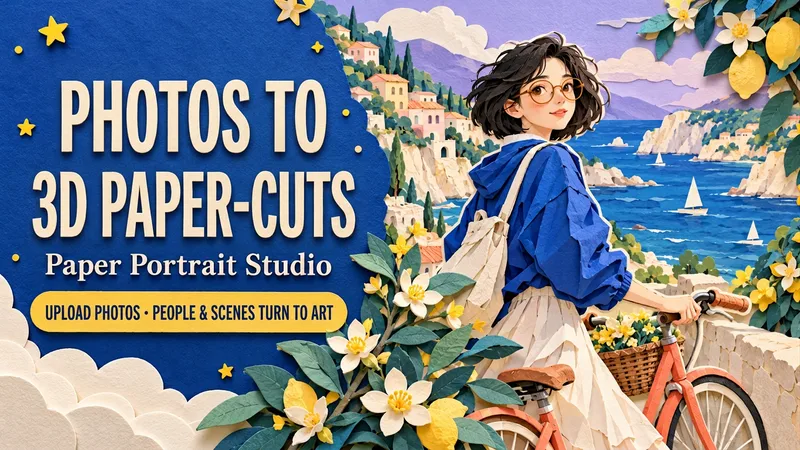 Image
Paper Portrait Studio
Upload a portrait, a couple photo or a pet photo. Transform both the subject and the setting into a dimensional cut-paper scene, with layered hair and clothes, crisp ivory edges, tactile cardstock and soft cast shadows. Choose Coastal Ride, Rainy Bookshop or Greenhouse Companion—or create your own setting. Keep recognizable hair, glasses, outfit colors and pet markings while customizing the action, palette, background and framing. Create solo portraits, shared memories or a paper garden for your pet. One text-free 3:4 portrait by default. Use English or Chinese, add a short title, or request matching separate language editions. Made for profile art, keepsake images, wallpapers and social posts. Try: “Use my photo for a seaside paper scene. Keep my short hair and glasses. Cobalt blue and coral, walking a bicycle. No text. Generate it.”
 Image
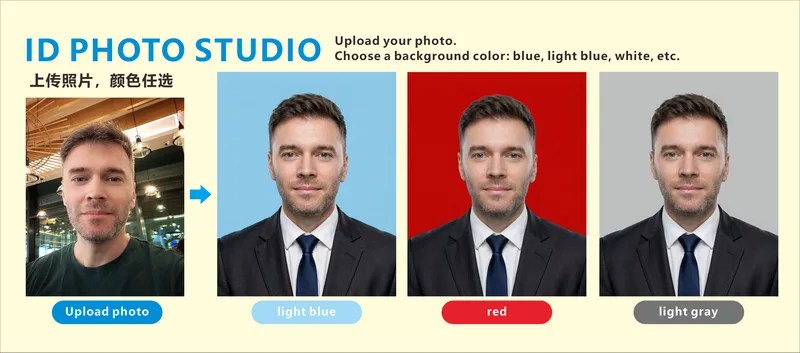
Passport Ready
ID Photo Studio: turn one casual snapshot into a formal ID / passport photo on any background — white, off-white, light grey, cream, blue, red, deep red or grey. Automatically replaces casual clothing with a dark tailored jacket over a white shirt, applies standard ID pose and framing, and keeps the face strictly identical to the original. Triggers when the user says "ID photo", "passport photo", "visa photo", "make this an ID photo", "white background photo", "blue background ID", "2x2 photo", "35x45 photo", "resume photo", "work badge photo", "change the background", "strip the background" and similar. Core hard rules: cleanup allowed, face changes forbidden (it has to pass official biometric checks); choose the background before the outfit (same-colour collisions are the number one failure); eyes near the upper-third line + level shoulders + even headroom; pure seamless background with no cast shadow. Defaults to 3:4 portrait. Prefers Nano Banana 2.1 (strongest identity preservation); never Midjourney. Can deliver a white / blue / red set in one run.
 Image
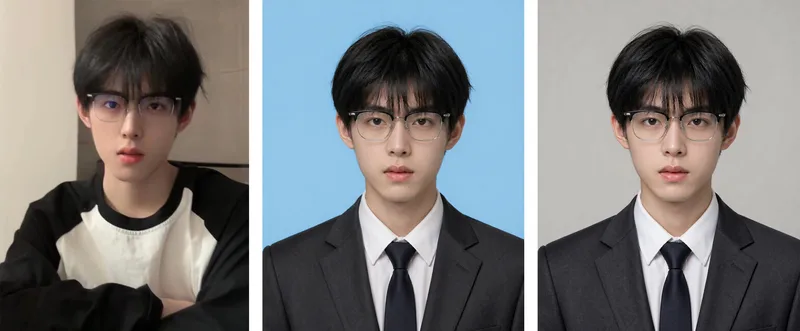
ID Photo Studio
ID Photo Studio: Upload a casual photo to create a formal ID photo with any background color—white, blue, red, dark red, or gray. It automatically changes casual clothing to a dark suit and white shirt, uses standard ID photo positioning and composition, and keeps your face exactly as it appears in the original photo. Trigger it when users say things like “ID photo,” “make an ID photo,” “white-background ID photo,” “blue-background 2-inch photo,” “resume photo,” “passport photo,” “turn this into an ID photo,” “change the background color,” or “1-inch/2-inch photo.” Core rules: removing blemishes is allowed, but changing facial features is not (for official verification); choose the background color before the clothing (to avoid color clashes); place the eyes on the upper-third line, keep both shoulders level, leave space above the head, and use a clean background without shadows. Default format is vertical 3:4, with customization available. Use Nano Banana 2.1 by default for the strongest identity preservation; do not use Midjourney. Supports generating multiple colors, including white, blue, and red, in one run.
Information
- Version
- v3
- Last updated
- Runtime credits
- Usage-based
- Models
- Auto
- Use cases
- Images & design
- What you get
- Image
- Visual styles
- Photorealistic
