Geometric Photo Collage
Gray paper collage posters from photos
Geometric Photo Collage
Gray paper collage posters from photos
Showcase
Description
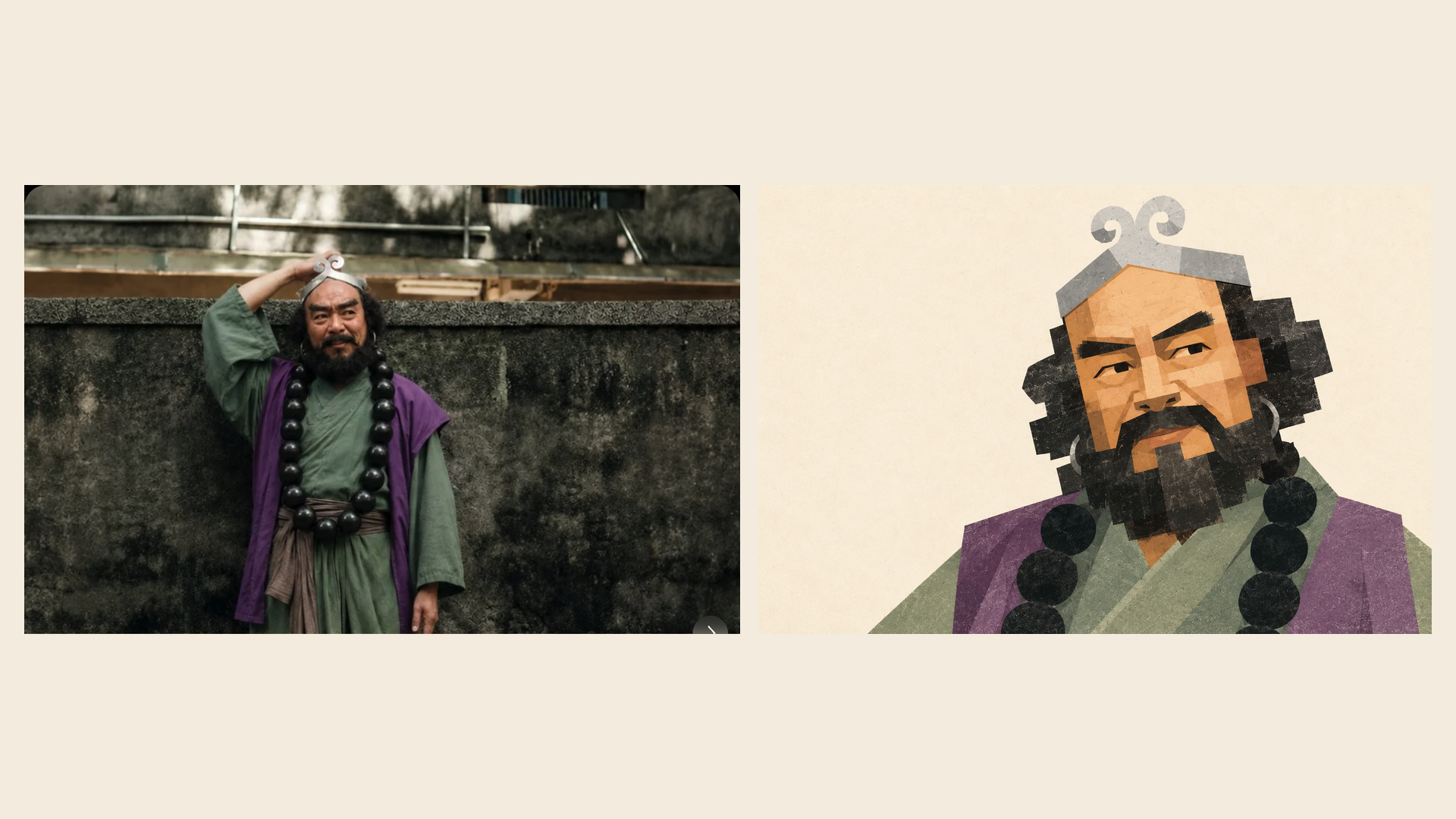
Turn photos of people, pets, buildings, or landscapes into geometric collage illustrations with asymmetrical forms, offset paper pieces, a grayscale palette, and fine printed grain. Provide a subject photo and optionally add a target style image. The photo determines the subject’s identity and recognizable features, while the reference guides the styling, composition, negative space, and paper layering. First create a standalone illustration, then optionally make a 3:4 comparison poster with the original photo on top and the illustration below. No text by default; multiple photos are rendered separately. The result can be refined based on actual comparisons, including facial proportions, hair and beard structure, building hierarchy, the negative space within bridges, and the paper texture. This helps avoid generic geometric cartoons and three-dimensional block effects. Version 1.1.0. Three sets of original photos and corresponding target images have been calibrated locally for reference; city details may still appear overly fragmented or too three-dimensional. Cross-subject performance and image generation on the YouMind platform still require practical testing, so exact reproduction is not guaranteed. Image generation capabilities, operating costs, and precise collage alignment depend on the environment used.
Recommended by
Dancang
Why we love this skill
Rebuilds key identifying features into layered geometric paper-cut art and combines the original with the result in a precise top-and-bottom poster. It goes beyond a grayscale style by carefully handling framing, shape roles, color areas, and low-contrast print texture.
Best for
Content creators who want to turn photos into flat paper-collage visuals and create comparison posters with the original photo and illustration.
How to use this Skill
Provide your input
Provide a photo of a person, pet, building, or landscape. You may add a style reference and specify whether you need a comparison poster, a particular aspect ratio, or text.
Run the Skill
Preserve the subject’s recognizable features, then rework the layout, paper shapes, grayscale palette, and print texture based on the reference. The original photo and illustration can be combined into a comparison poster.
Review your result
Get a standalone geometric paper collage illustration, or a comparison poster with the original photo on top and the illustration below. No text by default.
Related Skills
View all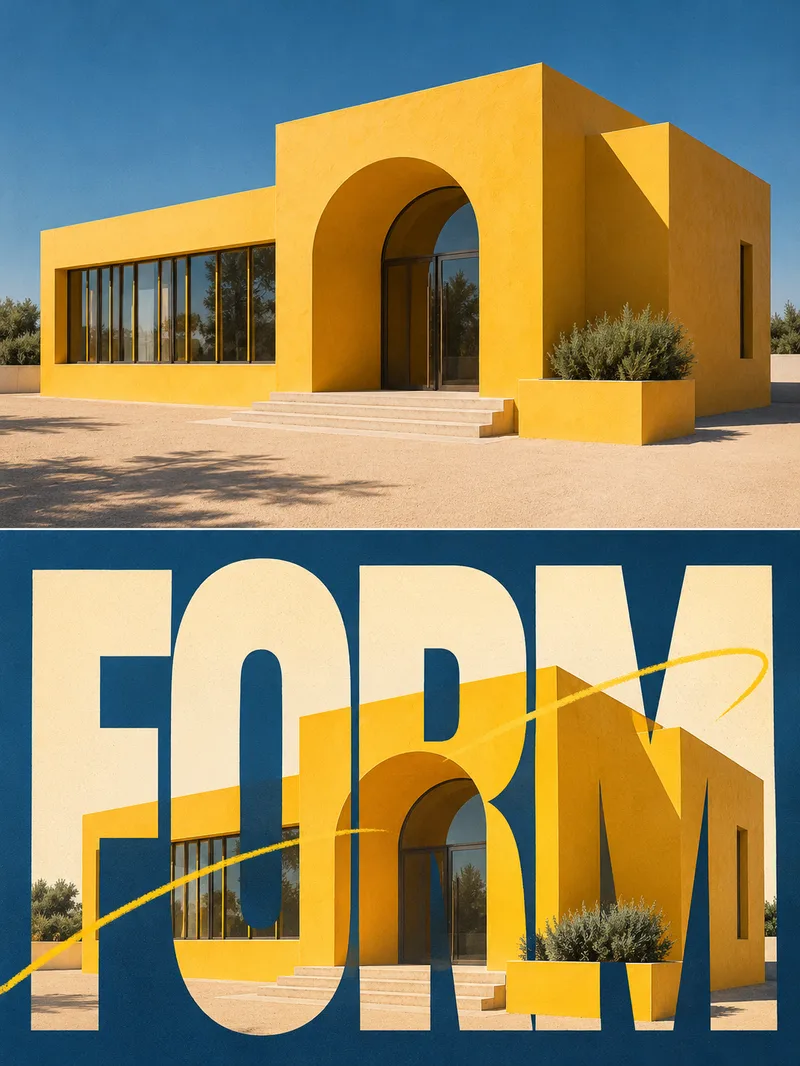 Image
Retro Typography Poster
Ideal for creators making social media graphics, sports themes, and editorial posters. Provide a text theme or an accessible photo with a short English word, color scheme, and purpose. Subjects can include people, pets, or architecture. The skill first verifies the subject and props, then plans a 3:4 dual-panel layout: natural photography in the upper frame, and huge, condensed bold typography organizing the lower frame. Photographic textures are woven into the letters, with parts of the subject extending in front of the text. It pairs warm white paper textures, a primary background color, and subtle motion lines, then uses actual image tools to generate and review each item. Delivers an actual poster image, reproducible title, and verification notes, with full prompts included when needed. Usage: Specify the theme, short word, and aspect ratio; review the subject, props, spelling, and occlusion, then request specific edits by part. Without image tools, the generation remains incomplete, and prompts are not passed off as finished images. Four example displays show fictional AI cases generated locally following the final skill workflow on November 12, 2026: tennis PLAY, golden retriever GO, architecture FORM, and dancer MOVE. These are not real photos, actual architectural records, or client deliverables. All four examples feature photo-text weaving and subject layering, where letter masks partially obscure bodies or structures, with variations in local poses and textures, and differing crops for the two tennis panels. They are not lossless photo edits. The avatar reference was separately generated from the golden retriever case, and the square render includes a Chinese title rather than serving as a fifth independent case. GPT is recommended for text planning, while image generation or editing tools available in the current environment are required for final image output. Locally uses the built-in image_gen without a returned model ID, and does not claim integration with Image2. Uploaded photo editing and YouMind execution have not been formally tested, so exact identity, product structure, text, or cross-panel consistency are not guaranteed. PSD or vector source files are not delivered. The 299 credits cover the skill installation fee only and exclude platform model and third-party service fees.
 Image
Photo Memory Poster
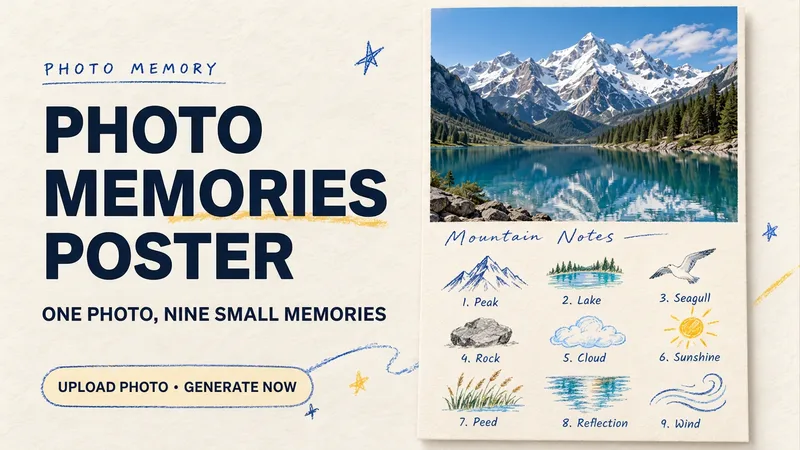
Some photos in your album deserve to be remembered with care. Upload an original photo of a trip, a coffee break, a pet, or an everyday moment to turn it into a textured memory poster with paper grain and drawn strokes: the top half preserves the real moment, while the bottom half illustrates the details worth remembering as nine small crayon-and-colored-pencil icons. Each photo is output separately in a 3:4 portrait layout, with no multi-photo collage. The top and bottom each take up half the page, with a loose nine-grid layout, short handwritten title, and small caption, creating the feel of a private visual diary. Colors adapt to the photo instead of using a fixed scenic template. Just upload a photo and optionally add a title. The Skill extracts memorable details, creates the image, and checks the subject, nine icons, and actual layout divisions. When an image tool with reference-image support is available, it can generate the image directly. Strict layout separation and fidelity to the original photo also depend on the editing and assembly capabilities of the runtime environment; if the requirements cannot be met, this will be explained. Suitable for travel keepsakes, pet collections, lifestyle journaling, and social sharing. The showcase images are demonstrations using locally created original AI scenes, not examples from real users; on YouMind, the Skill has been trialed with input guidance for missing photos, while complete image generation still awaits testing. Image-generation usage is subject to the current platform.
 Image
Torn Paper Dotted Photo Album
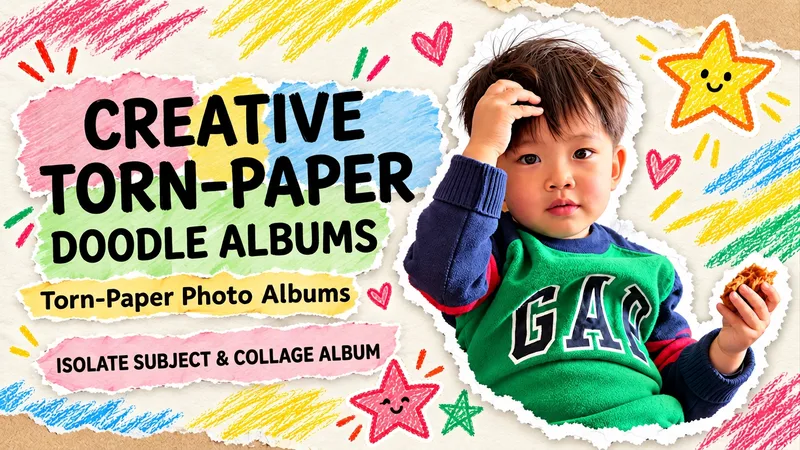
Upload a photo to turn people or pets into scrapbook stars, complete with torn paper edges, handwritten doodles, and vintage paper textures. Upload an original photo, and the subject (whether a person, pet, or main object) is automatically extracted with the original background removed. Group photos retain all individuals by default. Recognizable facial features, hairstyles, clothing, poses, and handheld items are kept, surrounded by natural white torn-paper furry edges, a cream-colored paper background, colored crayon stars, and handwritten short phrases. Generates a 3:4 vertical album image by default. Supports text-free versions, short Chinese phrases, fewer doodles, color adjustments, and landscape or portrait aspect ratios. Text-free means no added album text, though original clothing text is preserved. When parts of the body are obscured in the original photo, an appropriate half-body composition is used without inventing hidden limbs. Full-photo mode is available when explicitly requested. Great for everyday portraits, friend group photos, pet memories, and journal illustrations. Image editing may introduce subtle changes to faces or other details and does not guarantee 100% facial replication. The final image is checked against the original photo. This Skill is free to install. Image generation or editing quota consumption is subject to platform and model terms. Displayed examples show photo editing effects; complete image generation within YouMind has not been fully tested yet.
Information
- Version
- v3
- Last updated
- Runtime credits
- Usage-based
- Models
- Auto
- Use cases
- Images & design
- What you get
- Image
- Visual styles
- CollageFlatPaper art
