Instant Report Slides
Turn work notes into editable Slides
Instant Report Slides
Turn work notes into editable Slides
Showcase

妇科疾病知识 · 关爱女性妇科健康
妇科疾病知识 · 关爱女性妇科健康
妇科疾病知识 · 关爱女性妇科健康
妇科疾病知识 · 关爱女性妇科健康
Description
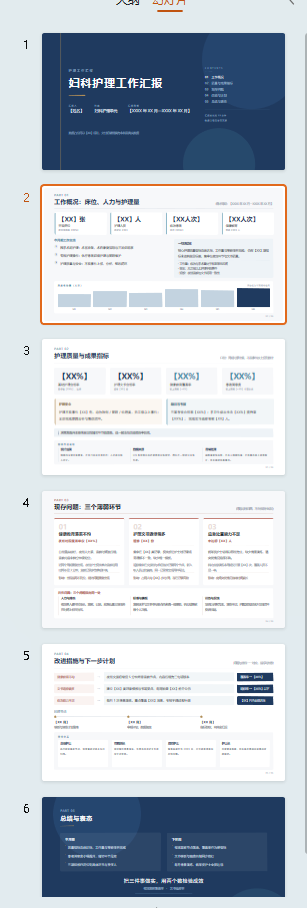
Work report presentation generator: input a report title or raw materials to first receive a paginated script (each page includes a title, body text, speaker notes, and image suggestions), then directly generate a .pptx file. Features 6 page types (cover, overview, metrics, issues, improvements, summary), a business blue theme, auto-mode placeholders, and a content organization mode that never invents data. Triggered when users say "make a work report presentation", "generate report Slides", "performance review Slides", "turn report script into Slides", "nursing work report", "year-end summary Slides", or "quarterly report pptx". Red lines: never fabricate personal data, keep body text concise, use standard terminology for medical and public service roles, and ensure every page passes layout and whitespace checks.
Best for
Professionals and teams who need to create performance reviews, quarterly updates, or end-of-year summary presentations.
How to use this Skill
Provide your input
Provide your presentation title, topic, or raw work materials, along with any preferences for page count, audience, and style.
Run the Skill
Organizes your materials into a paginated structure, generates slide text, speaker notes, and image suggestions, and creates an editable presentation.
Review your result
Receive an openable, editable work presentation complete with a checklist of placeholder items to replace.
Related Skills
View all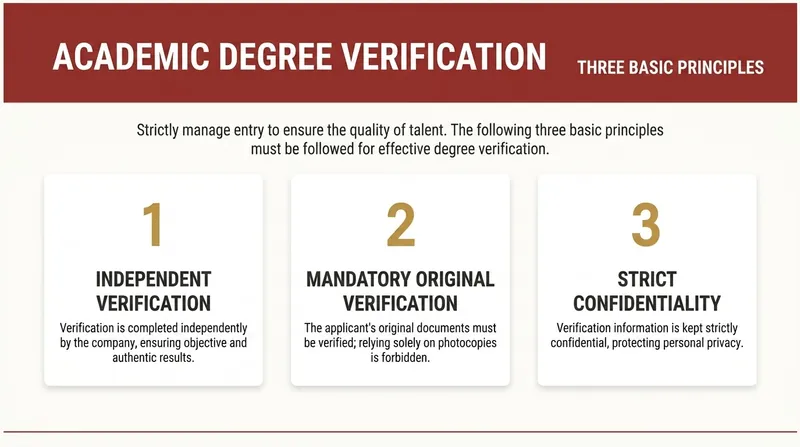 Slides
Work Report Slides
Automatically convert work report text into editable Slides with a minimalist business report style. Supports two modes: structured input and free-text speech drafts. First confirm the structure, then generate page by page, outputting only one slide at a time. Example: Input a slide speech script to output multiple Slide versions. No exaggeration, no flashy techniques—consistent, high-quality output that makes it easy to produce a series of uniformly styled Slide versions. Example image generation prompt: In the current complex employment environment, resume padding and false academic credentials are increasingly common. Verifying the authenticity of academic degrees is a necessary compliance procedure for hiring, serving as the bottom line for guarding the entry gate and protecting talent quality. This is not only responsible for the company but also a reflection of the professionalism of every HR worker. So, how to do a good job of academic credential verification? First, we must keep in mind three basic verification principles: First, independent verification, using official public channels; second, verify original documents, focusing on authenticity of anti-counterfeiting features, embossed seals, and official stamps; third, strict confidentiality, compare and archive verification information.
 Slides
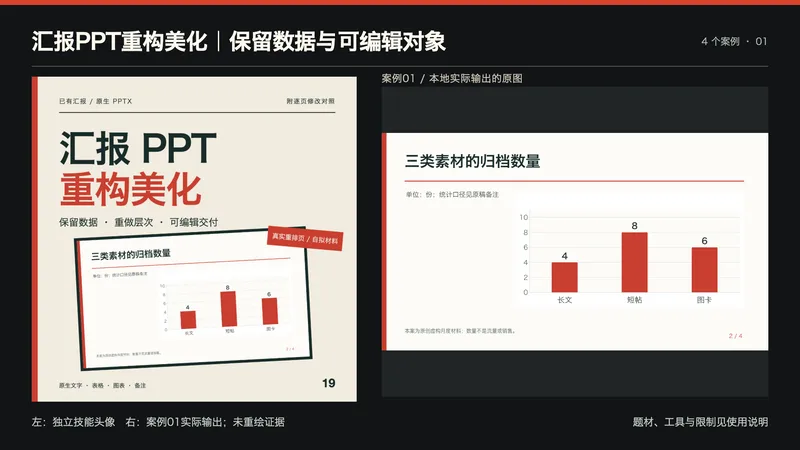
汇报PPT重构美化|保留数据与可编辑对象
适合月度汇报、项目复盘、年度总结与方案提案。提供已有PPTX、汇报对象、需要保留的品牌/尺寸/字体、允许修改范围和视觉参考;先看完整原稿再重排页面。 流程:提取文字、表格、原生图表和备注清单,逐页说明问题与改法;在副本中调整信息层次、对齐、字号、图表表格样式与页面节奏,保留数据口径和未知项;输出后重新读取、渲染并逐页检查。输入是PPTX;图片/PDF还原属于其他任务。 交付:可编辑PPTX、逐页修改对照、事实/数据/备注核对表、完整页预览和使用说明。不会把正文、表格和图表烘焙成整页图;未经授权不改数据、删页或把计划写成完成。专用编辑探针另存,正式汇报与测试副本明确区分。 包内Python3标准库清单脚本只负责OOXML事实取证,不是完整编辑器;工作簿保留助手仅在源与候选图表数据/公式唯一匹配时保留源工作簿原字节,不能修复任意PPT。核心重排仍需要真实PPTX原生编辑和渲染工具。使用可用文字模型(建议GPT)组织修改;精确型号以环境为准,不绑定图像模型。YouMind是否具备本地工具需按实际能力核验,不能仅因导入Skill就保证能运行编辑器。 四个本地真实执行案例都是本次新建的虚构原稿:月度内容、资料整理项目、年度归档、工时提案。每份4页,共16页,原生文字/表格/图表/备注完整保留;编辑测试实际修改标题、表格单元格和图表首项数值,另存并重开核对。源数据与原有工作簿保留检查覆盖这些案例,不等于任意复杂PPT零损失保证。 四展示为最终PPTX重新导入后渲染的代表页,未重绘证据;完整原稿、逐页前后图与16页正式稿本地保留。头像为原创文字排版结合真实案例页,未冒称生图API或客户业绩。 本地用Artifact Tool完成原生编辑与重开渲染;未在PowerPoint、Keynote或Google Slides应用内打开验证,字体缺失可能改变换行。复杂动画、宏、SmartArt/OLE、外链公式、图片文字及特殊模板须单独检查,工具丢失必需对象时应停止并说明。未消耗YouMind积分测试,未确认平台模型绑定;199积分不含模型或第三方工具费。不承诺审核、任意应用兼容、销量、融资、效率或收益提升。 展示说明:首张为独立技能头像与案例01实际输出的并排排版,用于横向缩略展示;不是新增案例,也未让生图模型重绘证据。其余三张对应案例02—04。
 Slides
White Space | Minimalist PPT
"White Space" is a Skill specifically designed to generate minimalist research report slides. Upload Word, PDF, web pages, data tables, research materials, or old PPTs, and it will convert them into an editable PPT with a cool white background, black-gray text, generous white space, thin line separators, and a touch of deep red accents. It automatically completes: · Reading and organizing raw materials · Extracting core conclusions from the report · Building a complete presentation storyline · Generating conclusion-style titles with one point per page · Redrawing native editable data charts · Unifying fonts, colors, margins, and page grids · Controlling text and chart density per page · Adding page numbers, dates, and data sources · Outputting actually editable Slides By default, it uses a 16:9 aspect ratio, with visual features including: · Cool white background · Black-gray text · Single deep red accent color · All left-aligned · Generous white space · Minimalist architectural geometry · At most two fonts throughout · Charts and shapes are fully editable Suitable for industry research, market analysis, business presentations, strategic plans, course reports, graduation defenses, and management reports. Simply upload your materials and describe the presentation scenario to generate a clean, professional, directly editable and presentable minimalist PPT.
Information
- Version
- v2
- Last updated
- Runtime credits
- Usage-based
- Models
- Auto
- Use cases
- Presentations & reporting
- What you get
- Slides
- Visual styles
- Corporate
