MIT Winston Speech Writer V1.0
MIT Winston Speech Writer V1.0
Showcase
Description
Based on MIT Professor Patrick Winston's speech methodology, this tool generates structured speech scripts in two steps according to the user-specified topic, duration, audience profile, and scenario type. It first outputs a structure outline for confirmation, then generates a complete word-for-word script and writes it to a document. It automatically adapts time allocation, cycle count, and tone. Suitable for academic defenses, conference reports, product launches, investment roadshows, internal presentations, public speaking, and other custom occasions.
Recommended by
nene@YouMind
Why we love this skill
This skill is built on MIT Professor Winston's speech methodology to help you create engaging speeches. It not only intelligently plans speech structure and time allocation based on your topic, audience, and duration, but also generates a conversational, impactful word-for-word script to ensure your message is effectively delivered and leaves a lasting impression.
Related Skills
View all
Speech Draft Generator V2.0
Professional speech drafting capability covering 6 major scenarios: graduation speeches, work reports, product launches, wedding toasts, training lectures, and impromptu speeches. Includes a 4-segment golden structure (opening-argument-climax-ending), 5 types of opening templates (story/data/question/golden quote/scenario), 5 types of closing templates (echo/call to action/blessing/golden quote/vision), rhythm control, pausing techniques, body language suggestions, and a pitfall avoidance guide. Suitable for: (1) speeches at important occasions, (2) business meeting presentations, (3) academic reports, (4) personal addresses. Trigger keywords: speech draft, address, speech, graduation speech, work report, wedding toast, impromptu speech, TED, speech opening, speech closing, golden quotes.
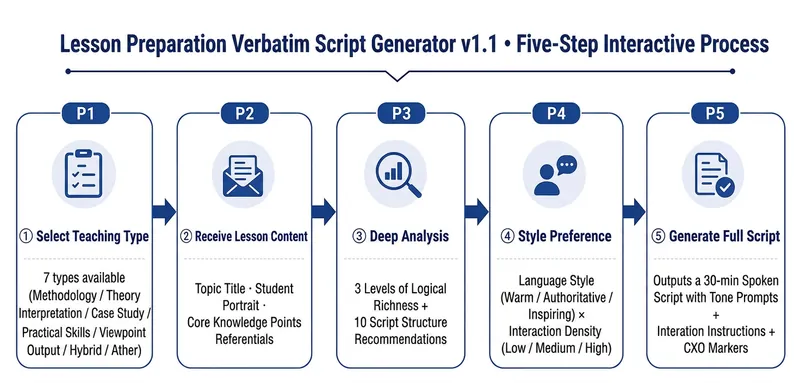
Lesson Prep Script V1.0
Helps instructors/knowledge IPs directly turn lesson preparation topics into a ready-to-use 30-minute spoken-word script—just pick it up and read, not secondary prompts. What it solves Traditional lesson preparation requires instructors to go through "ideation → break into modules → write script → mark pacing → design interactions", which is time-consuming and easy to miss details. This Skill compresses this process into a 5-step interaction. Instructors only need to provide the topic and key knowledge points, and the rest is automated. Core capabilities ① Five-step structured interaction: Select lesson type → Receive preparation content → Deep analysis with option presentation → Ask for style preference → Directly generate a complete spoken-word script. Each step waits for user confirmation before proceeding. ② CXO three-dimensional teaching verification: Each module is annotated with teaching dimensions — C (Content/Knowledge), X (Experience/Practice), O (Objective/Output), ensuring full coverage throughout. ③ Spoken-word script template: Each segment follows the framework of Hook → Key Point → Structure → Call to Action. The structure supports four modes: reason, method, situation/reaction, and chronological order. ④ Complete output includes: 7 modules totaling approximately 7,900 words of spoken text + tone cues (【Pause 2 seconds】【Emphasis】) + audience interaction instructions + CXO paragraph annotations + full statistics. ⑤ Seven-dimensional quality check: Word count deviation / Spoken style / Template completeness / CXO coverage / Logical coherence / Pacing / Reusability — each dimension is checked, and if any fails, it is corrected and regenerated.
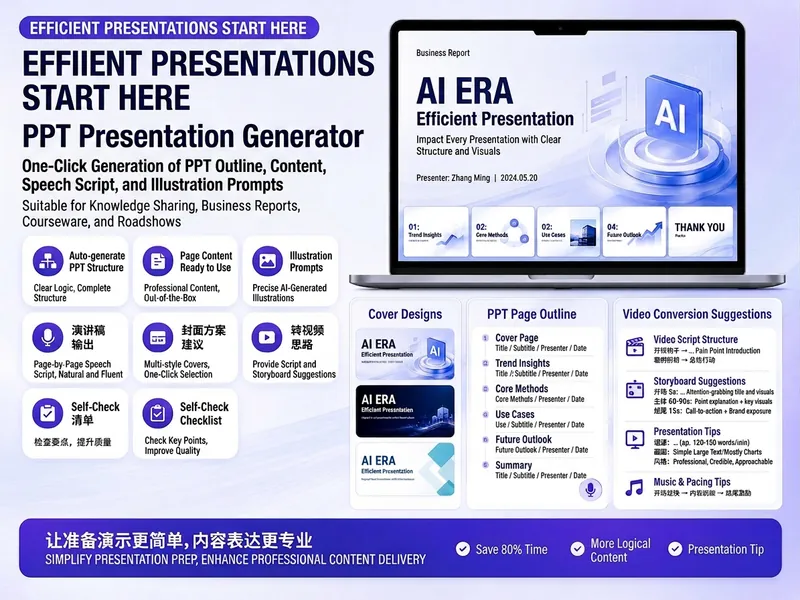
Trending PPT Slides Generator
Easily create engaging PPT Slides for knowledge sharing, business reports, course teaching, product introductions, or roadshows. Simply provide the topic, purpose, audience, duration, number of slides, or style preferences to get a customized PPT content plan. This skill provides a detailed PPT slides plan, including the PPT title, one-sentence theme, audience analysis, slide structure, titles for each slide, body text, and key points for your speech. It also offers specific visual suggestions and image prompts for each slide, even including cover design keywords to help you create a visually cohesive and attractive presentation. If you need to convert your PPT to a short video, this skill can also provide professional video conversion suggestions, covering key elements like rhythm, subtitles, voiceover, camera movements, and cover art to help your content perform well on multiple platforms. Say goodbye to vague outlines; every slide's content is ready to copy and use, ensuring your presentation is both substantive and impressive.
Information
- Version
- v1
- Last updated
- Runtime credits
- Usage-based
- Models
- Claude Opus 4.6
