
Showcase
Description
Your credits should go toward judgment, while external AI handles the heavy lifting. In YouMind, this Skill packages an in-progress content task into a ready-to-copy handoff brief that you can give to external AI tools such as ChatGPT, Claude, Gemini, and Cursor to handle the most credit-intensive work, including expansion, rewriting, batch organization, and drafting. Then bring the results back to the Board for review and archiving, completing the full loop: “package and hand off → external execution → retrieve and review.” It automatically recognizes three entry points: Direction A, “Outsource to save credits”—package your source materials and output specifications so external AI can handle token-intensive work; Direction B, “Relay and deepen”—send YouMind’s existing work, along with its versions, decisions, and do-not-change list, to continue refining it; and “Retrieve and review”—when the results return, save them as a new version while preserving the original, spot-check them against the return contract and review checklist, and produce a review report without rereading the entire piece. It includes a four-category fact-boundary system and direction-specific return contracts to prevent external AI from fabricating facts or changing finalized content without authorization. Say “package and hand off,” “outsource to save credits,” “give this to another AI to do/continue,” “switch AI and continue,” “the results are back—help me review them,” or “take this in” to trigger it.
Related Skills
View all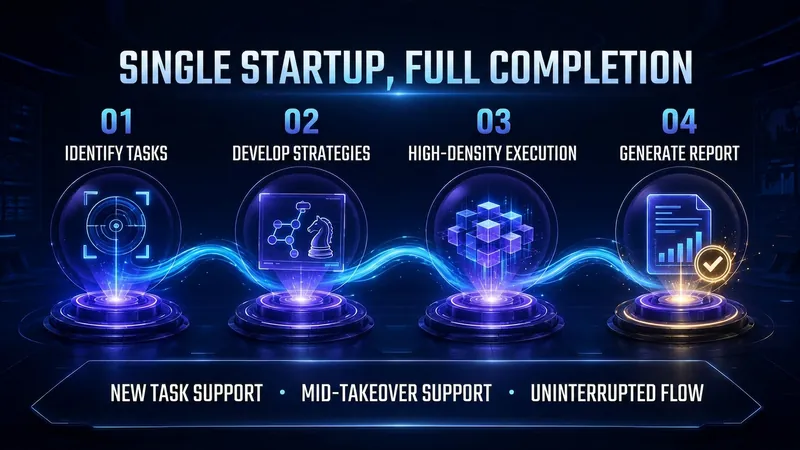
Token Actuary
Have you ever calculated how much you pay each month for AI's "fluff"? "Okay, let me help you..." "First, let's review your question..." "In summary, here's what we covered..." You don't even glance at these, but every word eats your tokens. 💸 I built a Skill called "Token Actuary" to fix this: ✅ Automatically identifies task type and applies token-saving strategies ✅ Cuts redundancy without cutting depth—quality stays 100% ✅ Generates an itemized bill: "This time saved 40%+", clear and transparent For heavy AI users, install it once and save the cost of a few bubble teas. A fact most overlook: a significant portion of what you pay for AI isn't for the "answer" — it's for "process language": opening pleasantries, restating the question, transitional filler, closing summaries. These add no value, but every token costs you. I've packaged the entire methodology of information density optimization into a Skill: "Token Actuary". Its logic is straightforward: after identifying the task type, it automatically matches token-saving strategies, executes tasks with maximum information density, eliminates all redundancy, and enforces strict quality constraints so output doesn't degrade. After completion, it auto-generates a token breakdown report showing consumption per stage, savings vs. standard mode, and future optimization tips. Supports both launch-time activation and mid-task takeover—no configuration needed. If you're a heavy AI user—writer, researcher, bulk content creator, or pay-per-token API user—this Skill is essentially a "money-saving machine": install once, and every conversation compresses your costs. It's now available on the YouMind Skill Market. Search for "Token Actuary" to install.
Mero — AI Memory Manager
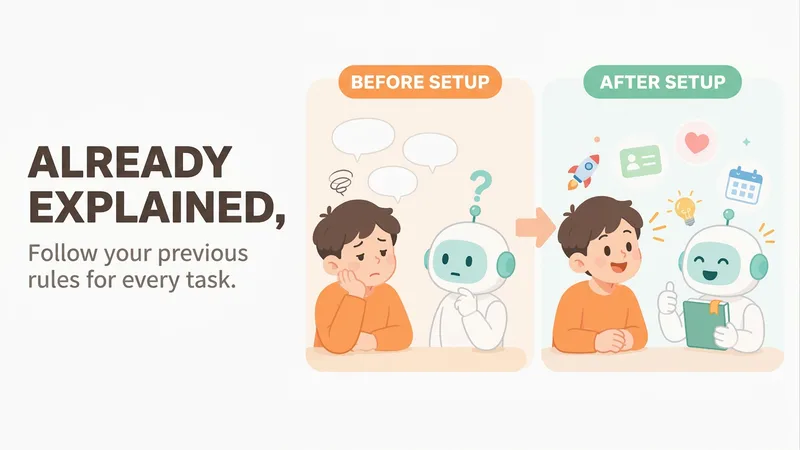
【What problem does it solve?】 Do you have to explain the same things every time you ask AI to do something? “Keep the answer short.” “Don’t use that kind of canned phrasing.” “Write in my voice.” “Give me the conclusion first.” “I work in product—don’t explain the basics.” You may have said these dozens of times, but start a new conversation and AI forgets everything. 【What changes after setup】 You only need to say these things once. After that, AI follows your usual rules first: · Writing articles: It automatically uses your voice, and avoids words and formatting you’ve said you don’t want · Writing weekly reports or proposals: It knows what you do and what you’re currently working on, so you don’t need to explain the background first · Asking questions: Answers come in the length and style you want 【What you’ll get】 1. A project called “My Memory Bank,” organized into “Who you are / How to work with you / What you’re working on / Your preferences,” which you can open, edit, or delete at any time 2. A “memory notebook” stored in the project you’re using, which AI reads before every conversation 3. A prepared “Who I am” profile that you can paste into your YouMind personal settings so it applies to all projects; you can also send it directly to Doubao, ChatGPT, or other AI tools 4. Automatic weekly organization: duplicates are removed, outdated items are archived, and contradictions are brought to your attention 【How to use it】 You don’t need to learn any special steps—just mention things naturally in everyday chats: “Remember, do it this way from now on.” “Forget that.” “Change it to this.” “What do you remember about me?” It also automatically records new details you mention in passing, such as changing jobs, starting a new project, or having a deadline next week. 【Who it’s for】 People who often use AI to write or get things done and are tired of repeating the same instructions. No technical knowledge is required. 【How to get started】 The first time, tell it one or two things you often repeat to AI, such as “Use simpler language and give more examples,” or simply say “set me up.” 【Privacy】 Personal matters such as health, emotions, and finances are not remembered by default. Web clippings and other people’s articles are not treated as information about you. You can ask at any time what it remembered and why.
Multi-Model Curation & Writing Assistant (INFP Edition)
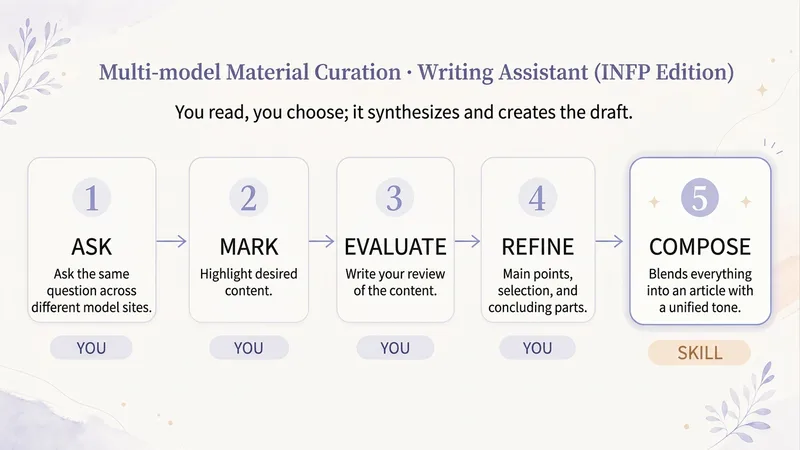
Different AIs each have their strengths, much like the strategists in Romance of the Three Kingdoms: one has precise structure, another has a particularly touching sentence, and a third explains a specific detail thoroughly. As the lord, you can listen to all sides and gain clarity. Yet the lord ultimately makes the decision: strategists have different tones and overlapping views, so stitching their words together directly just reads like a patchouli. This Skill helps you synthesize multiple responses queried from various model websites (or relevant models selected in YouMind) into an article with a unified tone. You read and choose: first mark up your text using highlights, strikethroughs, and underlines, then write down your evaluations and writing opinions (main draft, parts to integrate or exclude, endings to protect, readers, and tone). The Skill does not rank, score, or make curation judgments for you; it faithfully executes your choices: every place you mark lands properly, strikethroughs and content you reject will not be added back, and the ending you specify remains at the very end. After the draft is completed, a brief note is attached: which paragraphs were rewritten from which materials, what self-drafted transitions were included, and what content was not adopted. When dealing with personal feelings, psychology, and physiology, it distinguishes between personal experience and scientific conclusions while providing necessary factual boundaries, ensuring your privacy and unpublished content are not written into the public draft. Suitable for: writers accustomed to querying multiple models simultaneously and then filtering materials themselves; bloggers writing for WeChat Official Accounts, Xiaohongshu, and other platforms; INFPs who enjoy reading and selecting at a slow pace.
Information
- Version
- v10
- Last updated
- Runtime credits
- Usage-based
- Models
- Auto
