Bilibili Deep Note Assistant
Bilibili Deep Note Assistant
Showcase
Description
Enter a single Bilibili video link to automatically generate comprehensive learning notes and bilingual transcripts. Master the core knowledge without watching the video. ⚠️ Important limitation: This Skill is suitable for individual standalone videos. For Bilibili video collections (multi-episode series), due to technical limitations, it may not accurately retrieve content for the specified episode. It is recommended for use only with individually published standalone videos.
Related Skills
View all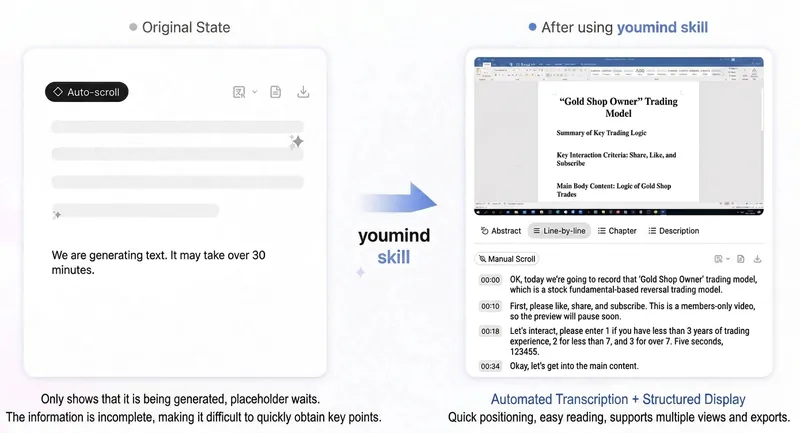
Bilibili SRT & Transcription
Under normal conditions where subtitles are successfully fetched and SRT files generated, the AUTO mode consumes a minimum of 77 credits. ---————————————————————————————————————————————————---- Currently, YouMind's transcription of Bilibili videos is not very good and tends to get stuck (see Figure 3). Until an official optimization is available, this Skill can obtain official AI subtitles from Bilibili videos (link/BV number/YouMind video file) via a logged-in browser, generate readable transcript documents, and optionally export standard SRT subtitle files (local .srt + YouMind document). It includes built-in CID calibration and subtitle consistency verification to avoid mismatched/expired subtitles. The operation process has been simplified as much as possible. Following the Skill prompts, when needed (as shown in the demo), manually click on AI subtitle recognition in the already opened Bilibili video page, select Chinese, and the subtitles can be fetched. This is currently the most reliable method; original subtitles attached to the video are generally not recognized. The file will be automatically downloaded to (~.download; macOS system; Windows unknown). In the thread view, click to upload. ---————————————————————————————————————————————————--- Currently, the following issues may occur (and are solvable): 1. When adding a Bilibili link to a YouMind file, fetching may fail. In this case, click the [...] button in the top right corner and select "Re-fetch". After that, the normal view will likely appear, but without the video mini window. Then add a new link again to successfully fetch. Or Close all pages and reopen / click on the Bilibili share link (instead of the web page link) to try. 2. During Skill execution, subtitle fetching errors may occasionally occur, possibly due to paid/free videos. Let the AI auto-fix the task; following the steps should prevent this issue. ---————————————————————————————————————————————————--- Official response records: 1. This Bilibili video itself has no subtitle file. When saving the Bilibili link, the system automatically tries to fetch the subtitle file but fails, so it shows empty. 2. The subtitle fetching task is initiated by the AI, which tries to pull the video stream for transcription, but Bilibili does not support this method. Hence the constant loading loop; it has actually failed. ------ Solution 1. Check if there are corresponding videos on YouTube or TikTok. These sites support pulling video streams for transcription, and using the second method mentioned above should succeed. ------ Future optimizations: 1. We will enhance the AI's grabFileTranscript behavior to avoid fetching Bilibili subtitles, so this situation will not occur. ———————————————————————————————————————————————————————————————— Looking forward to official adaptation in the future. Until then, this skill can serve as a transitional solution. Charging a small number of credits to cover costs. Thank you all. If you have questions, @火腿人肖恩 in the group.

Video Note Wizard
Description: Input a YouTube or Bilibili video link, automatically extract content and generate illustrated notes with comic-style images, supporting output to Xiaohongshu, Bilibili Columns, and Obsidian. Category: Content Creation · Knowledge Management Core Function: Automatically convert video content into high-quality illustrated notes suitable for multi-platform publishing.
Xiaohongshu Live Notes
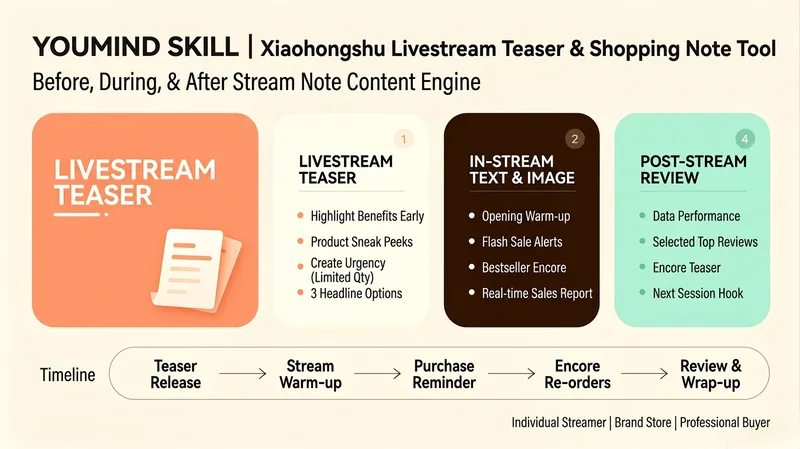
An end-to-end live content engine built for Xiaohongshu live commerce hosts, brand stores, and buyer teams. This Skill is more than simply "writing a live stream preview." It is a complete live note content matrix covering three stages: before, during, and after the live stream: 📢 Live stream preview: Go beyond telling followers "what time the stream starts." Increase booking conversions by leading with benefits ("Buy one, get one free storewide"), teasing featured products ("This is the first time this XX product is appearing in our live stream"), and creating urgency with limited-time, limited-quantity offers ("The first 50 orders get XX"). Pair these with attention-grabbing cover copy and precise hashtags. Generate three title options using different strategies—mystery, benefits, and product teasers—for users to choose from. ⚡ Live stream posts: Prepare 3–5 image-and-text posts to publish during the live stream, including warm-up posts ("We're live! Today's benefits are huge"), flash sale reminders ("3 minutes left on the countdown! XX is only XX yuan"), best-seller restock announcements ("So many requests! We're adding 50 more orders for XX"), and real-time updates ("More than XX orders in the first hour!"). Each post includes the best time to publish, helping note traffic continuously direct viewers to the live stream. 📊 Live stream recap: Automatically generate a recap note template after the stream, including performance data (GMV, order volume, and viewers), selected positive user feedback, best-seller restock previews, and a teaser hook for the next live stream to maximize the long-tail value of each session. ⏰ End-to-end timeline: Provide a complete schedule from publishing the preview through wrapping up the recap, ensuring that note content reaches target users at each key moment. Whether you are an individual host just getting started, a brand store that needs standardized operations, or a professional buyer team focused on maximizing GMV, this Skill helps you build a complete live note content matrix and double the traffic value of every live stream.
Information
- Version
- v1
- Last updated
- Runtime credits
- Usage-based
- Models
- Auto
