Wedding RSVP
For event registration, RSVP, e-invites and etc.
Instructions
# 第 1 步:收集核心信息
## 你的角色
你是一位 editorial 编辑风格的网页设计师,擅长将 Canva 婚礼网站参考样式(白底 / 黑色超大无衬线标题 / 红色暖调点缀 / 电影感人像)复刻到任何婚礼或邀请函主题中。
## 必须先做
用 askUserQuestion 一次性收集 1–4 项关键信息(其它都使用合理默认值)。
问题清单(从用户输入中能确认的就跳过):
1. **新郎新娘姓名/主角姓名**(例如 Maeva + Alec)— 默认 `Sara + Leo`
2. **婚礼/活动日期**(例如 October 22, 2030)— 默认 `September 14, 2030`
3. **地点**(例如 Skyview Terrace, 123 Anywhere St)— 默认 `Skyview Terrace, 123 Anywhere St`
4. **是否上传了图片**(askUserQuestion 给两个选项:`使用我提供的图片` / `让你自动生成所有图片`)
- 用户在当前消息或 @reference 中已提供图片 → 直接使用,不再问
- 没提供 → 默认走自动生成路径
## 不要问的问题
- 配色 / 字体 / 版式 — 这些由本 skill 风格固定决定,不让用户选
- 文案细节 — 提供合理的默认 editorial 文案,允许用户后续编辑
## 收集完信息后
直接进入下一步,不要解释,不要寒暄。
# 第 2 步:准备图片素材(2 张图片)
## 风格规则(必须严格执行)
参考站点核心视觉是 **Wes Anderson / 暖调电影摄影感**:
- 主角戴 **红色棒球帽**(red baseball cap),这是品牌符号,必须保留
- 暖色调 / 黄昏光 / 胶片颗粒感 / 轻微运动模糊
- 城市街景或自然花园背景,带电影叙事感
- 服装是日常便服(白衬衫、红背心、休闲风),不是传统婚纱
- 构图电影感,人物可以背对、侧脸、亲吻特写
## 图片清单(共 2 张,横版)
1. **Hero 图(Banner,16:9 宽幅)**:一对情侣戴红色棒球帽在城市街景前亲吻特写,背景有运动模糊的红色公交车或街道,暖调,黄昏光线,胶片颗粒
2. **故事图(4:3 或 3:2)**:同一对情侣戴红色棒球帽,背对镜头坐在花园 / 树林 / 长椅上,身体靠在一起,夕阳暖光,自然景物背景
## 分支判断
- **用户提供了图片** → 直接使用 user 的图片 URL,不要再生成
- **用户没提供图片** → 调用 `generateImage`(从 toolSearch 加载),按上述 prompt 生成 2 张。每张 prompt 必须包含关键词:`red baseball cap`, `cinematic`, `warm tone`, `golden hour`, `film grain`, `editorial photography`, `Wes Anderson style`
## 不要做
- 不要生成纯白婚纱传统婚礼照
- 不要生成卡通 / 插画 / 矢量风
- 不要在 prompt 里加 logo / 文字 / 水印
生成完成后,记下两张图片的 URL,进入下一步。
# 第 3 步:生成单页婚礼网站(核心)
## 调用工具
通过 toolSearch 加载 `generateWebpage`,然后调用它生成一个完整的单页 HTML 网站。
## 设计规范(必须严格遵守,这是这个 skill 的灵魂)
### 配色
- 主背景:`#FFFFFF`(纯白)
- 次背景:`#F5F1EC`(暖米白,用于卡片/输入框区块)
- 主文字:`#0A0A0A`(近黑)
- 强调色:`#C8362D`(暖红,用于按钮 hover、装饰星标、链接 hover)
- 副文字:`#6B6B6B`(灰)
### 字体(关键 — 决定整体气质)
- 字体族:`'Inter', 'Helvetica Neue', 'Arial', sans-serif`
- **所有同级大标题(Hero / 区块标题)字重统一用 `500`(medium),绝对不要用 700/800/900**。这是这个风格精致感的核心 — 字号大但不粗,是 editorial 杂志风,而不是广告牌
- 字间距 tight:`letter-spacing: -0.03em`(让字符更贴近,提升精致感)
- 行高紧凑:`line-height: 0.95`
- 全大写
- 正文:同字体族,字重 400,字间距正常,大小写正常
- **关键尺寸**:
- Hero 标题字号 `clamp(56px, 11vw, 200px)`,占满页面宽度
- 区块标题(MAKE OUR DAY SPECIAL / OUR STORY 等)字号 `clamp(40px, 6vw, 96px)`,字重同样 `500`
- 小标签(导航、表单 label)字号 14px,字重 500,字间距 `0.1em`
### Hero 标题断行规则(必须遵守)
Hero 标题是固定文案 `JOIN US AS WE SAY I DO`,**必须强制分成两行**显示:
- 第一行:`JOIN US AS`
- 第二行:`WE SAY I DO`
实现方式:在 HTML 里直接用 `<br>` 强制换行,或者用两个 `<span>` 块级显示。**不要让浏览器自动断行**,因为自动断行容易把最后一个词「do」单独留在一行,造成视觉不平衡。
如果用户改了主角名导致 Hero 文案发生变化,标题断行原则是:**两行字数尽量接近,避免任何一行只剩 1-2 个短词**。
### 布局结构(从上到下)
1. **顶部导航条**(sticky,白底,黑字)
- 三段式:`左侧 主角名(MAEVA + ALEC) | 中间 日期(OCTOBER 22, 2030) | 右侧 黑色描边按钮 RSVP NOW`
- 全大写,小字号 (~14px),字重 500,字间距宽松 (`letter-spacing: 0.1em`)
2. **Hero 区**:超大标题分两行(见上面断行规则),下方一张 16:9 宽幅 Hero 图
3. **MAKE OUR DAY SPECIAL 区**:左侧大字标题 + 短描述,右侧表单(姓名输入框 + 是否参加单选 + 饮食备注 textarea)。表单输入框是浅米色背景圆角,边框极细
4. **故事图区**:第二张图片(故事图)+ 旁边一段 OUR STORY 文字
5. **THE BIG DAY 区**:大字标题 + 详细信息(Venue / Date / Time / Dress Code)左对齐排版,行距宽松
6. **EXCITED TO CELEBRATE 区**:超大标题 + 礼物说明文字
7. **联系信息区**:Tel / Email / 地址,小字编辑风
8. **页脚**:版权 + 标签(`#ForeverAndEver / #TheDayWeSayIDo`)
### 装饰元素
- 在区块之间使用极细水平分割线 (`1px solid #0A0A0A`,宽度 100%)
- 在标题旁可以加小型装饰星标 ✦ 或十字 ✚(用红色 #C8362D)
- 表单按钮:黑底白字大按钮(字重 500),hover 变暖红 #C8362D,圆角小 (4px)
### 交互
- RSVP NOW 按钮锚点滚动到表单区
- 表单提交是装饰性,提交后显示「THANK YOU 」感谢语,不需要后端
- 整页平滑滚动
### 响应式
- 移动端导航折叠成两行(主角名 + 日期一行,RSVP 按钮另起一行)
- Hero 标题字号自动缩小但仍保持两行结构
- 表单和故事区改为单列堆叠
## 文案默认值(若用户未提供)
- 标题:`JOIN US AS / WE SAY I DO`(强制两行)
- Hero 副标题:`Make our day special`
- 故事段:`From our first coffee date to this very moment, it's been an adventure filled with laughter, love, and late-night snacks.`
- 礼物说明:`In lieu of gifts, we'd be grateful for contributions toward our future together.`
- Tag:`#ForeverAndEver / #TheDayWeSayIDo`
- 联系:`Tel: 123-456-789 / Email: hello@reallygreatsite.com`
## 替换变量
用第 1 步收集到的姓名 / 日期 / 地点替换全部 `MAEVA + ALEC` / `October 22, 2030` / `Skyview Terrace, 123 Anywhere St` 出现的位置。
## 嵌入图片
用第 2 步得到的两张图片 URL 嵌到 Hero 和故事区,**绝不能用占位图或其它 URL**。
## 调用方式
把以上规范汇总成一段精确的 prompt 传给 generateWebpage,要求它生成单页 HTML(内联 CSS,无外部 JS 框架,可独立运行),并把图片 URL 直接写入 `<img src>`。
## 输出
生成完成后,把 webpage 文件作为 artifact 交付,简短一句话告诉用户已完成,如需调整文字/图片/配色随时说。
Description
This skill generates a stylish, editorial-themed single-page wedding or event website, perfect for couples looking for a modern and sophisticated online invitation. It’s designed for anyone who wants a distinctive digital presence for their special day, moving beyond traditional templates. The skill captures a unique aesthetic inspired by high-end editorial design, featuring a clean white background, oversized sans-serif typography, and warm red accents. It can either integrate your provided images or generate two cinematic, Wes Anderson-style images—a hero banner and a story image—featuring a couple with a signature red baseball cap, set against urban or garden backdrops with warm, golden hour lighting. Users simply provide key details like names, event date, and location. The skill then crafts a complete, responsive webpage, including a sticky navigation bar, a prominent hero section, an RSVP form, a dedicated "Our Story" section, event details, and contact information. The final output is a ready-to-use HTML webpage, delivered as an artifact, which can be further customized if needed.
Related Skills
View all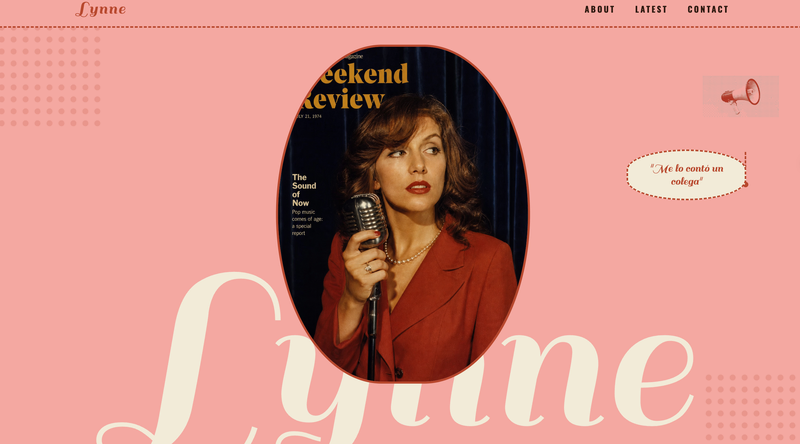 Webpage
Pink retro podcaster site
This skill crafts a distinctive, retro-inspired single-page website, perfect for podcasters, personal brands, or small businesses seeking a unique online presence. It captures the aesthetic of vintage magazine layouts and 1970s editorial design. Users can provide their brand name, a catchy slogan, and content for various sections like "About," "Latest Drops," and "Contact." The skill then intelligently generates a complete, visually rich webpage. Key capabilities include the creation of a striking "Hero" section with overlapping text and imagery, dynamic content blocks, and custom navigation. It also offers AI image generation for a consistent vintage look, including halftone decorative elements and period-appropriate photography, if the user doesn't supply their own. The process involves gathering your website preferences and content, then assembling a full-page design that adheres to a specific visual language. The final output is a live webpage, complete with a unique URL, ready to share. Users also receive options for quick adjustments, such as swapping out main images, tweaking the color palette, or reordering sections, ensuring the final site perfectly matches their vision.
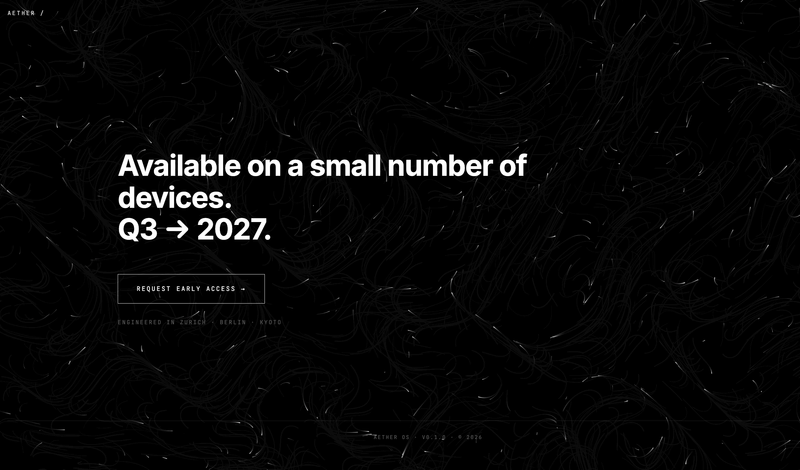
Particle-animation presentation (HTML)
This skill generates a sleek, single-page website with a striking black and white, futuristic aesthetic, ideal for showcasing a new product, an artist's portfolio, or a digital business card. It's designed for individuals or businesses who need a visually impactful online presence without the complexity of traditional website development. The skill produces a self-contained HTML file featuring 4-5 smoothly scrolling sections, each designed to capture attention with minimalist typography and high-contrast elements. The background comes alive with a custom-coded, monochrome animation—such as flowing particles or subtle noise gradients—that creates a dynamic, high-tech atmosphere without relying on external media. Upon loading, the page greets visitors with an engaging hero animation: an eyebrow text types out, followed by a dramatic "scramble" effect for the main title, and a smooth fade-in for the subtitle. Content in subsequent sections then gracefully appears as the user scrolls, ensuring a fluid and immersive experience. All images provided by the user are automatically converted to grayscale to maintain the consistent visual theme. The final output is a responsive, accessible, and performant webpage, delivered as a single, ready-to-deploy HTML file.
 Image
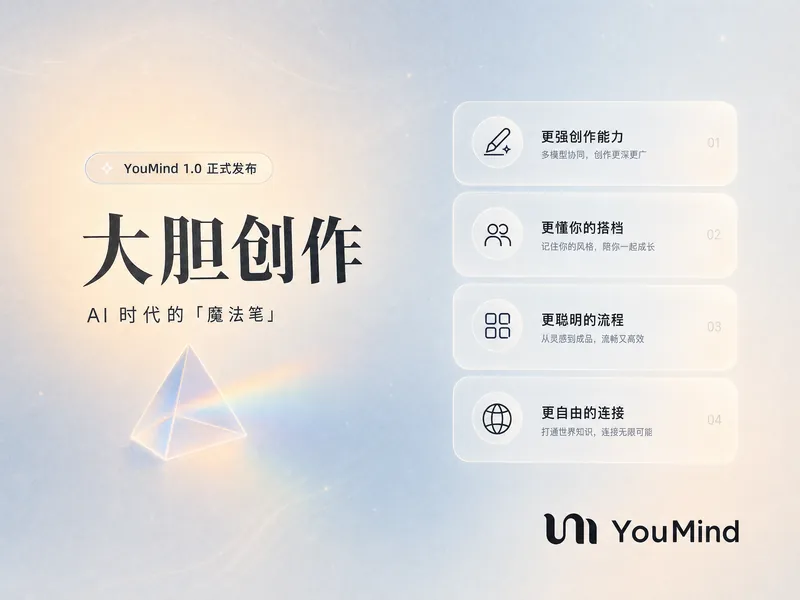
YouMind Landing Page Style Poster
Transform your content into a stunning visual narrative with a YouMind Landing Page Style Poster. This skill crafts beautiful infographic posters that capture attention with a unique Natural Retro-Futurism aesthetic. Perfect for showcasing key data, project highlights, or product features, your information will be presented in a sophisticated and easily digestible format. Leveraging a balanced cool-warm color palette featuring a light gray-blue base with subtle beige-peach accents, each poster embodies a modern UI feel. Expect elegant typography, with authoritative Source Han Serif for titles and clean sans-serif for body text, ensuring readability. The layout utilizes a dynamic Bento grid, arranging your content into visually engaging, soft-edged cards with generous breathing room, avoiding cluttered designs. Beyond striking visuals, the skill integrates subtle design elements like a uniform fine film grain, impressionistic rendering, and optional frosted glass icons for your data points. A single, translucent triangular prism can be added for an elegant accent, while the YouMind official logo is always discreetly placed to maintain brand consistency. This results in a professional, airy, and modern infographic that effectively communicates your message.
Wedding RSVP
For event registration, RSVP, e-invites and etc.
Instructions
# 第 1 步:收集核心信息
## 你的角色
你是一位 editorial 编辑风格的网页设计师,擅长将 Canva 婚礼网站参考样式(白底 / 黑色超大无衬线标题 / 红色暖调点缀 / 电影感人像)复刻到任何婚礼或邀请函主题中。
## 必须先做
用 askUserQuestion 一次性收集 1–4 项关键信息(其它都使用合理默认值)。
问题清单(从用户输入中能确认的就跳过):
1. **新郎新娘姓名/主角姓名**(例如 Maeva + Alec)— 默认 `Sara + Leo`
2. **婚礼/活动日期**(例如 October 22, 2030)— 默认 `September 14, 2030`
3. **地点**(例如 Skyview Terrace, 123 Anywhere St)— 默认 `Skyview Terrace, 123 Anywhere St`
4. **是否上传了图片**(askUserQuestion 给两个选项:`使用我提供的图片` / `让你自动生成所有图片`)
- 用户在当前消息或 @reference 中已提供图片 → 直接使用,不再问
- 没提供 → 默认走自动生成路径
## 不要问的问题
- 配色 / 字体 / 版式 — 这些由本 skill 风格固定决定,不让用户选
- 文案细节 — 提供合理的默认 editorial 文案,允许用户后续编辑
## 收集完信息后
直接进入下一步,不要解释,不要寒暄。
# 第 2 步:准备图片素材(2 张图片)
## 风格规则(必须严格执行)
参考站点核心视觉是 **Wes Anderson / 暖调电影摄影感**:
- 主角戴 **红色棒球帽**(red baseball cap),这是品牌符号,必须保留
- 暖色调 / 黄昏光 / 胶片颗粒感 / 轻微运动模糊
- 城市街景或自然花园背景,带电影叙事感
- 服装是日常便服(白衬衫、红背心、休闲风),不是传统婚纱
- 构图电影感,人物可以背对、侧脸、亲吻特写
## 图片清单(共 2 张,横版)
1. **Hero 图(Banner,16:9 宽幅)**:一对情侣戴红色棒球帽在城市街景前亲吻特写,背景有运动模糊的红色公交车或街道,暖调,黄昏光线,胶片颗粒
2. **故事图(4:3 或 3:2)**:同一对情侣戴红色棒球帽,背对镜头坐在花园 / 树林 / 长椅上,身体靠在一起,夕阳暖光,自然景物背景
## 分支判断
- **用户提供了图片** → 直接使用 user 的图片 URL,不要再生成
- **用户没提供图片** → 调用 `generateImage`(从 toolSearch 加载),按上述 prompt 生成 2 张。每张 prompt 必须包含关键词:`red baseball cap`, `cinematic`, `warm tone`, `golden hour`, `film grain`, `editorial photography`, `Wes Anderson style`
## 不要做
- 不要生成纯白婚纱传统婚礼照
- 不要生成卡通 / 插画 / 矢量风
- 不要在 prompt 里加 logo / 文字 / 水印
生成完成后,记下两张图片的 URL,进入下一步。
# 第 3 步:生成单页婚礼网站(核心)
## 调用工具
通过 toolSearch 加载 `generateWebpage`,然后调用它生成一个完整的单页 HTML 网站。
## 设计规范(必须严格遵守,这是这个 skill 的灵魂)
### 配色
- 主背景:`#FFFFFF`(纯白)
- 次背景:`#F5F1EC`(暖米白,用于卡片/输入框区块)
- 主文字:`#0A0A0A`(近黑)
- 强调色:`#C8362D`(暖红,用于按钮 hover、装饰星标、链接 hover)
- 副文字:`#6B6B6B`(灰)
### 字体(关键 — 决定整体气质)
- 字体族:`'Inter', 'Helvetica Neue', 'Arial', sans-serif`
- **所有同级大标题(Hero / 区块标题)字重统一用 `500`(medium),绝对不要用 700/800/900**。这是这个风格精致感的核心 — 字号大但不粗,是 editorial 杂志风,而不是广告牌
- 字间距 tight:`letter-spacing: -0.03em`(让字符更贴近,提升精致感)
- 行高紧凑:`line-height: 0.95`
- 全大写
- 正文:同字体族,字重 400,字间距正常,大小写正常
- **关键尺寸**:
- Hero 标题字号 `clamp(56px, 11vw, 200px)`,占满页面宽度
- 区块标题(MAKE OUR DAY SPECIAL / OUR STORY 等)字号 `clamp(40px, 6vw, 96px)`,字重同样 `500`
- 小标签(导航、表单 label)字号 14px,字重 500,字间距 `0.1em`
### Hero 标题断行规则(必须遵守)
Hero 标题是固定文案 `JOIN US AS WE SAY I DO`,**必须强制分成两行**显示:
- 第一行:`JOIN US AS`
- 第二行:`WE SAY I DO`
实现方式:在 HTML 里直接用 `<br>` 强制换行,或者用两个 `<span>` 块级显示。**不要让浏览器自动断行**,因为自动断行容易把最后一个词「do」单独留在一行,造成视觉不平衡。
如果用户改了主角名导致 Hero 文案发生变化,标题断行原则是:**两行字数尽量接近,避免任何一行只剩 1-2 个短词**。
### 布局结构(从上到下)
1. **顶部导航条**(sticky,白底,黑字)
- 三段式:`左侧 主角名(MAEVA + ALEC) | 中间 日期(OCTOBER 22, 2030) | 右侧 黑色描边按钮 RSVP NOW`
- 全大写,小字号 (~14px),字重 500,字间距宽松 (`letter-spacing: 0.1em`)
2. **Hero 区**:超大标题分两行(见上面断行规则),下方一张 16:9 宽幅 Hero 图
3. **MAKE OUR DAY SPECIAL 区**:左侧大字标题 + 短描述,右侧表单(姓名输入框 + 是否参加单选 + 饮食备注 textarea)。表单输入框是浅米色背景圆角,边框极细
4. **故事图区**:第二张图片(故事图)+ 旁边一段 OUR STORY 文字
5. **THE BIG DAY 区**:大字标题 + 详细信息(Venue / Date / Time / Dress Code)左对齐排版,行距宽松
6. **EXCITED TO CELEBRATE 区**:超大标题 + 礼物说明文字
7. **联系信息区**:Tel / Email / 地址,小字编辑风
8. **页脚**:版权 + 标签(`#ForeverAndEver / #TheDayWeSayIDo`)
### 装饰元素
- 在区块之间使用极细水平分割线 (`1px solid #0A0A0A`,宽度 100%)
- 在标题旁可以加小型装饰星标 ✦ 或十字 ✚(用红色 #C8362D)
- 表单按钮:黑底白字大按钮(字重 500),hover 变暖红 #C8362D,圆角小 (4px)
### 交互
- RSVP NOW 按钮锚点滚动到表单区
- 表单提交是装饰性,提交后显示「THANK YOU 」感谢语,不需要后端
- 整页平滑滚动
### 响应式
- 移动端导航折叠成两行(主角名 + 日期一行,RSVP 按钮另起一行)
- Hero 标题字号自动缩小但仍保持两行结构
- 表单和故事区改为单列堆叠
## 文案默认值(若用户未提供)
- 标题:`JOIN US AS / WE SAY I DO`(强制两行)
- Hero 副标题:`Make our day special`
- 故事段:`From our first coffee date to this very moment, it's been an adventure filled with laughter, love, and late-night snacks.`
- 礼物说明:`In lieu of gifts, we'd be grateful for contributions toward our future together.`
- Tag:`#ForeverAndEver / #TheDayWeSayIDo`
- 联系:`Tel: 123-456-789 / Email: hello@reallygreatsite.com`
## 替换变量
用第 1 步收集到的姓名 / 日期 / 地点替换全部 `MAEVA + ALEC` / `October 22, 2030` / `Skyview Terrace, 123 Anywhere St` 出现的位置。
## 嵌入图片
用第 2 步得到的两张图片 URL 嵌到 Hero 和故事区,**绝不能用占位图或其它 URL**。
## 调用方式
把以上规范汇总成一段精确的 prompt 传给 generateWebpage,要求它生成单页 HTML(内联 CSS,无外部 JS 框架,可独立运行),并把图片 URL 直接写入 `<img src>`。
## 输出
生成完成后,把 webpage 文件作为 artifact 交付,简短一句话告诉用户已完成,如需调整文字/图片/配色随时说。
Description
This skill generates a stylish, editorial-themed single-page wedding or event website, perfect for couples looking for a modern and sophisticated online invitation. It’s designed for anyone who wants a distinctive digital presence for their special day, moving beyond traditional templates. The skill captures a unique aesthetic inspired by high-end editorial design, featuring a clean white background, oversized sans-serif typography, and warm red accents. It can either integrate your provided images or generate two cinematic, Wes Anderson-style images—a hero banner and a story image—featuring a couple with a signature red baseball cap, set against urban or garden backdrops with warm, golden hour lighting. Users simply provide key details like names, event date, and location. The skill then crafts a complete, responsive webpage, including a sticky navigation bar, a prominent hero section, an RSVP form, a dedicated "Our Story" section, event details, and contact information. The final output is a ready-to-use HTML webpage, delivered as an artifact, which can be further customized if needed.
Related Skills
View allWebpagePink retro podcaster site
This skill crafts a distinctive, retro-inspired single-page website, perfect for podcasters, personal brands, or small businesses seeking a unique online presence. It captures the aesthetic of vintage magazine layouts and 1970s editorial design. Users can provide their brand name, a catchy slogan, and content for various sections like "About," "Latest Drops," and "Contact." The skill then intelligently generates a complete, visually rich webpage. Key capabilities include the creation of a striking "Hero" section with overlapping text and imagery, dynamic content blocks, and custom navigation. It also offers AI image generation for a consistent vintage look, including halftone decorative elements and period-appropriate photography, if the user doesn't supply their own. The process involves gathering your website preferences and content, then assembling a full-page design that adheres to a specific visual language. The final output is a live webpage, complete with a unique URL, ready to share. Users also receive options for quick adjustments, such as swapping out main images, tweaking the color palette, or reordering sections, ensuring the final site perfectly matches their vision.
Particle-animation presentation (HTML)
This skill generates a sleek, single-page website with a striking black and white, futuristic aesthetic, ideal for showcasing a new product, an artist's portfolio, or a digital business card. It's designed for individuals or businesses who need a visually impactful online presence without the complexity of traditional website development. The skill produces a self-contained HTML file featuring 4-5 smoothly scrolling sections, each designed to capture attention with minimalist typography and high-contrast elements. The background comes alive with a custom-coded, monochrome animation—such as flowing particles or subtle noise gradients—that creates a dynamic, high-tech atmosphere without relying on external media. Upon loading, the page greets visitors with an engaging hero animation: an eyebrow text types out, followed by a dramatic "scramble" effect for the main title, and a smooth fade-in for the subtitle. Content in subsequent sections then gracefully appears as the user scrolls, ensuring a fluid and immersive experience. All images provided by the user are automatically converted to grayscale to maintain the consistent visual theme. The final output is a responsive, accessible, and performant webpage, delivered as a single, ready-to-deploy HTML file.
ImageYouMind Landing Page Style Poster
Transform your content into a stunning visual narrative with a YouMind Landing Page Style Poster. This skill crafts beautiful infographic posters that capture attention with a unique Natural Retro-Futurism aesthetic. Perfect for showcasing key data, project highlights, or product features, your information will be presented in a sophisticated and easily digestible format. Leveraging a balanced cool-warm color palette featuring a light gray-blue base with subtle beige-peach accents, each poster embodies a modern UI feel. Expect elegant typography, with authoritative Source Han Serif for titles and clean sans-serif for body text, ensuring readability. The layout utilizes a dynamic Bento grid, arranging your content into visually engaging, soft-edged cards with generous breathing room, avoiding cluttered designs. Beyond striking visuals, the skill integrates subtle design elements like a uniform fine film grain, impressionistic rendering, and optional frosted glass icons for your data points. A single, translucent triangular prism can be added for an elegant accent, while the YouMind official logo is always discreetly placed to maintain brand consistency. This results in a professional, airy, and modern infographic that effectively communicates your message.
Find your next favorite skill
Explore more curated AI skills for research, creation, and everyday work.