
One-Click Courseware to Web
Courseware or article links to scrolling site
One-Click Courseware to Web
Courseware or article links to scrolling site
Showcase
Description
Turn your courseware into a viewable website. Whether you have a Markdown note, a PDF paper, a PPT slides, or a plain text script, or even a public account link, One-Click Courseware to Web can automatically convert it into a clear, beautifully designed online course display webpage. You don't need to write a single line of code—just provide the content. Two display styles: - Course training content → generates a scrolling long page, like flipping through a book. - Paper/report content → generates a PPT-style page-turning website, like browsing slides one by one. Responsive design adapts to mobile and desktop. What you need to do: Just one step: provide your courseware content. Supported formats: .md Markdown files, .pdf PDF documents, .pptx PPT presentations, .txt plain text. You can also paste course content directly in the conversation. Example commands: "Turn these lecture notes into a webpage" "Make this PDF paper into a PPT-style website" "Here is my courseware content, generate an online display page" What you get: A directly accessible online course display website, with the display mode automatically determined. Your content automatically selects the effect: - Course outlines, training handouts, textbooks → scrolling long pages, modules naturally connected, scroll to browse. - Academic papers, research reports → PPT-style slide flipping, each page focuses on one point. - Speeches, meeting reports → PPT-style page-by-page display, supports keyboard/click navigation. If you explicitly request "scrolling" or "PPT", your request is respected. Content extraction capability: For information-dense papers and long texts, the skill automatically performs: - Structure decomposition: splits continuous discourse into independent chapters/slides. - Information condensation: condenses three paragraphs into three key points, each within 20 characters. - Thesis-first: each page gives the conclusion first, then supporting arguments. - Framework visualization: models and classification systems are presented with charts instead of plain text. - Data highlighting: key numbers and metrics are displayed on separate pages prominently. Subsequent modifications: After the website is generated, you can request adjustments at any time: "Update the content of module three" "Change the color scheme to warm tones" "Add a course roadmap" "Change this module to a timeline layout" Modifications only affect the corresponding part; you don't need to regenerate the entire website. What it does not do: This skill currently focuses on course content display and does not include the following LMS (Learning Management System) features: - User login/registration - Learning progress tracking - File download - Online quizzes/practice If you need these features, they are separate extensions.
Why we love this skill
One-click conversion of courseware or articles into beautiful web pages, supporting scroll or PPT mode, easily visualizing content and making professional knowledge accessible.
Related Skills
View all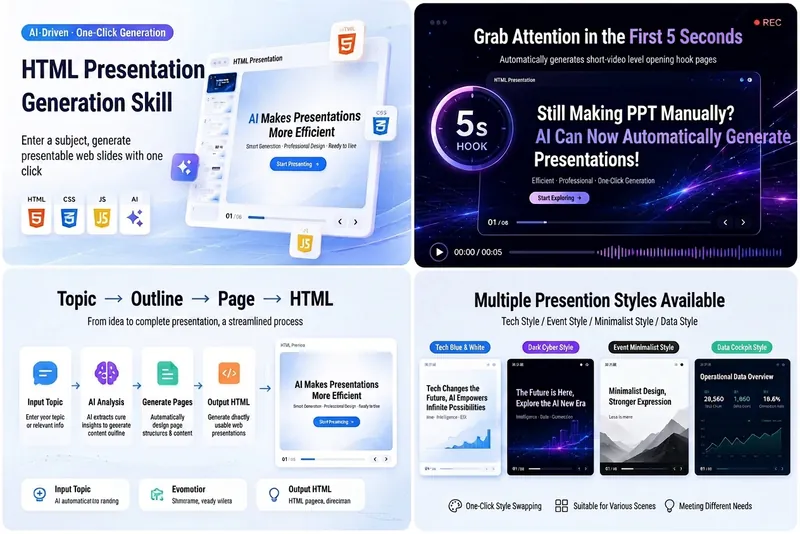
HTML Slides Generator
Easily turn your ideas, materials, or scripts into professional-grade HTML slides, designed for screen recording and pitch presentations. Whether you need AI tech sharing for platforms like Douyin, WeChat Video Channel, Xiaohongshu, or Bilibili, or product pitches, course demos, or business reports, this tool helps you quickly generate a visually refined, well-structured web slideshow. It automatically builds a complete slide structure, including an eye-catching opening hook in the first 5 seconds, titles and body text for each page, along with visual design suggestions. You'll get a standalone `index.html` file containing HTML, CSS, and JavaScript, supporting keyboard navigation, button navigation, progress bar, page numbers, and animations—perfectly optimized for 16:9 landscape screen recording. From AI tech blue-white to dark cyberpunk, to Apple keynote or Notion minimal style, you can choose or customize the visual theme to match your topic. Each slide is carefully designed to keep the content focused and easy to understand, with a reserved safe area in the lower right corner for video commentary, making your presentation more expressive and professional.
 Webpage
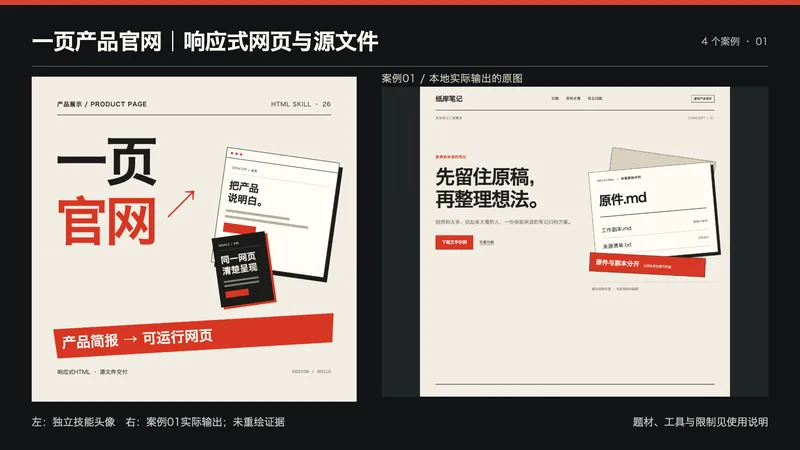
一页产品官网|响应式网页与源文件
适合需要介绍产品、课程或服务,但还没有清楚展示页的创作者。 提供:产品功能、受众、完成状态、价格与行动入口(如有)、视觉参考和授权素材。缺少客户数、好评、价格时不会编造。 处理:梳理事实与页面目标,设计首屏、功能和使用说明,编写响应式HTML/CSS/JavaScript,实际打开检查手机与桌面、链接及必要交互。没有后台时不展示伪发送或支付成功。 交付:可运行的一页网站源文件、使用与部署说明、内容核对及测试结果。默认单文件HTML,无CDN或远程字体。具备文件工具时给可下载文件;否则给完整代码并说明未保存,不用截图冒充代码。 使用:发送简报,核对页面内容,打开HTML检查并替换自己的真实入口;公开部署、域名、后台、支付和账号功能需另行配置与授权,本技能不自动开通。 依赖:文字/代码模型(推荐GPT)、文件能力与浏览器预览。核心不需要图片API;本地四案例用真实Chrome分别验证1600×1200桌面、1200×1200方形视窗与390×844手机,无横向溢出,FAQ键盘展开、锚点、示例TXT下载内容通过。四张展示直接来自四个实际网页的方形首屏视窗,完整HTML与长页另留档;按笔记归档、会议状态、课程步骤与设计配色区分视觉,页面题材明确虚构,没有真实客户或销量。头像为独立原创HTML文字与图形封面,不是案例运行证据,不冒称生图API输出。 未追加YouMind运行测试、未验证持久模型绑定。静态官网不等于完整SaaS或真实服务上线,不保证转化、SEO排名、流量或任意平台直接预览;199积分不包含托管、域名、后台、模型运行或第三方服务费用。 展示说明:首张为独立技能头像与案例01实际输出的并排排版,用于横向缩略展示;不是新增案例,也未让生图模型重绘证据。其余三张对应案例02—04。
 Slides
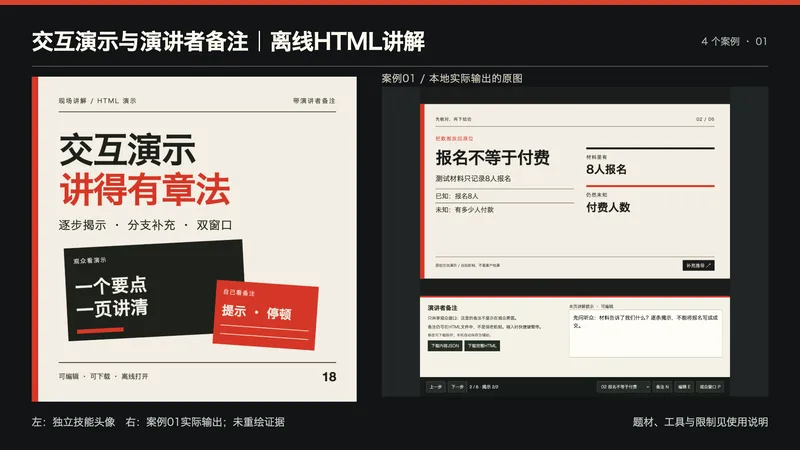
交互演示与演讲者备注|离线HTML讲解
适合授课、方法分享、内部说明与方案讲解。把讲稿/提纲做成可离线打开的16:9网页演示,附备注、输入JSON和使用说明。 提供主题、听众、讲稿/提纲、要保留的事实与出处、页数/时长及视觉参考;先核对材料和未知项,再组织主线与补充页。默认现场讲解式低密度,一页一个要点。 功能:右箭头/空格先揭示再翻页,章节跳转,分支讲完返回原位置;N打开备注并编辑,E编辑标题/正文,下载当前JSON或完整HTML保存。P或观众窗口按钮打开第二窗口,与原窗口本次连接同步当前演示;只共享观众窗口。备注仍写在HTML里,界面隐藏不是加密,分发文件前不要放机密。手机整页保持16:9,细看文字建议横屏或电脑。 交付:index.html、deck.json、speaker-notes.md与使用说明。包内独立Python3标准库构建器和HTML模板,无远程字体、无播放器包、无遥测;支持3—12主线页及最多4补充页,文字与四种语义图形。构建器不支持照片自动排版,照片或复杂图表需要另行实现和核验。输出HTML能离线运行;构建需实际Python/文件能力,观众窗口需浏览器允许弹窗。本机自动保存可能受浏览器设置限制,下载文件可携带修改。 四个本地真实执行案例:证据表达、单位换算、会议行动记录、备课节奏;均为原创教学或虚构演示材料,各6主线页+1补充页。实际测试桌面、方形窗口、手机的完整页面和交互,以及编辑下载与观众窗口同步。案例展示为真实浏览器截图,封面为独立原创HTML文字图形,未冒称生图API或客户成效。 文字模型推荐GPT,具体型号以实际环境为准;渲染由浏览器完成,不等于图像模型。YouMind是否具备Python、文件下载或浏览器工具需按实际平台能力,尚未在YouMind耗积分运行,不保证平台模型与本地一致。199积分不包含平台模型或第三方服务费用。不交付PPTX、MP4、配音或在线会议服务,不保证学习、销售、审核或收入效果。 展示说明:首张为独立技能头像与案例01实际输出的并排排版,用于横向缩略展示;不是新增案例,也未让生图模型重绘证据。其余三张对应案例02—04。
Information
- Version
- v8
- Last updated
- Runtime credits
- Usage-based
- Models
- Auto
