CMMI V2.0 Document Assistant
CMMI V2.0 Doc System Builder & Health Check
CMMI V2.0 Document Assistant
CMMI V2.0 Doc System Builder & Health Check
Showcase
Description
One-stop CMMI V2.0 document system builder. Covers all models (DEV/Services/People/Supplier/Security) ML2-ML5, with practice areas (PA) as the main axis. Each PA generates three-level documents: process description, template, and record. Supports bilingual output in Chinese and English. Core capabilities: - Intelligent document generation — 25+ PA × three-level documents, automatically categorized according to CMMI's four category domains (Execution, Management, Support, Improvement), with built-in complete structure definitions - Four intents — Template generation, material to document, intelligent update, and system health check. Automatically recognizes user intent and confirms before execution - System health check — Cross-PA coverage calculation, gap grading analysis, phased action plan, and assessment readiness evaluation - Bilingual output — Simplified Chinese and English freely combinable; CMMI standard abbreviations remain in English - Status tracking — Maintain project context status matrix, gap register, and document system general catalog - Project folder — Automatically create folder structure by CMMI category domains; documents are automatically placed - Intelligent awareness — Paste meeting minutes, logs, or emails; automatically recognizes 10 types of project events and associates corresponding PA documents - Version verification — Automatically detects and corrects CMMI version misnomers (e.g., V3→V2.0) - Agile adaptation — Supports CMMI practice adaptation in agile development environments Applicable scenarios: CMMI assessment preparation teams, EPG/process improvement groups, QA managers, project managers, and organizations that need to build a CMMI compliant document system. Whether the goal is ML2 entry-level or ML5 optimization-level, this assistant can quickly generate a process document system that meets CMMI V2.0 standards.
Related Skills
View all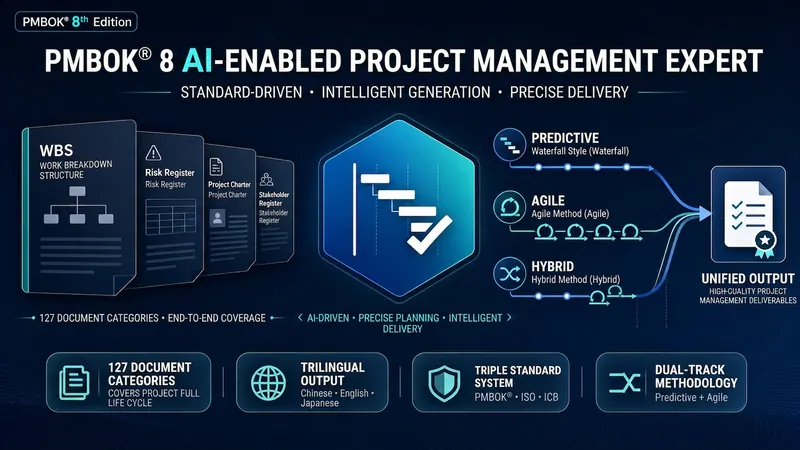
PMBOK 8 R&D PM Assistant
One-stop software development project management document generation assistant. Built on the PMBOK 8 framework, covering the full lifecycle from project initiation to closure, supporting both predictive (waterfall) and agile methodologies, with 127 standard project document templates built-in, enabling one-click generation of professional project management documents. Core capabilities: • Smart document generation — Project charter, requirements specification, WBS, risk register, test plan, deployment plan, and 127 other document types, automatically categorized by PMBOK 8 performance domains. • Dual methodology — Predictive and agile terminology automatically isolated, with bridging terms added for cross-methodology references, ensuring professional consistency. • Three standard systems — Integrated with China's CSPM (GB/T 41831/41246), e-government (国办发57号/等保/密评), and Hong Kong DPO standard systems, with automatic keyword detection and adaptation. • Trilingual output — Simplified Chinese, Traditional Chinese (Hong Kong usage), and English, supporting parallel multi-language generation. • Flexible configuration — Three orthogonal dimensions: proficiency (beginner/expert), richness (simple/standard/professional), and output language. • Project folder — Automatically creates PMBOK 8 focus area folder structure, documents auto-sorted, maintaining a project document master index. • Smart sensing — Paste meeting minutes, emails, logs, automatically identify project events and link to corresponding documents. • Template learning — Upload your templates, the Skill learns the structure and generates documents in your format. Applicable scenarios: Software development project managers, PMOs, technical leads, agile coaches, and teams needing standardized project management documents. Whether you use PMBOK, CSPM, or DPO systems, quickly generate compliant project documents.
New Format Textbook Designer
This skill aims to provide vocational educators with a one-stop solution for developing new-format textbooks. Whether you need to plan a new course textbook from scratch or want to innovatively revamp an existing textbook, it follows advanced methodologies for vocational new-format textbook development and guides you step by step through the entire process from concept to implementation. You only need to provide course and program basic information. The skill will automatically perform input analysis and gap diagnosis, comparing against national professional teaching standards, '1+X' certificate standards, and other 'four alignments' requirements. It evaluates existing materials and offers professional strategic recommendations. Then, it gradually assists you in completing topic selection argumentation, clarifying the ten major features of the textbook, designing an integrated path for 'post-course-competition-certification,' and establishing a school-enterprise dual-element, department-faculty dual-level management mechanism and team building plan. In core content design, the skill guides you in selecting an appropriate textbook format (e.g., project-based, workbook-style), designing a detailed outline, and transforming teaching objectives into actionable learning tasks. At the same time, it deeply explores and plans the integration of ideological and political education into the curriculum, and designs a comprehensive digital resource package and a scientific teaching evaluation system. Finally, all planning results are consolidated into a complete Markdown development plan document, and a professional, concise Slides presentation is automatically generated to help you easily present and promote new-format textbook construction.
Research Review Assistant
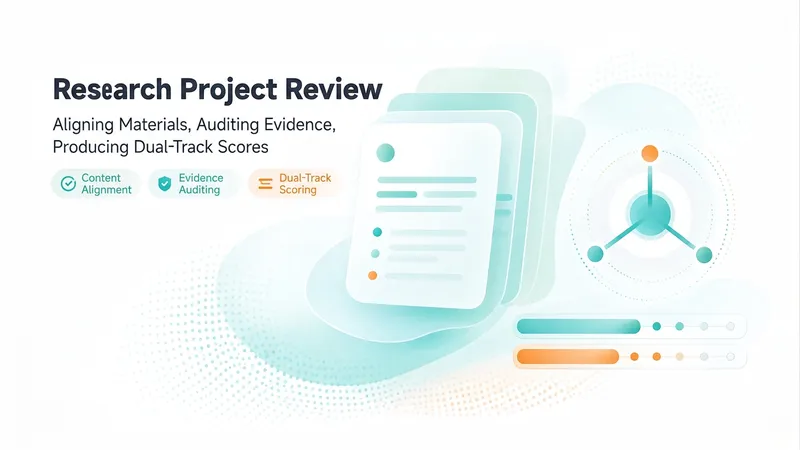
An expert assistant for university-level research project reviews. Provide the materials for N projects in a given category. Each project includes three types of files: a proposal, a form-check summary or interim review form, and supporting evidence. File names may be scrambled, mismatched, or changed, and files may be DOCX, XLSX, PDF, or image files. Supporting evidence may be bundled into one file or provided as multiple separate files. This Skill then completes the following steps: ① Content-anchor alignment—extracts the project or center name, principal investigator, affiliated school, and project period from within the documents; matches the three-part file set for each project; and flags items requiring review when file names do not match their contents. ② Evidence normalization—whether bundled or separate, breaks materials into “atomic evidence items” and creates a coded ledger for each item with one of four status labels: complete, needs verification, missing, or questionable. This avoids judging the strength of the evidence by file count. ③ Three-dimensional item-by-item audit—evaluates each piece of evidence for relevance, authenticity, and completeness, then reconciles it against the commitments in the proposal and the self-reported results in the interim review form. ④ Dual-track scoring and comparative ranking—uses the five weighted criteria in Appendix 2 as the reporting standard and the five dimensions of the interim review as a reference standard. The two systems remain independent and are not combined, and all projects are ranked and grouped into tiers. ⑤ Delivers a structured review draft with “score + review comments” that can be pasted directly into the official form, and can generate an interactive scoring webpage when needed. Huali’s current standards are used by default. Users can confirm or revise the criteria, weights, and reference materials before work begins, or upload replacements. There are two confirmation checkpoints: first for alignment and the evidence ledger, then for scoring and ranking. When materials cannot be identified, the user is prompted to confirm. For project completion reviews, two additional hard requirements apply: first, the correspondence between the proposal’s expected outcomes and the documented evidence must be verified. If the evidence does not include an expected outcome listed in the proposal, the project automatically fails. Second, template issues are distinguished between using the completely wrong template, which results in failure, and partial formatting inconsistencies, which result in only a small deduction.
Information
- Version
- v5
- Last updated
- Runtime credits
- Usage-based
- Models
- Auto
