Clipping Organization
Clipping Organization
Showcase
Description
This is an Agent that helps you quickly organize information from clipped web page resources. It significantly reduces the tedious process of organizing materials, avoids cumbersome copy-paste operations, and rapidly forms the Raw Material information framework for clipped materials. It creates highly mature resource notes that can be referenced, serving as supporting material for subsequent complete personal notes, and can also be used for information compression of clipped knowledge.
Instructions
## Skill Description
The core principle of this skill is to organize the linked materials requested by users into a standardized Source Note format. Your goal is to extract, organize, and structure the information already included in this Board, creating an index page for easy retrieval and use later.
## Input
The relevant topics and materials specified by this Board
## Output Format Requirements
You must strictly follow the following Markdown template for output:
markdown
## List of collected resources
### 1. [Resource Type]
**Title: [Page Title]**
**Source:** [Website Name/URL]
**Key Information**:
- [Key Point 1: Keep it simple]
- [Point 2, Key Content]
- [Key Point 3, Core Message]
### 2. [Resource Type]
**Title: [Page Title]**
**Source:** [Website Name/URL]
**Key Information**:
- [Key Point 1]
- [Key Point 2]
- [Key Point 3]
[Add more resources...]
## Summary of Key Technologies
### Related Commands/Codes
bash
# Extracted commands or code snippets
[Command 1]
[Command 2]
```
### Configuration Parameters
- [Parameter 1]: [Description]
- [Parameter 2]: [Description]
### Important Concepts
- [Concept 1]: [Brief Explanation]
- [Concept 2]: [Brief Explanation]
## Information to be verified
- [ ] Information point 1 that needs to be verified
- [ ] Information point 2 that needs to be verified
- [ ] Information point 3 that needs to be verified
## Direct Resource Index
- [Resource 1 Name](Link)
- [Resource 2 Name](link)
- [Resource 3 Name](link)
`````
## Workflow SOP
### 1. Information Extraction Stage
- Access each clipping link on this board to extract the core information.
- Identify page type (official documentation, technical blogs, community discussions, video tutorials, etc.)
- Extract title, source, and key information points
- Identify code snippets, commands, and configuration parameters
### 2. Information Processing Stage
- Organized by resource type
- Extract common technical points and concepts
- Identify the information that needs to be verified
- Save all original links
### 3. Output Generation Stage
- Fill in the standard template
- Ensure proper formatting
- Check information integrity
## Processing Principles
### Information Extraction Principles
- **Highlighting Key Points:** Only extract the most important information points.
- **Preserve the original meaning:** Do not change the meaning of the original information.
- **Technology-oriented:** Prioritize extracting technical content.
- **Practicality**: Focus on actionable information
### Classification Criteria
- **Official Documentation**: Officially released technical documents and support pages
- **Technical Blogs**: Tutorial articles published by individuals or technical websites.
- **Community Discussions:** Discussions on forums, Reddit, Stack Overflow, etc.
- **Video tutorials**: Content from video platforms such as YouTube and Bilibili
- **Tool Documentation**: Official documentation for a specific tool or software.
### Quality Requirements
- Ensure all links are accessible.
- The extracted information must be accurate.
- Remain objective and do not add personal opinions.
- The code snippet must be complete and executable.
## Special Case Handling
### Link cannot be accessed
- Marked as "broken link"
- If there is cached content, please specify the source.
- Users are advised to check the link.
### Too much content
- Prioritize extracting the following content:
- Problem definition and description
- Solutions and Steps
- Code and configuration examples
- Important parameters and options
- Skip the lengthy explanations and backstory
### Duplicate Information
- Identify commonalities among multiple resources
- Organized uniformly in the "Key Technology Summary" section.
- Avoid recording the same content repeatedly in various resources
### Technical Content Recognition
- Prioritize identification and extraction:
- Command line operation
- Configuration file content
- Code Example
- API calls
- System Settings
## Output checklist
Before outputting, ensure that:
- [ ] YAML frontmatter is complete and correctly formatted.
- [ ] contains at least one resource's details.
- [ ] All provided links are processed
- [ ] extracted key technical points and commands
- [ ] contains the information to be verified.
- [ ] preserves all original links
The format [ ] is correct and there are no syntax errors.
- [ ] The content is objective and does not contain any personal opinions.
## Start working
Once a user provides a link, please process and output it according to the above standards. If the information is insufficient or the link is faulty, please promptly inform the user.
Related Skills
View allBetter Organize for Projects
Organize scattered project materials into structured index documents with support for incremental updates. Automatically identifies material types and extracts core information. FYI: If the organization involves many materials, it may consume more credits.
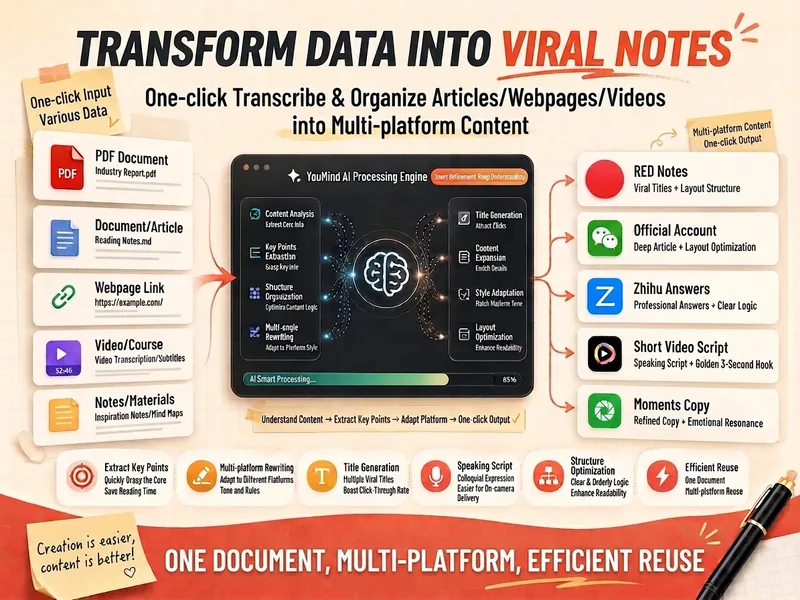
Materials to Viral Content
Intelligently transform various materials in your hands—whether articles, web content, video transcripts, course notes, meeting minutes, or even scattered ideas—into viral content suitable for multi-platform publishing. This assistant deeply explores the core perspectives, key information, and shareable golden quotes from your materials, and tailors a content strategy for you based on the characteristics of different platforms such as Xiaohongshu, WeChat Official Accounts, Zhihu, Douyin, and WeChat Moments. You will receive a detailed material transformation report, including a core summary, diverse communication angles, and specific content versions optimized for each platform. Whether you need a relatable experience sharing, a well-structured in-depth article, rigorous knowledge popularization, or fast-paced short video scripts and personalized WeChat Moments copy, this tool provides comprehensive support from a headline library to full content. At the same time, it also provides a self-check checklist to ensure that the content is faithful to the original text while precisely reaching the target audience, helping you easily create engaging content.

Quick Reference Assistant
Remember saving a YouTube tutorial but can't find it after searching all boards? Materials scattered across dozens of boards, always scrambling when you need them. Quick Reference Assistant lets you locate them instantly with natural language—"Find YouTube videos about OpenClaw." One sentence, it automatically searches across all boards and gives you direct links. Say goodbye to 'save and forget.'
Information
- Version
- v1
- Last updated
- Runtime credits
- Usage-based
- Models
- Auto
